This time we’re going bigger than ever. Fabric, Power BI, SQL, AI and more. We're covering it all. You won't want to miss it.
Learn moreDid you hear? There's a new SQL AI Developer certification (DP-800). Start preparing now and be one of the first to get certified. Register now
Hi All,
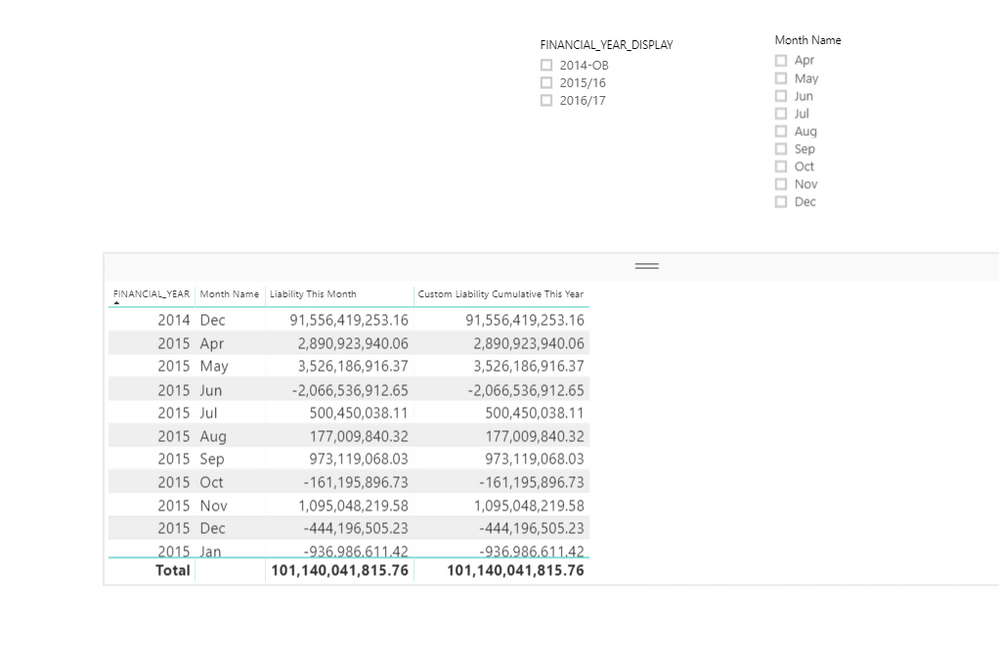
I need to Calculate cumulative liability,I used following formula
Custom Liability Cumulative This Year = CALCULATE([Liability This Month],FILTER(ALL(GL_LEDGER_ACCESS[Date]),'GL_LEDGER_ACCESS'[Date]<=MAX('GL_LEDGER_ACCESS'[Date])))
I get same output as shown in image
Please Help.
Best Regards,
Dora
Solved! Go to Solution.
Hi All,
Thank You for the help.Solved it by making a new unique index column and making the same formula
Best Regards,
Dora
@Dora,
Create a date table following the guide in this blog, establish relationship between the date field of date table and GL_LEDGER_ACCESS'[Date] field, then update your DAX to the following:
Custom Liability Cumulative This Year = CALCULATE([Liability This Month],FILTER(ALL('Date'[Date]),'Date'[Date]<=MAX('Date'[Date])))
Regards,
Lydia
Hi All,
Thank You for the help.Solved it by making a new unique index column and making the same formula
Best Regards,
Dora
Check out the April 2026 Power BI update to learn about new features.
Sign up to receive a private message when registration opens and key events begin.
If you have recently started exploring Fabric, we'd love to hear how it's going. Your feedback can help with product improvements.
| User | Count |
|---|---|
| 35 | |
| 32 | |
| 27 | |
| 23 | |
| 16 |
| User | Count |
|---|---|
| 65 | |
| 50 | |
| 30 | |
| 25 | |
| 24 |