Join us at FabCon Vienna from September 15-18, 2025
The ultimate Fabric, Power BI, SQL, and AI community-led learning event. Save €200 with code FABCOMM.
Get registered- Power BI forums
- Get Help with Power BI
- Desktop
- Service
- Report Server
- Power Query
- Mobile Apps
- Developer
- DAX Commands and Tips
- Custom Visuals Development Discussion
- Health and Life Sciences
- Power BI Spanish forums
- Translated Spanish Desktop
- Training and Consulting
- Instructor Led Training
- Dashboard in a Day for Women, by Women
- Galleries
- Data Stories Gallery
- Themes Gallery
- Contests Gallery
- Quick Measures Gallery
- Notebook Gallery
- Translytical Task Flow Gallery
- TMDL Gallery
- R Script Showcase
- Webinars and Video Gallery
- Ideas
- Custom Visuals Ideas (read-only)
- Issues
- Issues
- Events
- Upcoming Events
Enhance your career with this limited time 50% discount on Fabric and Power BI exams. Ends September 15. Request your voucher.
- Power BI forums
- Forums
- Get Help with Power BI
- Desktop
- Re: Cumulative Sum using DAX
- Subscribe to RSS Feed
- Mark Topic as New
- Mark Topic as Read
- Float this Topic for Current User
- Bookmark
- Subscribe
- Printer Friendly Page

- Mark as New
- Bookmark
- Subscribe
- Mute
- Subscribe to RSS Feed
- Permalink
- Report Inappropriate Content
Cumulative Sum using DAX
Hi All,
I have my data as below.
| ID | OUTPUT_TYPE | FORECASTED_MONTH | FORECAST_QTY | Cumm. FORECAST_QTY |
| 1 | NOMINAL | 3 | 26 | 26 |
| 1 | NOMINAL | 6 | 27 | 54 |
| 1 | NOMINAL | 9 | 28 | 82 |
| 1 | NOMINAL | 12 | 29 | 111 |
| 1 | NOMINAL | 18 | 60 | 172 |
| 1 | NOMINAL | 24 | 62 | 234 |
| 1 | NOMINAL | 36 | 127 | 360 |
| 1 | NOMINAL | 48 | 128 | 488 |
| 1 | NOMINAL | 60 | 127 | 615 |
| 1 | UPPER_BOUND | 3 | 32 | 26 |
| 1 | UPPER_BOUND | 6 | 34 | 66 |
| 1 | UPPER_BOUND | 9 | 36 | 102 |
| 1 | UPPER_BOUND | 12 | 37 | 139 |
| 1 | UPPER_BOUND | 18 | 78 | 217 |
| 1 | UPPER_BOUND | 24 | 82 | 299 |
| 1 | UPPER_BOUND | 36 | 170 | 469 |
| 1 | UPPER_BOUND | 48 | 172 | 641 |
| 1 | UPPER_BOUND | 60 | 169 | 810 |
| 1 | LOWER_BOUND | 3 | 22 | 26 |
| 1 | LOWER_BOUND | 6 | 22 | 44 |
| 1 | LOWER_BOUND | 9 | 23 | 67 |
| 1 | LOWER_BOUND | 12 | 23 | 90 |
| 1 | LOWER_BOUND | 18 | 46 | 136 |
| 1 | LOWER_BOUND | 24 | 46 | 182 |
| 1 | LOWER_BOUND | 36 | 92 | 274 |
| 1 | LOWER_BOUND | 48 | 91 | 365 |
| 1 | LOWER_BOUND | 60 | 89 | 454 |
Where last column Comm. ForeCast_Qty is Cumulative sum of Forecast Qty. I want to generate Comm. Forecast_Qty using DAX expression. But it is not coming as expected.
I have used below formula
| ID | FORECAST_MONTH | OUTPUT_TYPE | FORECAST_QTY | Cumm. FORECAST_QTY |
| 1 | 3 | UPPER_BOUND | 32 | 1932.113659 |
| 1 | 6 | UPPER_BOUND | 34 | 3987.743786 |
| 1 | 9 | UPPER_BOUND | 36 | 6153.976373 |
| 1 | 12 | UPPER_BOUND | 37 | 8417.15069 |
| 1 | 18 | UPPER_BOUND | 78 | 13180.17074 |
| 1 | 24 | UPPER_BOUND | 82 | 18176.57163 |
| 1 | 36 | UPPER_BOUND | 170 | 28551.03983 |
| 1 | 48 | UPPER_BOUND | 172 | 39048.55704 |
| 1 | 60 | UPPER_BOUND | 169 | 49351.2418 |
| 1 | 3 | NOMINAL | 26 | 1603.994892 |
| 1 | 6 | NOMINAL | 27 | 3279.197087 |
| 1 | 9 | NOMINAL | 28 | 5012.524375 |
| 1 | 12 | NOMINAL | 29 | 6793.830674 |
| 1 | 18 | NOMINAL | 60 | 10468.45101 |
| 1 | 24 | NOMINAL | 62 | 14250.6209 |
| 1 | 36 | NOMINAL | 127 | 21989.71836 |
| 1 | 48 | NOMINAL | 128 | 29789.28012 |
| 1 | 60 | NOMINAL | 127 | 37507.12435 |
| 1 | 3 | LOWER_BOUND | 22 | 1328.185432 |
| 1 | 6 | LOWER_BOUND | 22 | 2688.436389 |
| 1 | 9 | LOWER_BOUND | 23 | 4067.609045 |
| 1 | 12 | LOWER_BOUND | 23 | 5458.004435 |
| 1 | 18 | LOWER_BOUND | 46 | 8256.060605 |
| 1 | 24 | LOWER_BOUND | 46 | 11062.8622 |
| 1 | 36 | LOWER_BOUND | 92 | 16664.66502 |
| 1 | 48 | LOWER_BOUND | 91 | 22206.62438 |
| 1 | 60 | LOWER_BOUND | 89 | 27649.1102 |
I am not understanding where is the mistake. Please help me to solve this.
Thanks,
Rajesh S Hegde
Solved! Go to Solution.


- Mark as New
- Bookmark
- Subscribe
- Mute
- Subscribe to RSS Feed
- Permalink
- Report Inappropriate Content
@Anonymous , Try like
Cummulative Qty New =
CALCULATE(
SUM('Forecasting'[FORECAST_QTY]),
FILTER(
allselected('Forecasting'),'Forecasting'[ID],'Forecasting'[OUTPUT_TYPE] max('Forecasting'[OUTPUT_TYPE]) &&
'Forecasting'[FORECAST_MONTH] <= MAX('Forecasting'[FORECAST_MONTH])
)
)


- Mark as New
- Bookmark
- Subscribe
- Mute
- Subscribe to RSS Feed
- Permalink
- Report Inappropriate Content

Hello good afternoon I am in a dilemma here the %TO Voluntary I get 9.05% the total but when I want to show in graph I get a lower value 8.1. what I must do so that when I make a graph I get the correct total % .
I put the image of the graph that does not match the total quantities.
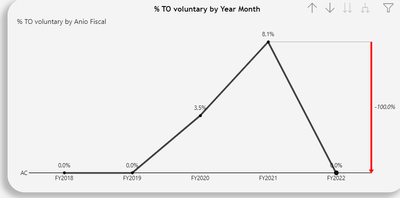
Please support.
- Mark as New
- Bookmark
- Subscribe
- Mute
- Subscribe to RSS Feed
- Permalink
- Report Inappropriate Content
Hi @Anonymous ,
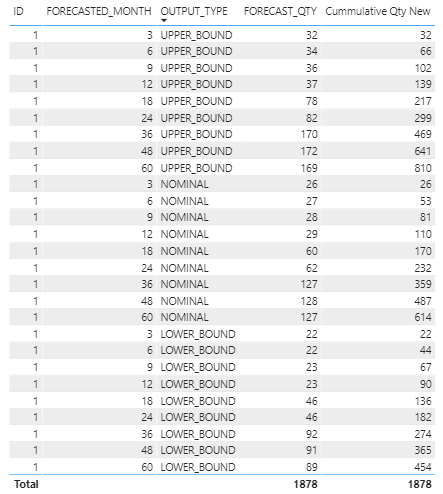
Here are the steps you can follow:
1. Create calculcated column.
Cumm. FORECAST_QTY =
CALCULATE(SUM('Table'[FORECAST_QTY]),FILTER('Table','Table'[Index]<=EARLIER('Table'[Index])&&'Table'[OUTPUT_TYPE]=EARLIER('Table'[OUTPUT_TYPE])))
2. Result.

You can downloaded PBIX file from here.
Best Regards,
Liu Yang
If this post helps, then please consider Accept it as the solution to help the other members find it more quickly.

- Mark as New
- Bookmark
- Subscribe
- Mute
- Subscribe to RSS Feed
- Permalink
- Report Inappropriate Content
- Mark as New
- Bookmark
- Subscribe
- Mute
- Subscribe to RSS Feed
- Permalink
- Report Inappropriate Content
Thank you @ryan_mayu , it is working as expected. I had additional columns and hence it was not coming. Now I have removed and it is working fine
- Mark as New
- Bookmark
- Subscribe
- Mute
- Subscribe to RSS Feed
- Permalink
- Report Inappropriate Content
@Anonymous , Try like
Cummulative Qty New =
CALCULATE(
SUM('Forecasting'[FORECAST_QTY]),
FILTER(
allselected('Forecasting'),'Forecasting'[ID],'Forecasting'[OUTPUT_TYPE] max('Forecasting'[OUTPUT_TYPE]) &&
'Forecasting'[FORECAST_MONTH] <= MAX('Forecasting'[FORECAST_MONTH])
)
)
- Mark as New
- Bookmark
- Subscribe
- Mute
- Subscribe to RSS Feed
- Permalink
- Report Inappropriate Content
Thank you @amitchandak, it is working as expected. I had additional columns and hence it was not coming. Now I have removed and it is working fine
- Mark as New
- Bookmark
- Subscribe
- Mute
- Subscribe to RSS Feed
- Permalink
- Report Inappropriate Content
Helpful resources

Power BI Monthly Update - August 2025
Check out the August 2025 Power BI update to learn about new features.

Fabric Community Update - August 2025
Find out what's new and trending in the Fabric community.

| User | Count |
|---|---|
| 70 | |
| 64 | |
| 62 | |
| 48 | |
| 28 |


