Join us at FabCon Atlanta from March 16 - 20, 2026, for the ultimate Fabric, Power BI, AI and SQL community-led event. Save $200 with code FABCOMM.
Register now!The Power BI Data Visualization World Championships is back! Get ahead of the game and start preparing now! Learn more
Hi,
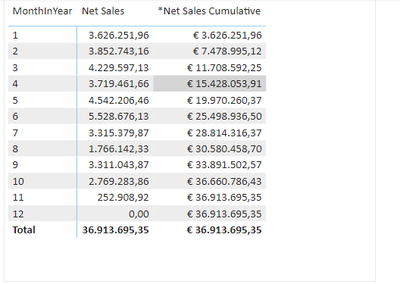
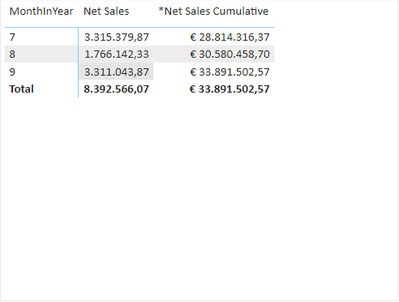
I've made below measure for Cumulative Sales. However I want it slightly different so that when I select for example Months 7, 8 and 9, it only shows cumulative sales as from Month 7 on. So, not showing values € 28.814.316,37 (Month 7), € 30.580.458,70 (Month 8), € 33.891.502,57 (Month 9) but values € 3.315.379,87 (Month 7), € 5.081.522,20 (Month 8 --> € 3.315.379,87 + € 1.766.142,33) and € 8.392.566,07 (Month 9 --> € 5.081.522,20 + € 3.311.043,87).
Does someone have an idea how to change the measure?
Solved! Go to Solution.
@Anonymous Should be able to use something along the lines of IF(COUNTROWS(ALLSELECTED('Table')) = 1, <net sales goes here>, <cumulative measure goes here>)
@Greg_Deckler Thank you!
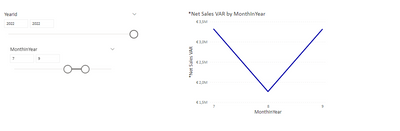
I want to use this cumulative measure in another measure as mentioned below (the idea is to switch to cumulative values (VAR _Cumulative) when more than 1 month is selected. If only 1 month is selected, it needs to show the Net Sales(=SUM(Sales[SalesAmount])). However, it does not work properly. Do you have an idea how it might work?
@Anonymous Should be able to use something along the lines of IF(COUNTROWS(ALLSELECTED('Table')) = 1, <net sales goes here>, <cumulative measure goes here>)
@Anonymous Try using ALLSELECTED vs. ALL
Check out the November 2025 Power BI update to learn about new features.
Advance your Data & AI career with 50 days of live learning, contests, hands-on challenges, study groups & certifications and more!