cancel
Showing results for 
Search instead for 
Did you mean: 

Next up in the FabCon + SQLCon recap series: The roadmap for Microsoft SQL and Maximizing Developer experiences in Fabric. All sessions are available on-demand after the live show. Register now

Reply
Anonymous
Not applicable

Cumulative Sum Graph with Labels

Dear All,


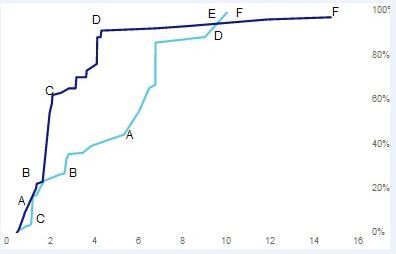
I have a requirement to dispaly a cumilative sum chart for Offline / Online brands . I also need to display the brand labels on the chart but i dont find a way  to show brand labels on the chart (I can only show the values). could somebody help me if you face this kind of requirement .

I would like to achieve the below graph. Please provide your help


Offline Online.PNGCapture.JPG

Thanks & Regards,

Rajeev


3 REPLIES 3
Anonymous
Not applicable

The graph and your data are very hard to understand Rajeev. Are you sure that a line chart is the correct chart here? Usually a line chart is only used when one of the dimensions is time based...

Anonymous
Not applicable

Hi Jaap,


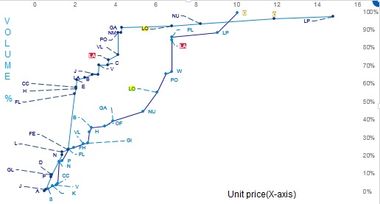
I'm using numbers and not time on X -axis. I need to show the brand labels on the line chart like below. Is it possible to achieve the below graph. I have used scatter plot to show the lables (Category labels) unfortunately we dont have connecting line to join the bubbles (Like in Excel Scatter plot with line).


sum.jpg


Anonymous
Not applicable

Yeah I still don't think that a line chart is appropriate here. LO and PO are now connected to each other for no reason, they have no more relation than NU and PO. A scatter chart is the correct chart here, the lines should not connect to each other. This is probably also why PowerBI doesnt allow you to put labels there, because it doenst make sense in a line chart....


If you have a line chart per day, and you have the following values:


1-1-2017  50

2-1-2017 100


You can put a line between those two values, because you're showing a rise in the value over time. In your example, there is no rise from LO to PO, they are unrelated, so there shouldn't be a line.


My recommendation would be to create a group for all the online and offline values, and use that group ID to determine the colour of the dots in the scatter plot (you can put this group value in the "legend" box. Then you will see which products are online and offline, and you have the brand names once you put the brand names in the "details" box.


Helpful resources

Announcements
New to Fabric survey Carousel

New to Fabric Survey

If you have recently started exploring Fabric, we'd love to hear how it's going. Your feedback can help with product improvements.

Power BI DataViz World Championships carousel

Power BI DataViz World Championships - June 2026

A new Power BI DataViz World Championship is coming this June! Don't miss out on submitting your entry.

FabCon and SQLCon Highlights Carousel

FabCon &SQLCon Highlights

Experience the highlights from FabCon & SQLCon, available live and on-demand starting April 14th.

March Power BI Update Carousel

Power BI Community Update - March 2026

Check out the March 2026 Power BI update to learn about new features.