Join us at FabCon Atlanta from March 16 - 20, 2026, for the ultimate Fabric, Power BI, AI and SQL community-led event. Save $200 with code FABCOMM.
Register now!The Power BI Data Visualization World Championships is back! Get ahead of the game and start preparing now! Learn more
Hi all,
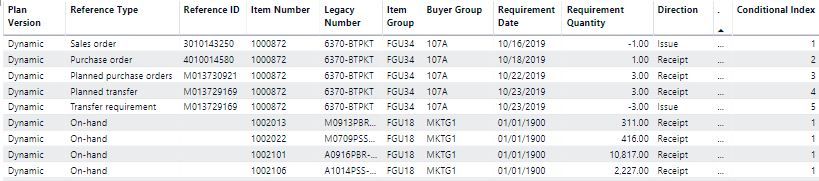
I'm having trouble creating a calculated column (or measure) in DAX that will return a running total based on groups. The data I'm working with looks like this:
I need the Requirement Quantity summed up as a running total, which would start over every time the 'Item Number' field changes. As you can see, I've also added a Conditional Index field through M Query. But I've tried almost every single DAX formula I've found on this forum and elsewhere and have had absolutely no luck with it. I managed to create a running total in M Query, but the query takes hours to refresh. Any ideas on how I can solve this? Thanks in advance!
Solved! Go to Solution.
This is my ussual way of calculating running totals but it should do the trick for you aswell.
Calculated column =
CALCULATE (
SUM ( 'Table'[Requirement quantity] );
// Calculate over the entire table
ALL ( 'Table' );
// Filter where item numbers are the same
'Table'[Item Number] = EARLIER ( 'Table'[Item NumberT] );
// Filter the order for calculating
'Table'[Index] <= EARLIER ( 'Table'[Index] )
)Always here to help.
Kind regards
Joren Venema
This is my ussual way of calculating running totals but it should do the trick for you aswell.
Calculated column =
CALCULATE (
SUM ( 'Table'[Requirement quantity] );
// Calculate over the entire table
ALL ( 'Table' );
// Filter where item numbers are the same
'Table'[Item Number] = EARLIER ( 'Table'[Item NumberT] );
// Filter the order for calculating
'Table'[Index] <= EARLIER ( 'Table'[Index] )
)Always here to help.
Kind regards
Joren Venema
Thanks Joren, this worked! You're the man!!!
Total Requirement measure = SUM(table[Requirement Quantity]) ====================================================== Total Cumulative =
VAR MaxDate =
MAX ( table[Requirement Date] ) -- Saves the last visible date
VAR ReqQuantity =
CALCULATE (
[Total Requirement measure],
-- Computes hours
table[Requirement Date] <= MaxDate,
-- Where date is before the last visible date
ALLEXCEPT (
table,
table[Buyer Group ]
)
)
RETURN
ReqQuantity
Hi @Anonymous
Let me know if you have any questions.
If this solves your issues, please mark it as the solution, so that others can find it easily. Kudos are nice too.
Nathaniel
Proud to be a Super User!
The Power BI Data Visualization World Championships is back! Get ahead of the game and start preparing now!
| User | Count |
|---|---|
| 38 | |
| 36 | |
| 33 | |
| 33 | |
| 29 |
| User | Count |
|---|---|
| 134 | |
| 96 | |
| 78 | |
| 67 | |
| 65 |