cancel
Showing results for 
Search instead for 
Did you mean: 

The Power BI Data Visualization World Championships is back! Get ahead of the game and start preparing now! Learn more

Reply
Anonymous
Not applicable

Cumulative Sales Calculation

Hi Expert


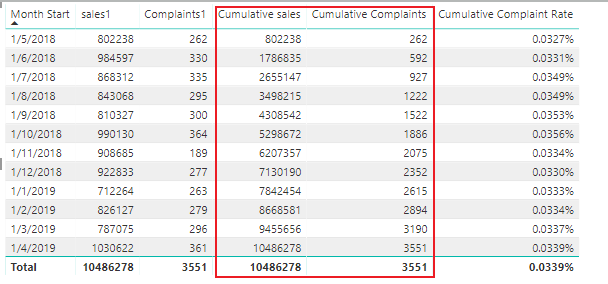
I am trying to work out the cumulative sales divided by the Cumulative Complaints in Power BI, i can work out the formula in Excel fine (see image)

Capture.PNG


The problem arises in Power BI, I am pretty sure i have the correct DAX.


Main Formula.


Cumulative Complaint Rate = IF(DIVIDE([Cumulative Complaints],[Cumulative Sales],0)<>0,DIVIDE([Cumulative Complaints],[Cumulative Sales],0)
)

Cumulative Sales and Complaint are calculated as follows:

Cumulative Complaints = CALCULATE([PMSComplaintsMN],
    FILTER(ALL(PMS_FINANCIAL_PDS[FISCAL_MON_START_DT]),
    PMS_FINANCIAL_PDS[FISCAL_MON_START_DT] <= MAX(PMS_FINANCIAL_PDS[FISCAL_MON_START_DT])
))


Cumulative Sales = CALCULATE([Sales],
    FILTER(ALL(PMS_FINANCIAL_PDS[FISCAL_MON_START_DT]),
    PMS_FINANCIAL_PDS[FISCAL_MON_START_DT] <= MAX(PMS_FINANCIAL_PDS[FISCAL_MON_START_DT])
))

The main formula just gives the in month complaints/in month sale as a percentage.


see attached PBIX (file is missing sales data - you can make this up). rest of the test data is here.

https://www.dropbox.com/s/qedzqlc8eltztqz/Test.pbix?dl=0


2 ACCEPTED SOLUTIONS
Anonymous
Not applicable

PS. I have already sum'd sales and complaints using a seperate Measure.


View solution in original post

v-xuding-msft
Community Support
Community Support

Hi @Anonymous 

By my test, you didn’t calculate the cumulative sales and complaints. You  still  need other formulas. The following are the formulas you can have a try.


1.Cumulative Complaints =

  CALCULATE (

    SUM ( Table1[Complaints] ),

    FILTER (

        ALL ( Table1[Month Start] ),

        Table1[Month Start] <= MAX ( Table1[Month Start])

    )

)

2.Cumulative sales =

   CALCULATE (

    SUM ( Table1[Sales] ),

    FILTER (

        ALL ( Table1[Month Start] ),

        Table1[Month Start] <= MAX ( Table1[Month Start])

    )

)

3.Cumulative Complaint Rate =

IF (

    DIVIDE ( [Cumulative Complaints], [Cumulative sales], 0 ) <> 0,

    DIVIDE ( [Cumulative Complaints], [Cumulative sales], 0 )

)

divide.PNG


Best Regards,

Xue Ding


If this post helps, then please consider Accept it as the solution to help the other members find it more quickly.

Best Regards,
Xue Ding
If this post helps, then please consider Accept it as the solution to help the other members find it more quickly.

View solution in original post

3 REPLIES 3
v-xuding-msft
Community Support
Community Support

Hi @Anonymous 

By my test, you didn’t calculate the cumulative sales and complaints. You  still  need other formulas. The following are the formulas you can have a try.


1.Cumulative Complaints =

  CALCULATE (

    SUM ( Table1[Complaints] ),

    FILTER (

        ALL ( Table1[Month Start] ),

        Table1[Month Start] <= MAX ( Table1[Month Start])

    )

)

2.Cumulative sales =

   CALCULATE (

    SUM ( Table1[Sales] ),

    FILTER (

        ALL ( Table1[Month Start] ),

        Table1[Month Start] <= MAX ( Table1[Month Start])

    )

)

3.Cumulative Complaint Rate =

IF (

    DIVIDE ( [Cumulative Complaints], [Cumulative sales], 0 ) <> 0,

    DIVIDE ( [Cumulative Complaints], [Cumulative sales], 0 )

)

divide.PNG


Best Regards,

Xue Ding


If this post helps, then please consider Accept it as the solution to help the other members find it more quickly.

Best Regards,
Xue Ding
If this post helps, then please consider Accept it as the solution to help the other members find it more quickly.
Anonymous
Not applicable

Xue.. many thanks for the feedback. that works just fine.

Anonymous
Not applicable

PS. I have already sum'd sales and complaints using a seperate Measure.


Helpful resources

Announcements
Power BI DataViz World Championships

Power BI Dataviz World Championships

The Power BI Data Visualization World Championships is back! Get ahead of the game and start preparing now!

December 2025 Power BI Update Carousel

Power BI Monthly Update - December 2025

Check out the December 2025 Power BI Holiday Recap!

FabCon Atlanta 2026 carousel

FabCon Atlanta 2026

Join us at FabCon Atlanta, March 16-20, for the ultimate Fabric, Power BI, AI and SQL community-led event. Save $200 with code FABCOMM.