Hi All,
I've been researching a while about how to do this and I feel like I'm getting close. I'm pretty familiar with DAX but feel much more comfortable in languages used by Tableau and Spotfire.
What I'm trying to do:
- Create a cumulative/running sum of Media cost that aggregates from the TV station that has the highest MER (a ratio where MER=Sales/Spend)and work our way down from the first highest MER station to the second highest to the third highest … etc.
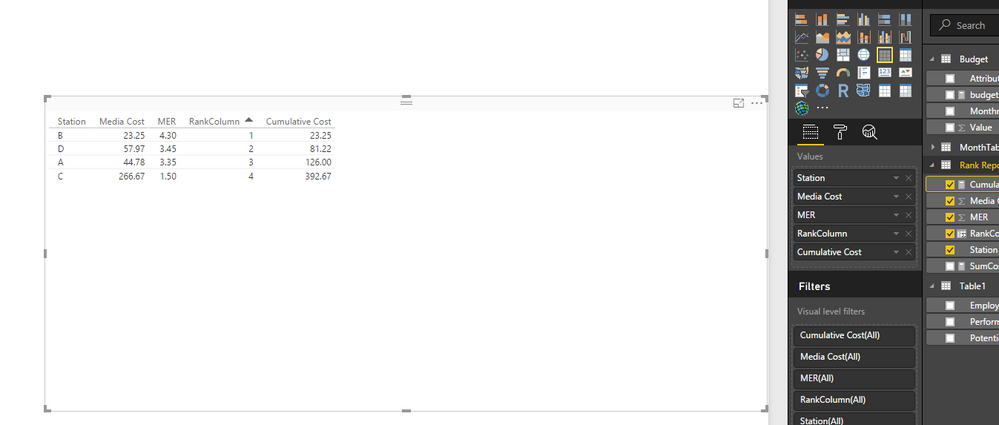
- Below we have a table with Station, Media Cost for that station, and MER sorted descending from the highest MER. I need to write a calculation that sums the values according to the rank of the highest MER station.
Station | Media Cost | MER (sorted desc) | Cumulative Media Cost |
B | 23.25 | 4.3 | 23.25 (Media Cost of station B) |
D | | 3.45 | 81.22 (Media Cost of station B+D) |
A | 44.78 | 3.35 | 126 (Media cost of station B+D+A) |
C | 266.67 | 1.5 | 392.67 (Media Cost of station B+D+A+C) |
What I have done so far:
- I have created a MEASURE that dynamically ranks each station based on the highest MER in the matrix/text table:
Ranking MER=
MINX (
FILTER (
SELECTCOLUMNS (
ALLSELECTED ( 'Rank Report' ),
"index", 'Rank Report'[Index],
"rank", RANKX ( ALLSELECTED ( 'Rank Report' ), 'Rank Report'[MER],,DESC, Dense )
),
[index] = MAX ( 'Rank Report'[Index] )
),
[rank]
)
So this gives me:
Station | Client Revenue | Media Cost | MER (sorted desc) | Top Rank Measure |
B | 100 | 23.25 | 4.3 | 1 |
D | 200 | 57.97 | 3.45 | 2 |
A | 150 | 44.78 | 3.35 | 3 |
C | 400 | 266.67 | 1.5 | 4 |
I thought then I could come up with some cumulative calculation to sum Media Cost but I’ve hit a wall. The closest that I’ve gotten were these calculations giving me Media Cost for the same row (these are inspired from searcing online):
Cumulative Cost =
CALCULATE(SUM('Rank Report'[Media Cost]),
                FILTER(ALL('Rank Report'[Station]),
                                [Top Rank Measure]<=100
                                )
)
And
Cumulative Cost 2=
CALCULATE (
SUM('Rank Report'[Media Cost]),
ALLSELECTED('Rank Report'[Station])
)
Either one gives me this:
Station | Client Revenue | Media Cost | MER (sorted desc) | Top Rank Measure | Cumulative Cost |
B | 100 | 23.25 | 4.3 | 1 | 23.25 |
D | 200 | 57.97 | 3.45 | 2 | 57.97 |
A | 150 | 44.78 | 3.35 | 3 | 44.78 |
C | 400 | 266.67 | 1.5 | 4 | 266.67 |
At first I tried to just use the Template for a Running Total for Dates and fill in my columns but I got an error saying:
A function 'CALCULATE' has been used in a True/False expression that is used as a table filter expression. This is not allowed.
The basic formula for a running total is:
Running Total COLUMN =
CALCULATE (
    SUM ( ‘TableName’[ColumnYouWantToAccumulate] ),
    ALL ( ‘TableName’ ),
    'TableName'[DateColumn] <= EARLIER ( 'TableName'[DateColumn] )
)

I tried replacing the dates with my Top Ranking Measure  like this:

Cumulative Cost=
CALCULATE (
    SUM ( 'Rank Report'[Media Cost] ),
    ALL ( 'Rank Report' ),
    [Top Rank Measure] <= EARLIER ( [Top Rank Measure] )
)
How can I get a cumulative sum starting from the top row with the highest MER and descned down keeping a running total of Media Cost?
Let me know if you need any more info.
Thanks,
Matt