Get certified for free when you join Fabric Data Days 2026 and dive into Fabric, Power BI, SQL, AI, and other essential data skills.
Join nowTry your skills in the Power BI Dataviz World Championship! Round one ends June 26. Join now
Hello,
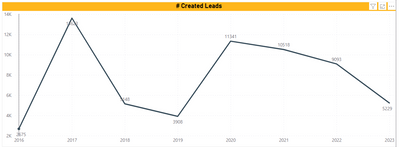
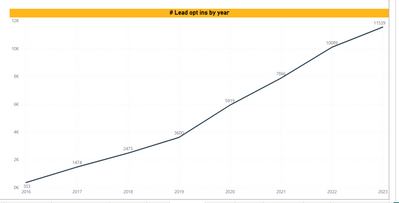
I can't find the option to set the line charts to "cumulative" format. Can you tell me how to do it ? When I did it for other charts, I found a button without using a formula, but I can't find it again...
When I say "cumulative" : as you can see on the screens : the second one is cumulative : the figures given are the results of the overall evolution for each year / on the other screen, you can see the details for each year.
Thanks in advance
Solved! Go to Solution.
Hi @Clem ,
Sorry, to my knowledge, i do not know there is the button.
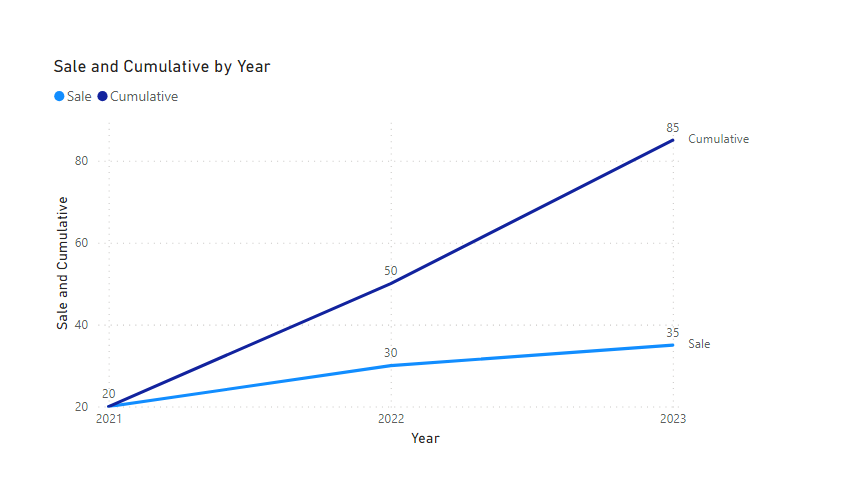
But you just could create a measure with simple dax formula to achieve it.
Cumulative =
VAR cur_year =
SELECTEDVALUE ( 'Table'[Year] )
VAR tmp =
FILTER ( ALL ( 'Table' ), [Year] <= cur_year )
RETURN
SUMX ( tmp, [Sale] )
Please refer the attached .pbix file.
Best regards,
Community Support Team_Binbin Yu
If this post helps, then please consider Accept it as the solution to help the other members find it more quickly.
Hi @Clem ,
Sorry, to my knowledge, i do not know there is the button.
But you just could create a measure with simple dax formula to achieve it.
Cumulative =
VAR cur_year =
SELECTEDVALUE ( 'Table'[Year] )
VAR tmp =
FILTER ( ALL ( 'Table' ), [Year] <= cur_year )
RETURN
SUMX ( tmp, [Sale] )
Please refer the attached .pbix file.
Best regards,
Community Support Team_Binbin Yu
If this post helps, then please consider Accept it as the solution to help the other members find it more quickly.
| User | Count |
|---|---|
| 23 | |
| 21 | |
| 20 | |
| 20 | |
| 11 |
| User | Count |
|---|---|
| 62 | |
| 55 | |
| 47 | |
| 44 | |
| 37 |