
cancel
Showing results for 
Search instead for 
Did you mean: 

The Power BI Data Visualization World Championships is back! Get ahead of the game and start preparing now! Learn more

Reply
Anonymous
Not applicable

Cummulative DAX

Hi everyone


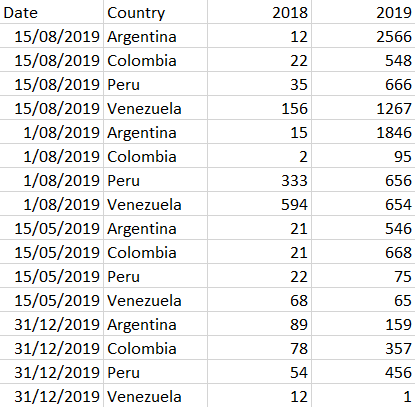
Someone can help me.... I try to do a DAX formula to calculate the cummulative figure per date and I cann't.... y try with this formula:


Cummulative Figure = CALCULATE(SUM(Applications[2018]); FILTER(all(Applications); Applications[2018] = LASTDATE(Applications[Date])); values (Applications[2018]))
 
Screenshot - 19_08_2019 , 2_13_23 p_ m.png
 

Thanks for the help


1 ACCEPTED SOLUTION
Anonymous
Not applicable

Sorry, it would be either >= or <=. Try both of those. 

View solution in original post

3 REPLIES 3
Anonymous
Not applicable

change '=' to '=>' and see if that works. 

Anonymous
Not applicable

Dear @Anonymous Thx for the answer, nut it doesn't work...


Screenshot - 19_08_2019 , 3_01_26 p_ m.pngI only change the name of the column...


Anonymous
Not applicable

Sorry, it would be either >= or <=. Try both of those. 

Helpful resources

Announcements
Power BI DataViz World Championships

Power BI Dataviz World Championships

The Power BI Data Visualization World Championships is back! Get ahead of the game and start preparing now!

December 2025 Power BI Update Carousel

Power BI Monthly Update - December 2025

Check out the December 2025 Power BI Holiday Recap!

FabCon Atlanta 2026 carousel

FabCon Atlanta 2026

Join us at FabCon Atlanta, March 16-20, for the ultimate Fabric, Power BI, AI and SQL community-led event. Save $200 with code FABCOMM.