Join us at FabCon Atlanta from March 16 - 20, 2026, for the ultimate Fabric, Power BI, AI and SQL community-led event. Save $200 with code FABCOMM.
Register now!Get Fabric Certified for FREE during Fabric Data Days. Don't miss your chance! Request now
Hi
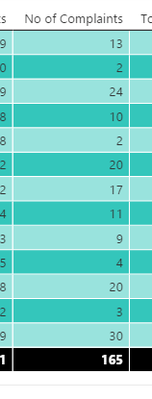
I have a matrix in my dashboard im building, and i want to add a column that calculates the % per line of the total, there are slicers and selections that will alter this number, suxh as date range etc, i have tried to build a calculated column, but it jsut keeps returning an error, this is simple to do in excel but doing this in Power BI when i dont get an error, all i get is 100% for everythiing, how is this done?
For instance i want to divide 13/165 then 2/165 then 24/165 and so on, i have a card visual that shows me 165 as a total number, but i cant get a measure to work with that without returning 100% where it is picking up the row name, for example Row A, Row B, then it is saying im dividing 13/13 and 2/2 etc.
Anyone have any ideas how this is done?, Thanks
Solved! Go to Solution.
Hi @Schoif-D,
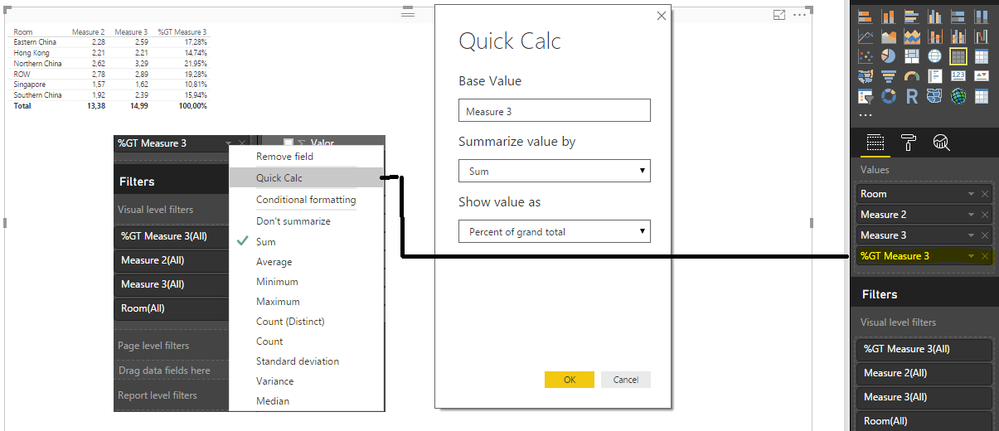
Add the column you want to calculat (No Complaints) then just select quick calc and Show value as % of grand total, it's good for average, sum, ... and can be used in all visuals
Regards
MFelix
Regards
Miguel Félix
Proud to be a Super User!
Check out my blog: Power BI em PortuguêsHi @Schoif-D,
Add the column you want to calculat (No Complaints) then just select quick calc and Show value as % of grand total, it's good for average, sum, ... and can be used in all visuals
Regards
MFelix
Regards
Miguel Félix
Proud to be a Super User!
Check out my blog: Power BI em PortuguêsCheck out the November 2025 Power BI update to learn about new features.
Advance your Data & AI career with 50 days of live learning, contests, hands-on challenges, study groups & certifications and more!