FabCon is coming to Atlanta
Join us at FabCon Atlanta from March 16 - 20, 2026, for the ultimate Fabric, Power BI, AI and SQL community-led event. Save $200 with code FABCOMM.
Register now!- Power BI forums
- Get Help with Power BI
- Desktop
- Service
- Report Server
- Power Query
- Mobile Apps
- Developer
- DAX Commands and Tips
- Custom Visuals Development Discussion
- Health and Life Sciences
- Power BI Spanish forums
- Translated Spanish Desktop
- Training and Consulting
- Instructor Led Training
- Dashboard in a Day for Women, by Women
- Galleries
- Data Stories Gallery
- Themes Gallery
- Contests Gallery
- QuickViz Gallery
- Quick Measures Gallery
- Visual Calculations Gallery
- Notebook Gallery
- Translytical Task Flow Gallery
- TMDL Gallery
- R Script Showcase
- Webinars and Video Gallery
- Ideas
- Custom Visuals Ideas (read-only)
- Issues
- Issues
- Events
- Upcoming Events
The Power BI Data Visualization World Championships is back! It's time to submit your entry. Live now!
- Power BI forums
- Forums
- Get Help with Power BI
- Desktop
- Re: Creating relationships based on a sum calculat...
- Subscribe to RSS Feed
- Mark Topic as New
- Mark Topic as Read
- Float this Topic for Current User
- Bookmark
- Subscribe
- Printer Friendly Page

- Mark as New
- Bookmark
- Subscribe
- Mute
- Subscribe to RSS Feed
- Permalink
- Report Inappropriate Content
Creating relationships based on a sum calculation
Hi
I have a table of milestones (because our financial calendar doesn’t match the regular calendar):
Financial Year Name Period Start Date End Date
2018 2018-2019 Q1 20181001 20181231
2018 2018-2019 Q2 20190101 20190331
2018 2018-2019 Q3 20190401 20190630
2018 2018-2019 Q4 20190701 20190930
2018 2018-2019 Year 20181001 20190930
2019 2019-2020 Q1 20191001 20191231
…
I also have a table of invoices:
Date Amount Job ID
01/11/2017 20.87 0001
01/12/2017 32.31 0002
...
Finally, I have a table of jobs. The table has a relationship to the invoices table via Job ID:
Job ID Job Team
0001 Team #A
0002 Team #B
0003 Team #A
…
I’ve created columns in the financial milestones table to sum the invoices in that period... I'm using the following instruction:
Invoices = CALCULATE(SUMX(FILTER('Invoices',
AND('Invoices'[Invoice Date] >= SELECTEDVALUE('[Start Date]), 'Invoices'[Invoice Date] < SELECTEDVALUE(‘End Date’))),
'Invoices'[Amount]))
I now want to slice the calculated result by Job Team, but I keep getting the error:
‘Can’t determine the relationship between the fields’
I’m think this is because the Invoices calculation doesn’t create/have a relationship to the invoices table.
Is there a way to create this relationship?
Any suggestions would be gratefully received.
Solved! Go to Solution.


- Mark as New
- Bookmark
- Subscribe
- Mute
- Subscribe to RSS Feed
- Permalink
- Report Inappropriate Content
Hi @FrankMcQ
Create a calendar table,
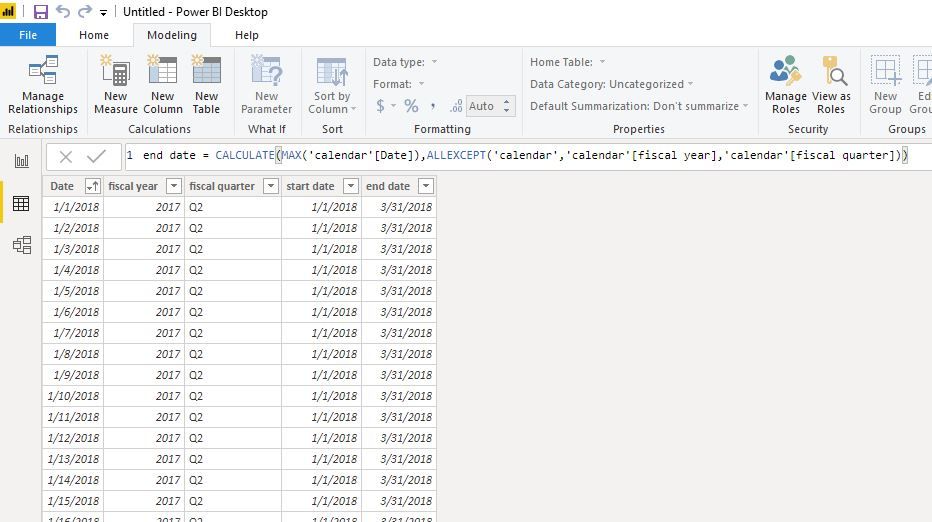
calendar =
ADDCOLUMNS (
    CALENDARAUTO (),
    "fiscal year", IF ( MONTH ( [Date] ) >= 10, YEAR ( [Date] ), YEAR ( [Date] ) - 1 ),
    "fiscal quarter", SWITCH (
        TRUE (),
        MONTH ( [Date] ) >= 10
            && MONTH ( [Date] ) <= 12, "Q1",
        MONTH ( [Date] ) >= 1
            && MONTH ( [Date] ) <= 3, "Q2",
        MONTH ( [Date] ) >= 4
            && MONTH ( [Date] ) <= 6, "Q3",
        MONTH ( [Date] ) >= 7
            && MONTH ( [Date] ) <= 9, "Q4"
    )
)
Create columns in this table
start date = CALCULATE(MIN('calendar'[Date]),ALLEXCEPT('calendar','calendar'[fiscal year],'calendar'[fiscal quarter]))

end date = CALCULATE(MAX('calendar'[Date]),ALLEXCEPT('calendar','calendar'[fiscal year],'calendar'[fiscal quarter]))
create relationship as below,
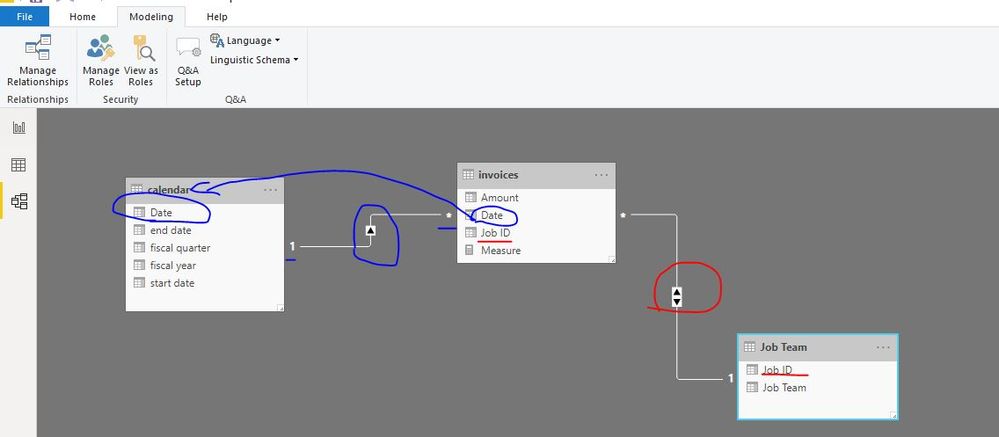
create a measure
Measure = SUM(invoices[Amount])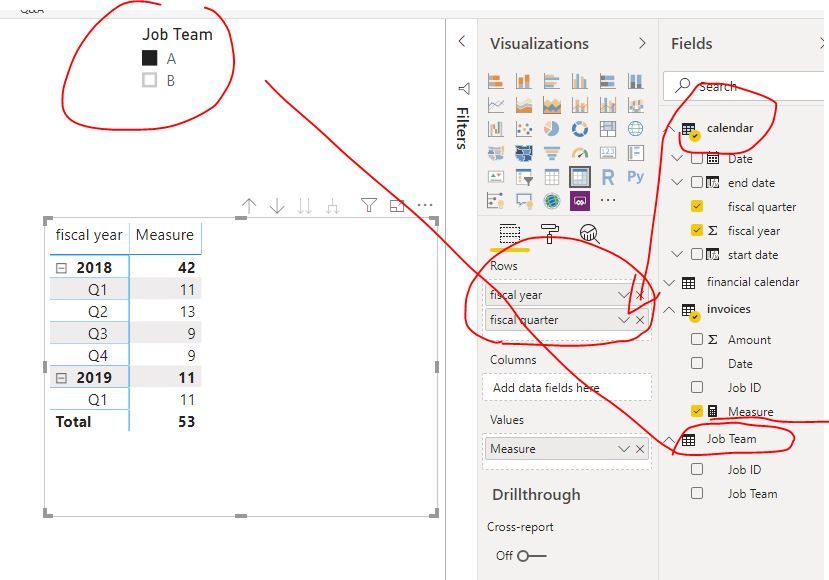
Best Regards
Maggie
Community Support Team _ Maggie Li
If this post helps, then please consider Accept it as the solution to help the other members find it more quickly.


- Mark as New
- Bookmark
- Subscribe
- Mute
- Subscribe to RSS Feed
- Permalink
- Report Inappropriate Content
Is this formula saved without error
Invoices = CALCULATE(SUMX(FILTER('Invoices',
AND('Invoices'[Invoice Date] >= SELECTEDVALUE('[Start Date]), 'Invoices'[Invoice Date] <  SELECTEDVALUE(‘End Date’))),
'Invoices'[Amount]))
I doubt powerbi support AND as function
Invoices = CALCULATE(SUMX(FILTER('Invoices',
('Invoices'[Invoice Date] >= SELECTEDVALUE('[Start Date]) && 'Invoices'[Invoice Date] <  SELECTEDVALUE(‘End Date’))),
'Invoices'[Amount]))- Mark as New
- Bookmark
- Subscribe
- Mute
- Subscribe to RSS Feed
- Permalink
- Report Inappropriate Content
Yes, the formula works with no problems.
- Mark as New
- Bookmark
- Subscribe
- Mute
- Subscribe to RSS Feed
- Permalink
- Report Inappropriate Content
Hi @FrankMcQ
Create a calendar table,
calendar =
ADDCOLUMNS (
    CALENDARAUTO (),
    "fiscal year", IF ( MONTH ( [Date] ) >= 10, YEAR ( [Date] ), YEAR ( [Date] ) - 1 ),
    "fiscal quarter", SWITCH (
        TRUE (),
        MONTH ( [Date] ) >= 10
            && MONTH ( [Date] ) <= 12, "Q1",
        MONTH ( [Date] ) >= 1
            && MONTH ( [Date] ) <= 3, "Q2",
        MONTH ( [Date] ) >= 4
            && MONTH ( [Date] ) <= 6, "Q3",
        MONTH ( [Date] ) >= 7
            && MONTH ( [Date] ) <= 9, "Q4"
    )
)
Create columns in this table
start date = CALCULATE(MIN('calendar'[Date]),ALLEXCEPT('calendar','calendar'[fiscal year],'calendar'[fiscal quarter]))

end date = CALCULATE(MAX('calendar'[Date]),ALLEXCEPT('calendar','calendar'[fiscal year],'calendar'[fiscal quarter]))
create relationship as below,
create a measure
Measure = SUM(invoices[Amount])Best Regards
Maggie
Community Support Team _ Maggie Li
If this post helps, then please consider Accept it as the solution to help the other members find it more quickly.
- Mark as New
- Bookmark
- Subscribe
- Mute
- Subscribe to RSS Feed
- Permalink
- Report Inappropriate Content
This is a great, many thanks. As I suspected, I just had a bad design - I think this is a much more elegant solution!
- Mark as New
- Bookmark
- Subscribe
- Mute
- Subscribe to RSS Feed
- Permalink
- Report Inappropriate Content

Helpful resources

Power BI Dataviz World Championships
The Power BI Data Visualization World Championships is back! It's time to submit your entry.

Power BI Monthly Update - January 2026
Check out the January 2026 Power BI update to learn about new features.

FabCon Atlanta 2026
Join us at FabCon Atlanta, March 16-20, for the ultimate Fabric, Power BI, AI and SQL community-led event. Save $200 with code FABCOMM.

| User | Count |
|---|---|
| 60 | |
| 49 | |
| 30 | |
| 25 | |
| 23 |


| User | Count |
|---|---|
| 130 | |
| 103 | |
| 58 | |
| 39 | |
| 31 |


