cancel
Showing results for 
Search instead for 
Did you mean: 

The Power BI Data Visualization World Championships is back! Get ahead of the game and start preparing now! Learn more

Reply
Yuiitsu
Helper V
Helper V

Creating new column with custom grouping

Hi Experts


I would like to create a new column to group my customer base on certain rules. Please take a look at the example I created below


CustomerItem Purchased
AAAGT
BBBGT
AAAAT
CCCAT
CCCFT
DDDGT
DDDGT
AAAHT
CCCHT


I want the rule to be like this:

New column= if customer = AAA = "AAA",

if customer = BBB = "BBB"

anything else will be grouped as "others"


Can anyone tell me how to set this formula? 

Let me know if my request is confusing. 

Thanks!

1 ACCEPTED SOLUTION
v-alq-msft
Community Support
Community Support

Hi, @Yuiitsu 


Based on your description, you may create a meausre or a column as follows.


Result = 
var _customer = SELECTEDVALUE('Table'[Customer])
return
IF(
    ISFILTERED('Table'[Customer]),
    IF(
        _customer in {"AAA","BBB"},
        _customer,
        "others"
    )
)

Result Column = 
IF(
    'Table'[Customer] in {"AAA","BBB"},
    'Table'[Customer],
    "others"
)


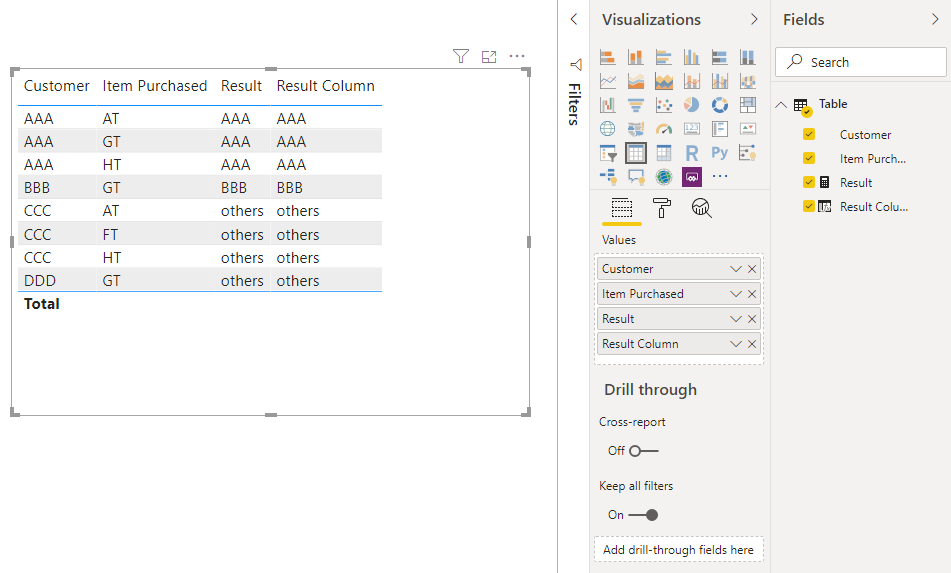
Result:

b2.png


Best Regards

Allan


If this post helps, then please consider Accept it as the solution to help the other members find it more quickly.

View solution in original post

3 REPLIES 3
v-alq-msft
Community Support
Community Support

Hi, @Yuiitsu 


Based on your description, you may create a meausre or a column as follows.


Result = 
var _customer = SELECTEDVALUE('Table'[Customer])
return
IF(
    ISFILTERED('Table'[Customer]),
    IF(
        _customer in {"AAA","BBB"},
        _customer,
        "others"
    )
)

Result Column = 
IF(
    'Table'[Customer] in {"AAA","BBB"},
    'Table'[Customer],
    "others"
)


Result:

b2.png


Best Regards

Allan


If this post helps, then please consider Accept it as the solution to help the other members find it more quickly.

Hi Experts


I found out that I could just right click the column and add new group.


It is so much easier!


Thanks alot for all the info guys!

amitchandak
Super User
Super User

Try a new column

New column = switch( true(),
[customer] = "AAA", "AAA",
[customer] = "BBB", "BBB",
"Others"
)

Also check : https://radacad.com/grouping-and-binning-step-towards-better-data-visualization

Share with Power BI Enthusiasts: Full Power BI Video (20 Hours) YouTube
Microsoft Fabric Series 60+ Videos YouTube
Microsoft Fabric Hindi End to End YouTube

Helpful resources

Announcements
Power BI DataViz World Championships

Power BI Dataviz World Championships

The Power BI Data Visualization World Championships is back! Get ahead of the game and start preparing now!

December 2025 Power BI Update Carousel

Power BI Monthly Update - December 2025

Check out the December 2025 Power BI Holiday Recap!

FabCon Atlanta 2026 carousel

FabCon Atlanta 2026

Join us at FabCon Atlanta, March 16-20, for the ultimate Fabric, Power BI, AI and SQL community-led event. Save $200 with code FABCOMM.