Join us at FabCon Atlanta from March 16 - 20, 2026, for the ultimate Fabric, Power BI, AI and SQL community-led event. Save $200 with code FABCOMM.
Register now!The Power BI Data Visualization World Championships is back! Get ahead of the game and start preparing now! Learn more
Hi All,
I have a scenario where i want to create a calculated column which is using two other columns from 2 other tables.
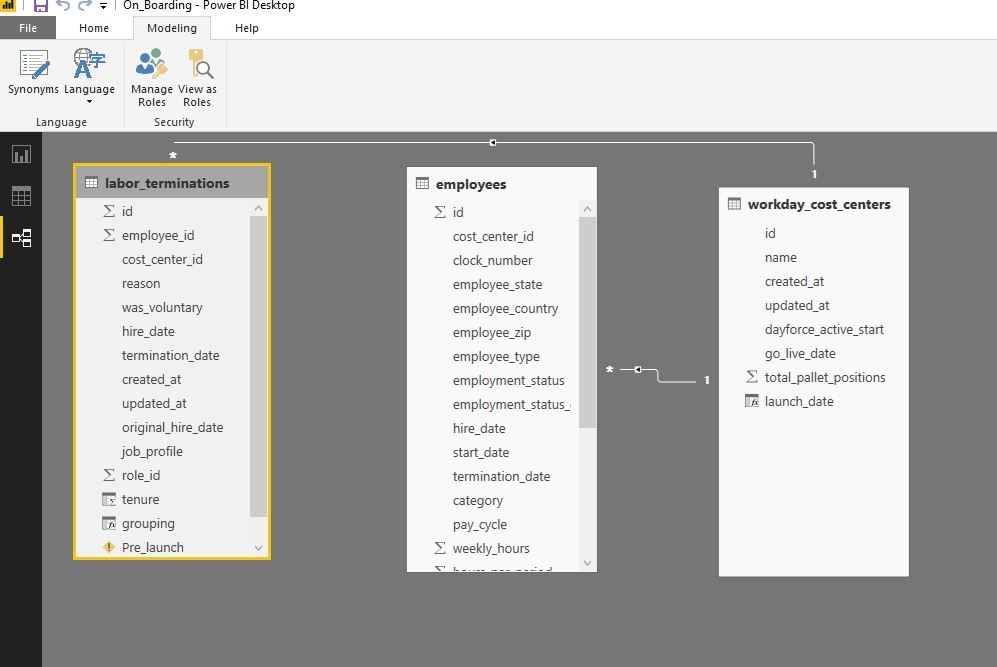
I have 3 tables as - labor_terminations, employee & workday_cost_centers. These three tables are connected with each other.
labor_terminations is connected with workday_cost_centers and employee is also connected with workday_cost_centers.
Please find the screenshots for understanding the relation.
When i am trying to create new column in labor_terminations i want one column from employee and one from workday_cost_centers. Since labor_terminations is not directly connected with employee it is not showing any column of employee table even with the use of related keyword.
Any help would be greatful.
Regards,
Shailesh
@Anonymous wrote:
Hi All,
I have a scenario where i want to create a calculated column which is using two other columns from 2 other tables.
I have 3 tables as - labor_terminations, employee & workday_cost_centers. These three tables are connected with each other.
labor_terminations is connected with workday_cost_centers and employee is also connected with workday_cost_centers.
Please find the screenshots for understanding the relation.
When i am trying to create new column in labor_terminations i want one column from employee and one from workday_cost_centers. Since labor_terminations is not directly connected with employee it is not showing any column of employee table even with the use of related keyword.
Any help would be greatful.
Regards,
Shailesh
@Anonymous
The snapshot shows the table labor and employ are in a many-to-many relationship, so you'll have to use RELATEDTABLE. So to create a calculated column in the table labor, the DAX shall be like
calculated column = SUMX(RELATEDTABLE(employee),employee[somecolumn])
For further advice, please post some smaple data nd expected output.
The Power BI Data Visualization World Championships is back! Get ahead of the game and start preparing now!
| User | Count |
|---|---|
| 151 | |
| 130 | |
| 109 | |
| 79 | |
| 54 |