cancel
Showing results for 
Search instead for 
Did you mean: 

Join the FabCon + SQLCon recap series. Up next: Power BI, Real-Time Intelligence, IQ and AI, and Data Factory take center stage. All sessions are available on-demand after the live show. Register now

Reply
ablackburn21
New Member

Creating my first Chart

I am a new user.


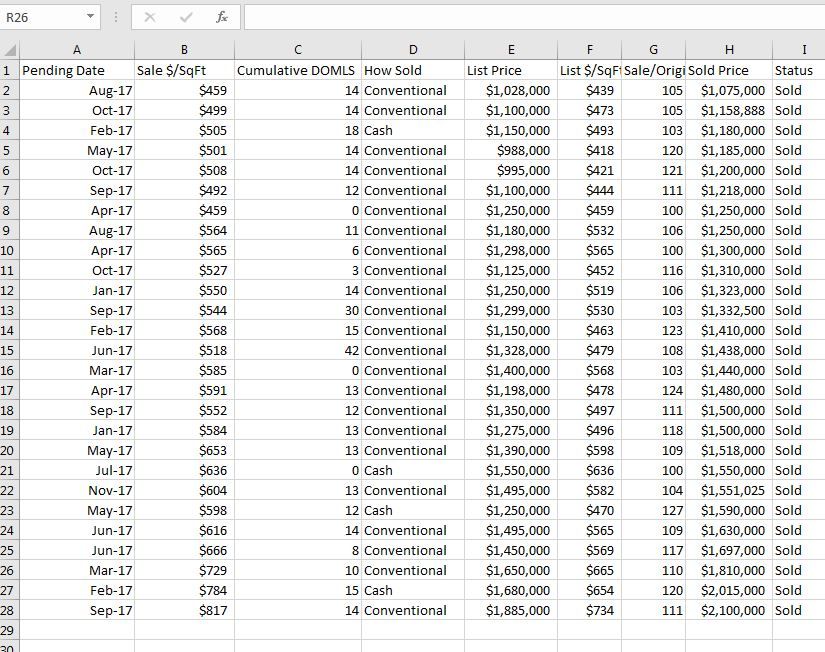
I have a small dataset in excel that I imported to Power BI


Dataset.JPG


The data is in Power BI adn I can see the field. When I select 2 fields, such as "Pending Date" and 'Sale $/SF", I get a line chart that doesnt seem to relate to the data.


Line Chart.JPG


I just want a simple Chart with the date on the Horizontal axis and the Sale $ / SF on the vertical Axis.


Help is appreciated.


1 REPLY 1
v-yulgu-msft
Microsoft Employee
Microsoft Employee

Hi @ablackburn21,


When I select 2 fields, such as "Pending Date" and 'Sale $/SF", I get a line chart that doesnt seem to relate to the data.


What do you say the line chart is not related to the dataset data? Could you explain with an example?


 Line Chart.JPG


I just want a simple Chart with the date on the Horizontal axis and the Sale $ / SF on the vertical Axis. 


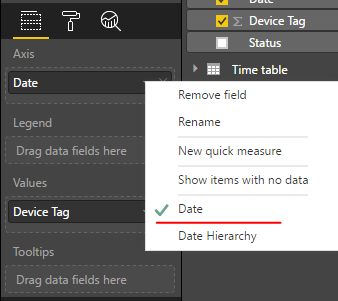
From above line chart, everything looks correct. Date is shown as X-axis and Sale $ / SF on the vertical Axis. If you want to display Date rather than Month on X-axis, please change "Date hierarchy" to "Date".

1.PNG


Besides, any numeric fields added to Y-axis will be aggregated (sum, max, average, etc). That may be why the data values shown in chart looks different from source table.


Regards,

Yuliana Gu

Community Support Team _ Yuliana Gu
If this post helps, then please consider Accept it as the solution to help the other members find it more quickly.

Helpful resources

Announcements
April Power BI Update Carousel

Power BI Monthly Update - April 2026

Check out the April 2026 Power BI update to learn about new features.

New to Fabric survey Carousel

New to Fabric Survey

If you have recently started exploring Fabric, we'd love to hear how it's going. Your feedback can help with product improvements.

Power BI DataViz World Championships carousel

Power BI DataViz World Championships - June 2026

A new Power BI DataViz World Championship is coming this June! Don't miss out on submitting your entry.

FabCon and SQLCon Highlights Carousel

FabCon &SQLCon Highlights

Experience the highlights from FabCon & SQLCon, available live and on-demand starting April 14th.