Share feedback directly with Fabric product managers, participate in targeted research studies and influence the Fabric roadmap.
Sign up nowGet Fabric certified for FREE! Don't miss your chance! Learn more
I am a new user.
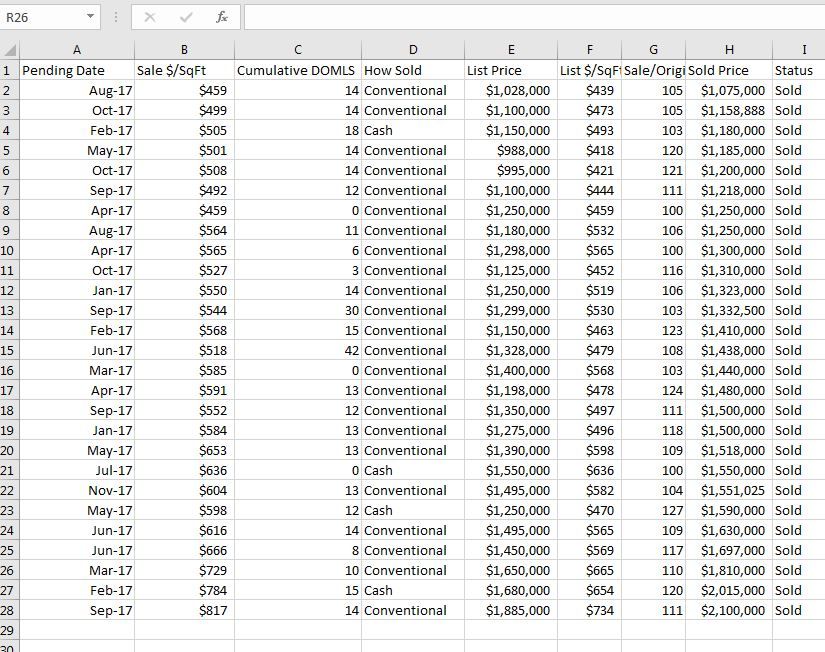
I have a small dataset in excel that I imported to Power BI
The data is in Power BI adn I can see the field. When I select 2 fields, such as "Pending Date" and 'Sale $/SF", I get a line chart that doesnt seem to relate to the data.
I just want a simple Chart with the date on the Horizontal axis and the Sale $ / SF on the vertical Axis.
Help is appreciated.
Hi @ablackburn21,
When I select 2 fields, such as "Pending Date" and 'Sale $/SF", I get a line chart that doesnt seem to relate to the data.
What do you say the line chart is not related to the dataset data? Could you explain with an example?
I just want a simple Chart with the date on the Horizontal axis and the Sale $ / SF on the vertical Axis.
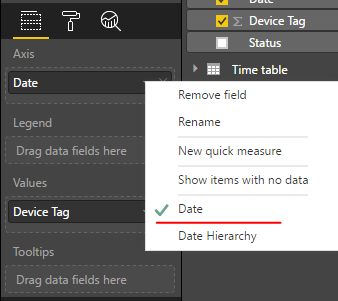
From above line chart, everything looks correct. Date is shown as X-axis and Sale $ / SF on the vertical Axis. If you want to display Date rather than Month on X-axis, please change "Date hierarchy" to "Date".
Besides, any numeric fields added to Y-axis will be aggregated (sum, max, average, etc). That may be why the data values shown in chart looks different from source table.
Regards,
Yuliana Gu
Share feedback directly with Fabric product managers, participate in targeted research studies and influence the Fabric roadmap.
| User | Count |
|---|---|
| 68 | |
| 59 | |
| 44 | |
| 19 | |
| 15 |
| User | Count |
|---|---|
| 108 | |
| 105 | |
| 37 | |
| 26 | |
| 26 |