Get Fabric or SQL Certified for Free.
Get certified for free when you join Fabric Data Days 2026 and dive into Fabric, Power BI, SQL, AI, and other essential data skills.
Join now- Power BI forums
- Get Help with Power BI
- Desktop
- Service
- Report Server
- Power Query
- Mobile Apps
- Developer
- DAX Commands and Tips
- Custom Visuals Development Discussion
- Health and Life Sciences
- Power BI Spanish forums
- Translated Spanish Desktop
- Training and Consulting
- Instructor Led Training
- Dashboard in a Day for Women, by Women
- Galleries
- Data Stories Gallery
- Themes Gallery
- Contests Gallery
- QuickViz Gallery
- Quick Measures Gallery
- Visual Calculations Gallery
- Notebook Gallery
- Translytical Task Flow Gallery
- TMDL Gallery
- R Script Showcase
- Webinars and Video Gallery
- Ideas
- Custom Visuals Ideas (read-only)
- Issues
- Issues
- Events
- Upcoming Events
Data Days is here! Join us now for 60+ days of learning, challenges, and connection. Learn more
- Power BI forums
- Forums
- Get Help with Power BI
- Desktop
- Re: Creating measure by adding column value
- Subscribe to RSS Feed
- Mark Topic as New
- Mark Topic as Read
- Float this Topic for Current User
- Bookmark
- Subscribe
- Printer Friendly Page

- Mark as New
- Bookmark
- Subscribe
- Mute
- Subscribe to RSS Feed
- Permalink
- Report Inappropriate Content
Creating measure by adding column value
Hi All,
I have a dataset with values like below
ABCD Theatre 1 100
ABCE Theatre 2 300
ABCE Theatre 4 200
ABCD Theatre 3 150
GABC Theatre 1 120
PLK Theatre 2 100
ABCE Theatre 5 125
| Movie | Theatre | TicketCharge |
| ABCD | Theatre 1 | 100 |
| ABCE | Theatre 2 | 300 |
| ABCE | Theatre 3 | 200 |
| ABCD | Theatre 4 | 150 |
| GABC | Theatre 3 | 120 |
| PLKE | Theatre 4 | 100 |
| ABCE | Theatre 5 | 125 |
I need to create a measure with sum of ticketcharge where movie name contains ABC with output ABC-1075
Need help for this.
I treid like below
MEASURE = SUMX('MOVIETABLE',FILTER('MOVIETABLE','MOVIETABLE'['Movie'] = 'ABC'),TicketCharge)
giving errors.
Solved! Go to Solution.


- Mark as New
- Bookmark
- Subscribe
- Mute
- Subscribe to RSS Feed
- Permalink
- Report Inappropriate Content
Hi @Anonymous,
You can create a measure below:
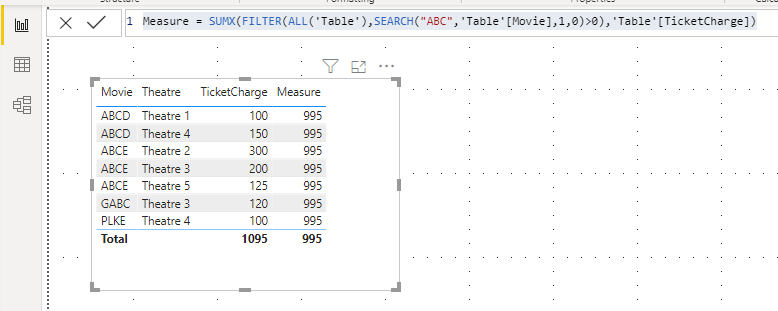
Qiuyun Yu
If this post helps, then please consider Accept it as the solution to help the other members find it more quickly.


- Mark as New
- Bookmark
- Subscribe
- Mute
- Subscribe to RSS Feed
- Permalink
- Report Inappropriate Content
@Anonymous
If you need at the start
MEASURE = SUMX('MOVIETABLE',FILTER('MOVIETABLE',left('MOVIETABLE'['Movie'],3) = "ABC"),TicketCharge)
Anywhere in the string
MEASURE = SUMX('MOVIETABLE',FILTER('MOVIETABLE',search("ABC",'MOVIETABLE'['Movie'],1,0)>0 ),TicketCharge)

- Mark as New
- Bookmark
- Subscribe
- Mute
- Subscribe to RSS Feed
- Permalink
- Report Inappropriate Content
SumABC = CALCULATE(SUM('Table'[TicketCharge]),FILTER('Table',FIND("ABC", 'Table'[Movie],,0)<>0))
- Mark as New
- Bookmark
- Subscribe
- Mute
- Subscribe to RSS Feed
- Permalink
- Report Inappropriate Content
@Anonymous
If you need at the start
MEASURE = SUMX('MOVIETABLE',FILTER('MOVIETABLE',left('MOVIETABLE'['Movie'],3) = "ABC"),TicketCharge)
Anywhere in the string
MEASURE = SUMX('MOVIETABLE',FILTER('MOVIETABLE',search("ABC",'MOVIETABLE'['Movie'],1,0)>0 ),TicketCharge)
- Mark as New
- Bookmark
- Subscribe
- Mute
- Subscribe to RSS Feed
- Permalink
- Report Inappropriate Content
Hi @Anonymous,
You can create a measure below:
Qiuyun Yu
If this post helps, then please consider Accept it as the solution to help the other members find it more quickly.
- Mark as New
- Bookmark
- Subscribe
- Mute
- Subscribe to RSS Feed
- Permalink
- Report Inappropriate Content
SumABC = CALCULATE(SUM('Table'[TicketCharge]),FILTER('Table',FIND("ABC", 'Table'[Movie],,0)<>0))
- Mark as New
- Bookmark
- Subscribe
- Mute
- Subscribe to RSS Feed
- Permalink
- Report Inappropriate Content
Helpful resources

Fabric Data Days 2026
Don't miss out on Data Days, June 15 through August 7. Learn Fabric, Power BI, SQL, AI and more.

Power BI Monthly Update - May 2026
Check out the May 2026 Power BI update to learn about new features.

Power BI DataViz World Championships - June 2026
A new Power BI DataViz World Championship is coming this June! Don't miss out on submitting your entry.

| User | Count |
|---|---|
| 22 | |
| 21 | |
| 20 | |
| 19 | |
| 13 |


| User | Count |
|---|---|
| 58 | |
| 52 | |
| 37 | |
| 31 | |
| 27 |


