FabCon is coming to Atlanta
Join us at FabCon Atlanta from March 16 - 20, 2026, for the ultimate Fabric, Power BI, AI and SQL community-led event. Save $200 with code FABCOMM.
Register now!- Power BI forums
- Get Help with Power BI
- Desktop
- Service
- Report Server
- Power Query
- Mobile Apps
- Developer
- DAX Commands and Tips
- Custom Visuals Development Discussion
- Health and Life Sciences
- Power BI Spanish forums
- Translated Spanish Desktop
- Training and Consulting
- Instructor Led Training
- Dashboard in a Day for Women, by Women
- Galleries
- Data Stories Gallery
- Themes Gallery
- Contests Gallery
- QuickViz Gallery
- Quick Measures Gallery
- Visual Calculations Gallery
- Notebook Gallery
- Translytical Task Flow Gallery
- TMDL Gallery
- R Script Showcase
- Webinars and Video Gallery
- Ideas
- Custom Visuals Ideas (read-only)
- Issues
- Issues
- Events
- Upcoming Events
The Power BI Data Visualization World Championships is back! Get ahead of the game and start preparing now! Learn more
- Power BI forums
- Forums
- Get Help with Power BI
- Desktop
- Creating date index
- Subscribe to RSS Feed
- Mark Topic as New
- Mark Topic as Read
- Float this Topic for Current User
- Bookmark
- Subscribe
- Printer Friendly Page


- Mark as New
- Bookmark
- Subscribe
- Mute
- Subscribe to RSS Feed
- Permalink
- Report Inappropriate Content
Creating date index
I have the below data showing company fiscal year and month number. My intention is to convert this data into a "month year" format. For instance, I need the 202006 to read as September 2020, 202007 as October 2020, and so on. I was told I needed to create an index, but wasn't sure the best way to go about it. I appreciate any insight, thanks!
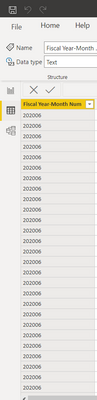
Solved! Go to Solution.

- Mark as New
- Bookmark
- Subscribe
- Mute
- Subscribe to RSS Feed
- Permalink
- Report Inappropriate Content
Hi @dmoney7612 ,
Based on your description, you can do some steps as follows.
1. Create a date column to record the real date from the "Fisal year month number".
_DATE = DATE(LEFT([Fisal Year Month Number],4),RIGHT([Fisal Year Month Number],2),1)2. create a calculated column.
Test_for_date =

var x1=DATEADD('Calendar'[_DATE],3,MONTH)

return

FORMAT(x1,"MMMM"&" "&"YYYY")
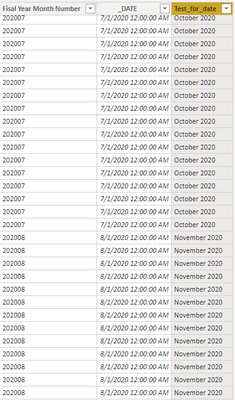
Hope that's what you were looking for.
Best Regards,
Yuna
If this post helps, then please consider Accept it as the solution to help the other members find it more quickly.
- Mark as New
- Bookmark
- Subscribe
- Mute
- Subscribe to RSS Feed
- Permalink
- Report Inappropriate Content
Hi @dmoney7612 ,
Based on your description, you can do some steps as follows.
1. Create a date column to record the real date from the "Fisal year month number".
_DATE = DATE(LEFT([Fisal Year Month Number],4),RIGHT([Fisal Year Month Number],2),1)2. create a calculated column.
Test_for_date =

var x1=DATEADD('Calendar'[_DATE],3,MONTH)

return

FORMAT(x1,"MMMM"&" "&"YYYY")
Hope that's what you were looking for.
Best Regards,
Yuna
If this post helps, then please consider Accept it as the solution to help the other members find it more quickly.


- Mark as New
- Bookmark
- Subscribe
- Mute
- Subscribe to RSS Feed
- Permalink
- Report Inappropriate Content
Hello @dmoney7612 ,
You can crete calculated column as
Column 2 = DATE(LEFT('Table'[Column],4),RIGHT('Table'[Column],2),01)
And change the format to mmmm yyyy from format option.
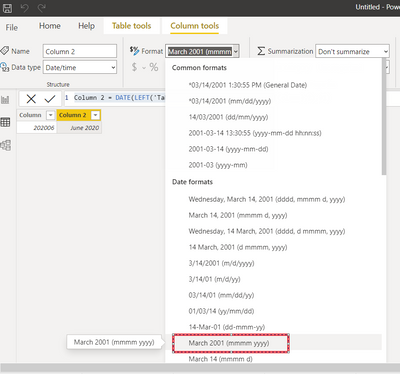
If this fulfilled your requirement please mark this post as a solution.
Thanks!
Shishir
- Mark as New
- Bookmark
- Subscribe
- Mute
- Subscribe to RSS Feed
- Permalink
- Report Inappropriate Content
I tried this but it doesn't give me the correct order for my fiscal months. For example I need 202006 to be September 2020, but when I use this formula it shows 202006 as June 2020. Are there previous steps I need to complete first?
- Mark as New
- Bookmark
- Subscribe
- Mute
- Subscribe to RSS Feed
- Permalink
- Report Inappropriate Content
Hello @dmoney7612 ,
Try this-
Column 2 = DATEADD(DATE(LEFT('Table'[Column],4),RIGHT('Table'[Column],2),01),3,MONTH)
Please check for 202012 and 202101 if its giving expected result.
If this fulfilled your requirement please mark this post as a solution.
Thanks!
Shishir
- Mark as New
- Bookmark
- Subscribe
- Mute
- Subscribe to RSS Feed
- Permalink
- Report Inappropriate Content
I am receieving an error right after the ",01),"


- Mark as New
- Bookmark
- Subscribe
- Mute
- Subscribe to RSS Feed
- Permalink
- Report Inappropriate Content
Use your original column 202006 as the Sort By column for the new column. If that gives a circular dependency error, you will need to make the MMMM yyyy column in the query editor first.
Pat
Did I answer your question? Mark my post as a solution! Kudos are also appreciated!
To learn more about Power BI, follow me on Twitter or subscribe on YouTube.
@mahoneypa HoosierBI on YouTube
- Mark as New
- Bookmark
- Subscribe
- Mute
- Subscribe to RSS Feed
- Permalink
- Report Inappropriate Content
Please try this column expression
Did I answer your question? Mark my post as a solution! Kudos are also appreciated!
To learn more about Power BI, follow me on Twitter or subscribe on YouTube.
@mahoneypa HoosierBI on YouTube
- Mark as New
- Bookmark
- Subscribe
- Mute
- Subscribe to RSS Feed
- Permalink
- Report Inappropriate Content
I'm confused as to what the "YM' in the forumla is referencing
Helpful resources

Power BI Dataviz World Championships
The Power BI Data Visualization World Championships is back! Get ahead of the game and start preparing now!

Power BI Monthly Update - December 2025
Check out the December 2025 Power BI Holiday Recap!

FabCon Atlanta 2026
Join us at FabCon Atlanta, March 16-20, for the ultimate Fabric, Power BI, AI and SQL community-led event. Save $200 with code FABCOMM.

| User | Count |
|---|---|
| 40 | |
| 37 | |
| 35 | |
| 34 | |
| 27 |


| User | Count |
|---|---|
| 136 | |
| 99 | |
| 73 | |
| 66 | |
| 65 |


