cancel
Showing results for 
Search instead for 
Did you mean: 

Get Fabric certified for FREE! Don't miss your chance! Learn more

Reply
mayankhginfra
Frequent Visitor

Creating custom pie chart

Hi Experts,


For my report I want a pie chart visual which is equally divided into 5 parts naming as follows:

1 Current Quarter

2 Last Quarter

3 Same Quarter LY

4 YTD

5 Last Year YTD

And then each of the above 5 parts be sub divided into 3 parts which are Revenue, PAT and EBITA.

I want to keep same color for all Revenue slices and similarly for PAT and EBITA.


How can I do it.

I have tried but default pie chart does not create 5 equal parts.


Thanks in Advance..!! 

2 REPLIES 2
Tahreem24
Super User
Super User

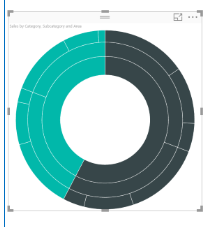
@mayankhginfra You can try some custom chart like SUNBURST

Tahreem24_0-1685619012727.png


Don't forget to give thumbs up and accept this as a solution if it helped you!!!

Please take a quick glance at newly created dashboards : Restaurant Management Dashboard , HR Analytics Report , Hotel Management Report, Sales Analysis Report , Fortune 500 Companies Analysis , Revenue Tracking Dashboard

First of all thank you for the response.


I have already tried it. But the results were un acceptable to the client.


mayankhginfra_0-1685623722758.png


Helpful resources

Announcements
Join our Fabric User Panel

Join our Fabric User Panel

Share feedback directly with Fabric product managers, participate in targeted research studies and influence the Fabric roadmap.

January Power BI Update Carousel

Power BI Monthly Update - January 2026

Check out the January 2026 Power BI update to learn about new features.

FabCon Atlanta 2026 carousel

FabCon Atlanta 2026

Join us at FabCon Atlanta, March 16-20, for the ultimate Fabric, Power BI, AI and SQL community-led event. Save $200 with code FABCOMM.