Get certified for free when you join Fabric Data Days 2026 and dive into Fabric, Power BI, SQL, AI, and other essential data skills.
Join nowData Days is here! Join us now for 60+ days of learning, challenges, and connection. Learn more
Hi! I am a fairly new user to PowerBi and I have been struggling to understand how to calculate data in a table, specifically how toadd a new column to a visualization table that I made with filters and specific data chosen. What I mean by this is that I made a table where i filtered by specific rows and dates and now with the information shown in the visualization i want to be able to create a calculation, but only with the information shown!
I would also like to know if i can do a "VLOOKUP" in PowerBi!
Thank you very much!
Solved! Go to Solution.
Hi @Anonymous ,
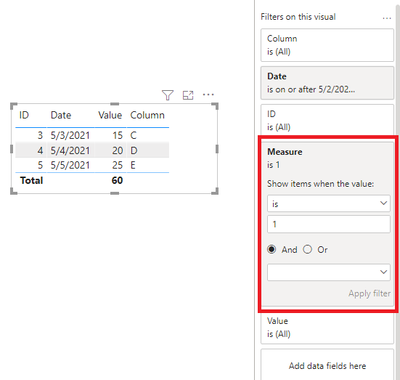
You can create measures like this, set its value as 1 and put it in the visual filter to do the calculation and filter data in the visual:
Measure =
IF (
SUM ( 'Table 1'[Value] ) >= 15
&& MAX ( 'Table 1'[Column] ) <> BLANK (),
1,
0
)
In addtion, in power bi, you can use Lookupvalue() function to replace Vlookup():
Column = LOOKUPVALUE('Table 2'[Category],'Table 2'[ID],'Table 1'[ID])
You can refer this article: DAX In Power BI - How To Use LOOKUPVALUE() Function
Best Regards,
Community Support Team _ Yingjie Li
If this post helps, then please consider Accept it as the solution to help the other members find it more quickly.
Hi @Anonymous ,
You can create measures like this, set its value as 1 and put it in the visual filter to do the calculation and filter data in the visual:
Measure =
IF (
SUM ( 'Table 1'[Value] ) >= 15
&& MAX ( 'Table 1'[Column] ) <> BLANK (),
1,
0
)
In addtion, in power bi, you can use Lookupvalue() function to replace Vlookup():
Column = LOOKUPVALUE('Table 2'[Category],'Table 2'[ID],'Table 1'[ID])
You can refer this article: DAX In Power BI - How To Use LOOKUPVALUE() Function
Best Regards,
Community Support Team _ Yingjie Li
If this post helps, then please consider Accept it as the solution to help the other members find it more quickly.
Don't miss out on Data Days, June 15 through August 7. Learn Fabric, Power BI, SQL, AI and more.
Check out the May 2026 Power BI update to learn about new features.
| User | Count |
|---|---|
| 23 | |
| 21 | |
| 20 | |
| 18 | |
| 13 |
| User | Count |
|---|---|
| 58 | |
| 51 | |
| 38 | |
| 31 | |
| 26 |