Join us at FabCon Atlanta from March 16 - 20, 2026, for the ultimate Fabric, Power BI, AI and SQL community-led event. Save $200 with code FABCOMM.
Register now!The Power BI Data Visualization World Championships is back! Get ahead of the game and start preparing now! Learn more
I am trying to create what I think will be a stacked column chart, but with different data in each of the 2 columns for each project in a portfolio, with the data coming from Project Online.
The first column would contain the baselined budget (hours or cost)
The second would contain the actuals to date and then, stacked on it, the estimate to complete (hours or cost)
I saw one suggestion to make the column overlap by 100% but didn't find any detail as to how to achieve.
Thanks in advance for any suggestions (detailed if possible)
Hi MitieFred,
Could you please share some sample data and clarify more details about your requirement?
Regards,
Jimmy Tao
Hi Jimmy,
The data would come from Project Online oData. We have "n" projects and want to create a stacked column chart, either for all the projects, or, using a slicer, an individual project.
Each project has the following fields
baselined budget (hours or cost)
actuals to date (hours or cost)
estimate to complete (hours or cost)
What I'm wanting to create is a visual that shows, at a glance, whether a project is coming in under, on or over budget.
To show this I think I want to use a stacked column chart (but I am willing to be pointed in a different direction re the visual to use), with two columns, the first being the baseline, the second showing the actuals plus, stacked on top, the estimate to complete.
That, in a nutshell, is the aim.
Project Name - Mickey
Baseline budget - 15,500
Actuals to date - 10,200
Est to complete - 3,400
I need to be able to show that this project will come in under budget, but also need to show the split between actuals and ETC
@Anonymous,
Have you solved your issue by now? If you have, could you please help mark the correct answer to finish the thread? Your contribution will be much appreciated.
Regards,
Jimmy Tao
Hi Jimmy, apologies, I've been out of the office over Christmas and just returned.
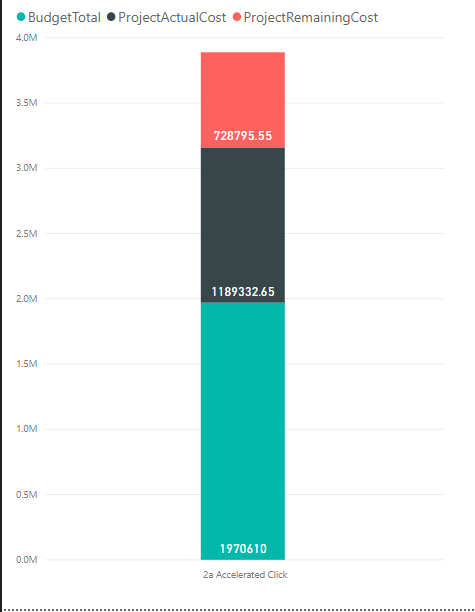
In the above picture I currently show a stacked column, containing Budget Total, Actuals and Remaining.
What I'm trying o achieve is that the Budget Total column sits alongside Actuals and Remaining, rather than beneath it.
So not a slicer but a separate column.
Regards
Fred
Hi MitieFred,
So your requirement is to convert the columns name into column values as category and create a slicer based on these column names, right? You can click on the column [baselined budget], [actuals to date] and [estimate to complete], then click Transform-> Unpivot Columns. Please check if it can meet your requirement.
Regards,
Jimmy Tao
The Power BI Data Visualization World Championships is back! Get ahead of the game and start preparing now!
| User | Count |
|---|---|
| 38 | |
| 38 | |
| 36 | |
| 28 | |
| 28 |
| User | Count |
|---|---|
| 124 | |
| 88 | |
| 74 | |
| 66 | |
| 65 |