Join us in Barcelona for FabCon and SQLCon, September 28 - October 1, 2026.
This is best Fabric, Power BI, SQL and AI community event. How do we know? The last event sold out! Save €200 with code FABCMTY200.
Register now- Power BI forums
- Get Help with Power BI
- Desktop
- Service
- Report Server
- Power Query
- Mobile Apps
- Developer
- DAX Commands and Tips
- Custom Visuals Development Discussion
- Health and Life Sciences
- Power BI Spanish forums
- Translated Spanish Desktop
- Training and Consulting
- Instructor Led Training
- Dashboard in a Day for Women, by Women
- Galleries
- Data Stories Gallery
- Themes Gallery
- Contests Gallery
- QuickViz Gallery
- Quick Measures Gallery
- Visual Calculations Gallery
- Notebook Gallery
- Translytical Task Flow Gallery
- TMDL Gallery
- R Script Showcase
- Webinars and Video Gallery
- Ideas
- Custom Visuals Ideas (read-only)
- Issues
- Issues
- Events
- Upcoming Events
A new Data Days event is coming soon! This time we’re going bigger than ever. Fabric, Power BI, SQL, AI and more. Don't miss out.
- Power BI forums
- Forums
- Get Help with Power BI
- Desktop
- Re: Creating an entry based upon a date compared t...
- Subscribe to RSS Feed
- Mark Topic as New
- Mark Topic as Read
- Float this Topic for Current User
- Bookmark
- Subscribe
- Printer Friendly Page


- Mark as New
- Bookmark
- Subscribe
- Mute
- Subscribe to RSS Feed
- Permalink
- Report Inappropriate Content
Creating an entry based upon a date compared to today
Solved! Go to Solution.


- Mark as New
- Bookmark
- Subscribe
- Mute
- Subscribe to RSS Feed
- Permalink
- Report Inappropriate Content
It would be helpful next time (or if this doesn't work) to include some sample data to work with.
The order matters with these statements, so try this instead.
Status Approval =
SWITCH (
TRUE (),
ISBLANK ('Execution Status'[Approved Date].[Date])
&& ('Execution Status'[Due Date].[Date]) < TODAY (), "Overdue",
ISBLANK ( 'Execution Status'[Approved Date].[Date] ), "In Process",
'Execution Status'[Approved Date].[Date] < 'Execution Status' [Due Date].[Date], "On Time",
"Completed Late"
)
| Have I solved your problem? Please click Accept as Solution so I don't keep coming back to this post, oh yeah, others may find it useful also ;). |
| If you found this post helpful, please give Kudos. It gives me a sense of instant gratification and, if you give me Kudos enough times, magical unicorns will appear on your screen. If you find my signature vaguely amusing, please give Kudos. |

- Mark as New
- Bookmark
- Subscribe
- Mute
- Subscribe to RSS Feed
- Permalink
- Report Inappropriate Content
Hi,
Try this calculated column formula
Status Approval = IF(ISBLANK([Approved Date]),IF(TODAY()>[Due date],"Overdue","In Process"),IF([Approved Date]>[Due Date],"Late","On Time"))
Hope this helps.
Regards,
Ashish Mathur
http://www.ashishmathur.com
https://www.linkedin.com/in/excelenthusiasts/
- Mark as New
- Bookmark
- Subscribe
- Mute
- Subscribe to RSS Feed
- Permalink
- Report Inappropriate Content
If I understand you correctly, maybe something like this...
Status Approval =
SWITCH (
    TRUE (),
    ISBLANK ( '[Approved Date].[Date]' )
        && '[Due Due].[Date]'
            > TODAY (), "Overdue",
    '[Approved Date].[Date]' > '[Due Date].[Date]', "Late",
    ISBLANK ( '[Approved Date].[Date]' ), "In Process",
    "On Time"
)
| Have I solved your problem? Please click Accept as Solution so I don't keep coming back to this post, oh yeah, others may find it useful also ;). |
| If you found this post helpful, please give Kudos. It gives me a sense of instant gratification and, if you give me Kudos enough times, magical unicorns will appear on your screen. If you find my signature vaguely amusing, please give Kudos. |
- Mark as New
- Bookmark
- Subscribe
- Mute
- Subscribe to RSS Feed
- Permalink
- Report Inappropriate Content
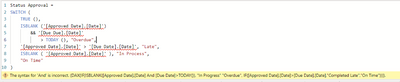
PowerBI doesn't like that
- Mark as New
- Bookmark
- Subscribe
- Mute
- Subscribe to RSS Feed
- Permalink
- Report Inappropriate Content
Try removing the single quotes maybe?
| Have I solved your problem? Please click Accept as Solution so I don't keep coming back to this post, oh yeah, others may find it useful also ;). |
| If you found this post helpful, please give Kudos. It gives me a sense of instant gratification and, if you give me Kudos enough times, magical unicorns will appear on your screen. If you find my signature vaguely amusing, please give Kudos. |
- Mark as New
- Bookmark
- Subscribe
- Mute
- Subscribe to RSS Feed
- Permalink
- Report Inappropriate Content
Had to do that and add the table name. Not throwing an error anymore, but still not populating the field correctly.
Overdue seems to be working correctly, but the filed is populating with On Time when the Approved date field is blank. That should be "In Process". The "Completed late" calcuation appears to be correct as well.
Status Approval =
SWITCH (
TRUE (),
ISBLANK ('Execution Status'[Approved Date].[Date])
&& ('Execution Status'[Due Date].[Date]) < TODAY (), "Overdue",
'Execution Status'[Approved Date].[Date] < 'Execution Status' [Due Date].[Date], "On Time",
ISBLANK ( 'Execution Status'[Approved Date].[Date] ), "In Process","Completed Late"
)
- Mark as New
- Bookmark
- Subscribe
- Mute
- Subscribe to RSS Feed
- Permalink
- Report Inappropriate Content
It would be helpful next time (or if this doesn't work) to include some sample data to work with.
The order matters with these statements, so try this instead.
Status Approval =
SWITCH (
TRUE (),
ISBLANK ('Execution Status'[Approved Date].[Date])
&& ('Execution Status'[Due Date].[Date]) < TODAY (), "Overdue",
ISBLANK ( 'Execution Status'[Approved Date].[Date] ), "In Process",
'Execution Status'[Approved Date].[Date] < 'Execution Status' [Due Date].[Date], "On Time",
"Completed Late"
)
| Have I solved your problem? Please click Accept as Solution so I don't keep coming back to this post, oh yeah, others may find it useful also ;). |
| If you found this post helpful, please give Kudos. It gives me a sense of instant gratification and, if you give me Kudos enough times, magical unicorns will appear on your screen. If you find my signature vaguely amusing, please give Kudos. |
- Mark as New
- Bookmark
- Subscribe
- Mute
- Subscribe to RSS Feed
- Permalink
- Report Inappropriate Content
That did the trick. Thank you so much for your help. Still trying to learn all of this.
- Mark as New
- Bookmark
- Subscribe
- Mute
- Subscribe to RSS Feed
- Permalink
- Report Inappropriate Content
Happy to help.
| Have I solved your problem? Please click Accept as Solution so I don't keep coming back to this post, oh yeah, others may find it useful also ;). |
| If you found this post helpful, please give Kudos. It gives me a sense of instant gratification and, if you give me Kudos enough times, magical unicorns will appear on your screen. If you find my signature vaguely amusing, please give Kudos. |

Helpful resources

Power BI Monthly Update - May 2026
Check out the May 2026 Power BI update to learn about new features.

Data Days 2026 coming soon!
Sign up to receive a private message when registration opens and key events begin.

New to Fabric Survey
If you have recently started exploring Fabric, we'd love to hear how it's going. Your feedback can help with product improvements.

Power BI DataViz World Championships - June 2026
A new Power BI DataViz World Championship is coming this June! Don't miss out on submitting your entry.

| User | Count |
|---|---|
| 30 | |
| 28 | |
| 23 | |
| 19 | |
| 17 |


| User | Count |
|---|---|
| 49 | |
| 47 | |
| 40 | |
| 21 | |
| 19 |


