

cancel
Showing results for 
Search instead for 
Did you mean: 

Next up in the FabCon + SQLCon recap series: The roadmap for Microsoft SQL and Maximizing Developer experiences in Fabric. All sessions are available on-demand after the live show. Register now

Reply
AnandTrivedi
Regular Visitor

Creating a time driven bullet chart

All,


I am new to Power BI and I am trying to develop a time driven bullet chart. The gist is to use the bullet chart to show the application availability times i.e. when did the batch start to make the application available and when was the application available for use by the user. I had downloaded  the sample and did some investigation myself but was not able to achieve what I want.


Steps done so far - 


1. Created a table with following columns :


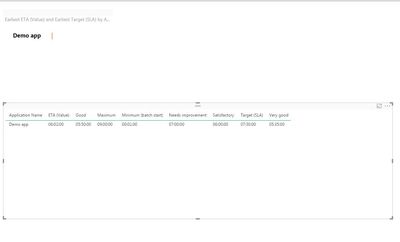
AppliactionName| ETA| Target| Minimum| Satisfactory| Good| Very Good| Maximum| Needs improvement

ApplicationTable.JPGCurrentState.JPG

The values for all of the columns (apart from Application Name) is HH:MM:SS.


2. Dragged the values to the corresponding fields for bullet chart custom visual but unfortunately the attached is where I get. 


I'd greatly appreciate if someone is able to help me out and point the mistake I am making. I am attaching some screenshots as well.

3 REPLIES 3
v-huizhn-msft
Microsoft Employee
Microsoft Employee

Hi @AnandTrivedi,

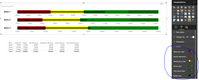
I can not create a time driven bullet chart without your resource table. Based on the fields you discribed, it looks like you can create a right one. Have you set the colors for different field like highlighted in bule circle in the following screenshot? Please check and try it.

1.PNG

If this still does not resolve your issue, please share your sample table for further analysis.

Best Regards,
Angelia

Hi @v-huizhn-msft,
 

Thanks for taking a look at it.


I am attaching the excel (table) here. The idea is to create a bullet chart from worksheet named as  "applicationCurrentEstimate". The bullet chart needs to be based on the time completion of the batch.


The "batchStartTime" denotes the time at which the overnight batch starts. If the batch is running smooth and the ETA for completion is below the SLA (the target value) then the chart should be green, if it is over the SLA then it should be red. If it needs improvement then it should be amber. Capture.JPG


Hi @AnandTrivedi,

As for as I tested, it also return the blank result when we add your data. I am not sure if the time type data is not available to this custom visual, you can post the comments on below the webside.

Best Regards,
Angelia

Helpful resources

Announcements
New to Fabric survey Carousel

New to Fabric Survey

If you have recently started exploring Fabric, we'd love to hear how it's going. Your feedback can help with product improvements.

Power BI DataViz World Championships carousel

Power BI DataViz World Championships - June 2026

A new Power BI DataViz World Championship is coming this June! Don't miss out on submitting your entry.

Join our Fabric User Panel

Join our Fabric User Panel

Share feedback directly with Fabric product managers, participate in targeted research studies and influence the Fabric roadmap.

March Power BI Update Carousel

Power BI Community Update - March 2026

Check out the March 2026 Power BI update to learn about new features.