cancel
Showing results for 
Search instead for 
Did you mean: 

The Power BI Data Visualization World Championships is back! Get ahead of the game and start preparing now! Learn more

Reply
Anonymous
Not applicable

Creating a template and managing a MySQL DB Name as a parameter

Hello everyone,


I want to create a power bi template that includes all the tables of a MySQL DB for one of my clients and save it as a template. All my clients have exactly the same tables and I collect the same exact data, but i have different DB names for each one of them.


What I need is when I open the template to give the DB name of the client I want to create a report for and update all the tables with the correct DB name. 

So far, I have to edit the schema of each table and change the DB name manually. If there is a way to automate that it will save lots of time.

Thank you in advance,


George

1 ACCEPTED SOLUTION
Anonymous
Not applicable

@Anonymous,

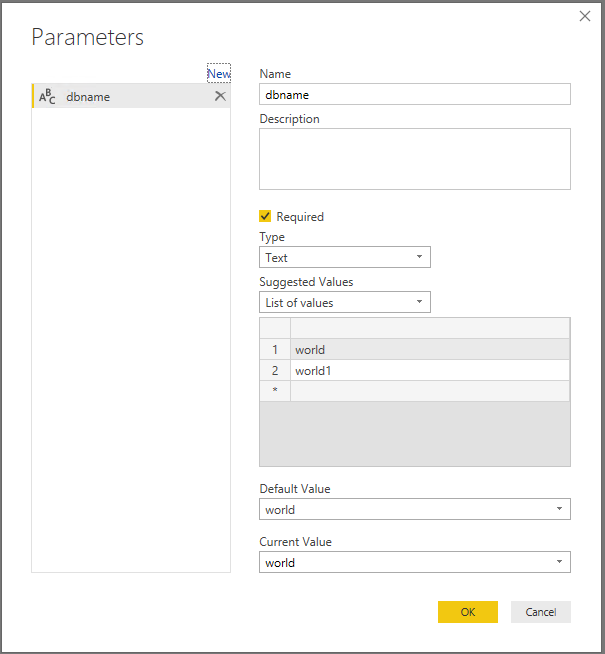
You can create a database name parameter in your PBIX file following the instructions in this blog, then add a new blank query and paste the code below to the Advanced Editor of the blank query.

1.PNG

let
    Source = MySQL.Database("Server", ""&dbname&"", [ReturnSingleDatabase=true]),
    TTable = Source{[Schema=""&dbname&"",Item="TableName"]}[Data]
in
    TTable


After that, create Power BI template following the guide in the blog below.

https://powerbi.microsoft.com/en-us/blog/deep-dive-into-query-parameters-and-power-bi-templates/

Regards,
Lydia

View solution in original post

2 REPLIES 2
Anonymous
Not applicable

I have found the solution. I will provide information shortly.

Anonymous
Not applicable

@Anonymous,

You can create a database name parameter in your PBIX file following the instructions in this blog, then add a new blank query and paste the code below to the Advanced Editor of the blank query.

1.PNG

let
    Source = MySQL.Database("Server", ""&dbname&"", [ReturnSingleDatabase=true]),
    TTable = Source{[Schema=""&dbname&"",Item="TableName"]}[Data]
in
    TTable


After that, create Power BI template following the guide in the blog below.

https://powerbi.microsoft.com/en-us/blog/deep-dive-into-query-parameters-and-power-bi-templates/

Regards,
Lydia

Helpful resources

Announcements
Power BI DataViz World Championships

Power BI Dataviz World Championships

The Power BI Data Visualization World Championships is back! Get ahead of the game and start preparing now!

December 2025 Power BI Update Carousel

Power BI Monthly Update - December 2025

Check out the December 2025 Power BI Holiday Recap!

FabCon Atlanta 2026 carousel

FabCon Atlanta 2026

Join us at FabCon Atlanta, March 16-20, for the ultimate Fabric, Power BI, AI and SQL community-led event. Save $200 with code FABCOMM.