cancel
Showing results for 
Search instead for 
Did you mean: 

Get Fabric Certified for FREE during Fabric Data Days. Don't miss your chance! Request now

Reply
Anonymous
Not applicable

Creating a table of individual measures

Hi all! I have a series of measures that return a single value. I am currently displaying them on individual cards and arranging them in a table (some measures are the difference of other measures) i.e. the delta. I'd like to construct a table that can be populated element-wise with these individual measures. Could I create a new table with DAX perhaps? Thank you for any guidance.


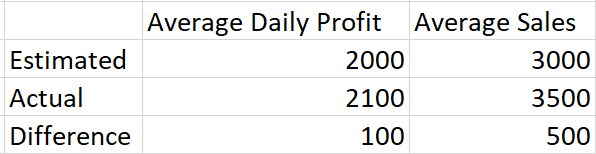
Please see an example below where each element in the table is assumed to be a measure.


Capture.PNG

2 REPLIES 2
amitchandak
Super User
Super User

@Anonymous ,

Try a new table like

Union (
	Summarize(Table,"Name","estimated" ,"Avergae Daily profit",[estimated Avergae Daily profit],"Average Sales",[estimated Average Sales]),
	Summarize(Table,"Name","Actual" ,"Avergae Daily profit",[Actual Avergae Daily profit],"Average Sales",[Actual Average Sales]),
	Summarize(Table,"Name","Diff" ,"Avergae Daily profit",[Diff Avergae Daily profit],"Average Sales",[Diff Average Sales]),
	)
Share with Power BI Enthusiasts: Full Power BI Video (20 Hours) YouTube
Microsoft Fabric Series 60+ Videos YouTube
Microsoft Fabric Hindi End to End YouTube
Anonymous
Not applicable

Hi @amitchandak  thank you for your answer. It definitely works! However, when I change the context of the underlying measures e.g. with a date slicer, this is not reflected in the newly created table. Is there any way around this? Additionally the measures will come from different tables but I assume this not to be an issue if the relationship model is well configured.


EDIT: Having done some research I believe it is not possible to do this? This is because "New Tables" created by DAX formulas are evaluated once on startup. Thus any filters added on (i.e. by slicers) will not have an effect on the table. Is this correct?

Helpful resources

Announcements
November Power BI Update Carousel

Power BI Monthly Update - November 2025

Check out the November 2025 Power BI update to learn about new features.

Fabric Data Days Carousel

Fabric Data Days

Advance your Data & AI career with 50 days of live learning, contests, hands-on challenges, study groups & certifications and more!

FabCon Atlanta 2026 carousel

FabCon Atlanta 2026

Join us at FabCon Atlanta, March 16-20, for the ultimate Fabric, Power BI, AI and SQL community-led event. Save $200 with code FABCOMM.

Top Solution Authors
Top Kudoed Authors