Join us at FabCon Atlanta from March 16 - 20, 2026, for the ultimate Fabric, Power BI, AI and SQL community-led event. Save $200 with code FABCOMM.
Register now!The Power BI Data Visualization World Championships is back! Get ahead of the game and start preparing now! Learn more
Hello everyone!
I've faced to the next issue and already lost.
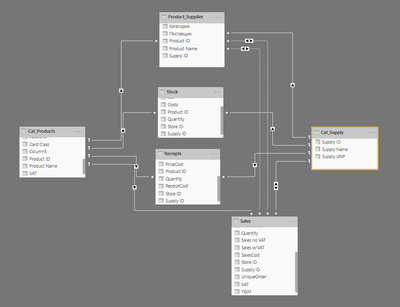
I have a pretty complicated data model with a lot of tables and connections between. And have 5 basic tables:
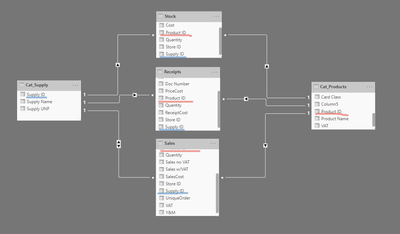
Products are connected to Sales via Product ID. Suppliers are connected to Sales via Supplier ID.
And there are no straight connections between products and suppliers. And also there is a detail: 1 product can has a few suppliers.
Because of described before, in the report mode, when I choose a supplier, in visuals I see all products with it's values by selected supplier and all the rest list of products with empty values. And also, as you can guess, when I choose a supplier in Product Slicer, I also see the full list of products, not only from chosen supplier.
And also there are a lot of combinations for each supplier:
- no sales, but has stocks and receipts
- no receipts, but with sales and stocks
- etc.
So the question is next: how to organize this model, to be able to manage the report in proper way? I mean no empty products, slicers working correctly...
Thank you in advance, hope for your help!
@D3K -
A couple of potential solutions:
1. If you want to treat product as belonging to certain suppliers, rather than as truly separate dimensions, then you could "snowflake" suppliers off of product. You would need a row in the product dimension for each combination of supplier/product.
2. In your visuals, you can Hide rows with no data.
Hope this helps,
Nathan
Thanks @Anonymous
1. You've pushed the idea. I'll try to combine these 3 tables into 1 with power query and make the unique combination product/supplier. And after will make it as a basic table.
2. Agree, this is the way.
Thanks for ideas! ![]()
Combined 3 tables into 1 and made the list of unique combinations product ID/supplierUD, but anyway it didn't help. Because I can't make 2 connections from new table to Sales table (Product and Supplier). Tried to use TREATAS and USERELATIONSHIP, but it also doesn't work correctly. I can see correct sales for product, but visual with suppliers shows the same sales value for every supplier, when I choose the product.
So the issue is still actual... Maybe someone knows the decision?
Thanks
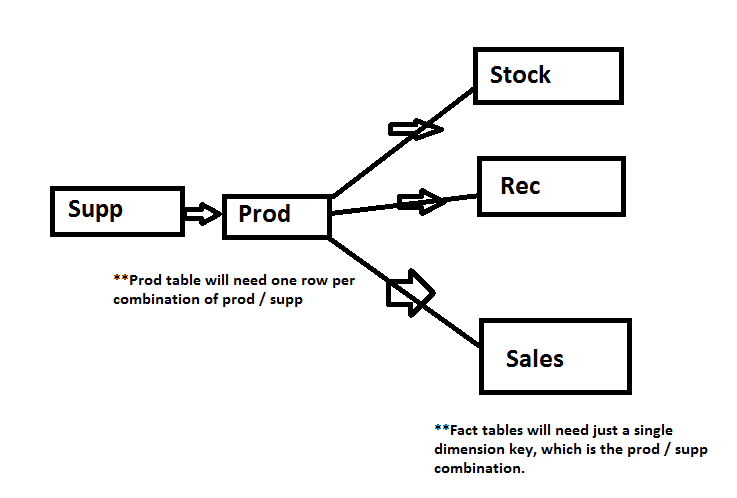
I think we had a miscommunication - here is the model I was suggesting. The idea is that it will allow you to filter Products based on the selected supplier.
Hope this helps,
Nathan
The Power BI Data Visualization World Championships is back! Get ahead of the game and start preparing now!
| User | Count |
|---|---|
| 38 | |
| 36 | |
| 33 | |
| 31 | |
| 28 |
| User | Count |
|---|---|
| 129 | |
| 88 | |
| 79 | |
| 68 | |
| 63 |