This time we’re going bigger than ever. Fabric, Power BI, SQL, AI and more. We're covering it all. You won't want to miss it.
Learn moreLevel up your Power BI skills this month - build one visual each week and tell better stories with data! Get started
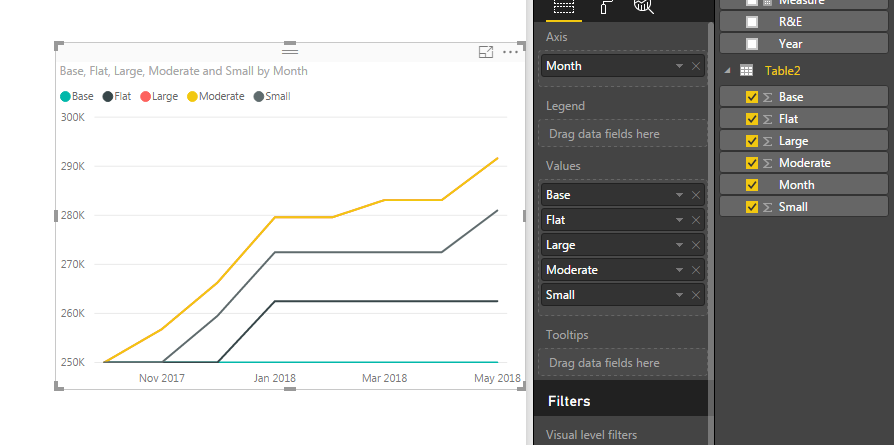
I'm looking to do a simple line chart with a date range as the X axis, and the actual value of 4 different scenarios overlapping as the Y axis. So data table looks something like this:
| Month | Base | Large | Moderate | Small | Flat |
| 10/1/2017 | 250000 | 250000 | 250000 | 250000 | 250000 |
| 11/1/2017 | 250000 | 256780 | 256780 | 250000 | 250000 |
| 12/1/2017 | 250000 | 266280 | 266280 | 259500 | 250000 |
| 1/1/2018 | 250000 | 279594 | 279594 | 272475 | 262500 |
| 2/1/2018 | 250000 | 279594 | 279594 | 272475 | 262500 |
| 3/1/2018 | 250000 | 283094 | 283094 | 272475 | 262500 |
| 4/1/2018 | 250000 | 283094 | 283094 | 272475 | 262500 |
| 5/1/2018 | 250000 | 291594 | 291594 | 280975 | 262500 |
It seems the line or area chart constantly summarize the columns of data in some way. I've already ensured that in the modeling tab - all values are correctly formatted to decimal number or date as appropriate.
This is crazy simple in Excel as you can simply highlight the table and Insert - Line Chart, but I'd prefer to take advantage of the formatting capabilities of Power BI is possible.
Solved! Go to Solution.
I copied and pasted your data into PowerBI, is this what you are trying to build? My numbers are Whole Numbers instead of Decimals, but it shoudln't make a difference... Un-hiearchy your date, does that help resolve the gropuing? All my values are set to SUM, but that's OK b/c I have each date listed on the Axis.
FOrrest
Proud to give back to the community!
Thank You!
I copied and pasted your data into PowerBI, is this what you are trying to build? My numbers are Whole Numbers instead of Decimals, but it shoudln't make a difference... Un-hiearchy your date, does that help resolve the gropuing? All my values are set to SUM, but that's OK b/c I have each date listed on the Axis.
FOrrest
Proud to give back to the community!
Thank You!
I guess removing the hierarchy does it. More fundamentally though, i guess there's no way to actually choose not to aggregate data.
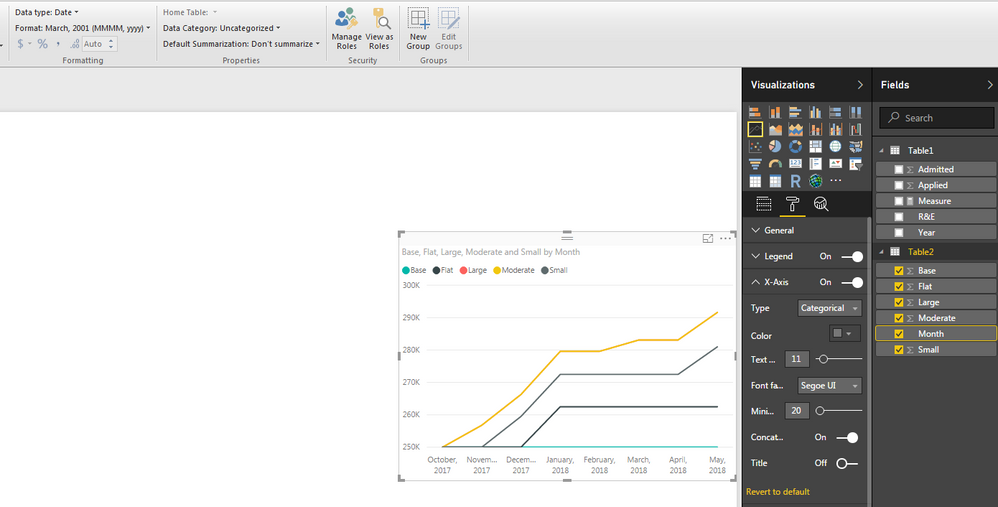
Any chance you know how to get the X-axis to show more granularity?
Thanks much for the assistance
If you change the X-Axis Type to Categorial, it will list every value you provide (generally). Remember to change your Date Formatting to something like MMMM,yyyy so it's not overwhelming in length... Hope this helps...
Proud to give back to the community!
Thank You!
Check out the April 2026 Power BI update to learn about new features.
Sign up to receive a private message when registration opens and key events begin.
If you have recently started exploring Fabric, we'd love to hear how it's going. Your feedback can help with product improvements.
| User | Count |
|---|---|
| 34 | |
| 26 | |
| 25 | |
| 22 | |
| 18 |
| User | Count |
|---|---|
| 65 | |
| 35 | |
| 32 | |
| 25 | |
| 23 |