Join us at FabCon Atlanta from March 16 - 20, 2026, for the ultimate Fabric, Power BI, AI and SQL community-led event. Save $200 with code FABCOMM.
Register now!The Power BI Data Visualization World Championships is back! It's time to submit your entry. Live now!
Hello! I am not sure how to go about the dax formula that I want to make...
I want to make a formula, that does this:
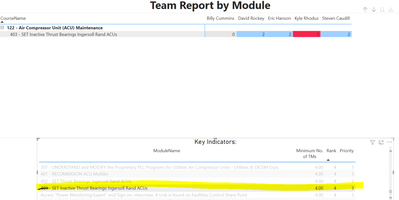
Takes the minimum no. of TMs, and if that number of people in the table above have a 3 or above, then it's a yes, and if not, it's no.
So in this screenshot, I need 4 people to have a score of 3 or above. and because none of them do, the answer would be no.
So the tables with the entities are:
tablea[score] - which values are 0-4
tableb[numberOfTMs]
Please let me know if you can help!!
Sorry, I think an IF statment will be what you are looking for.
It will be something like this: IF(tableb[numberOfTMs]) => 3, "YES","NO")
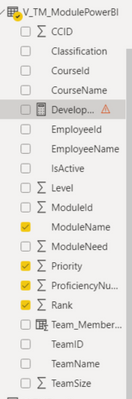
okay.... When I try to type that in, I can't bring in some of the values. Attached is my entities. (Proficiency number is my number of team members)
I was going to type in: IF ( count(employeeName) >= proficiencyNu, 'YES', 'NO')
But it won't let me bring in proficiency number.
Try this? (My columns are purely examples.)
TestMeasure =
VAR limit = MAX('Chapters'[Chapter ID])
RETURN
IF (COUNT(Characters[Character Name])>=limit,"YES","NO")
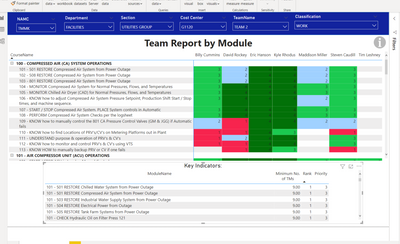
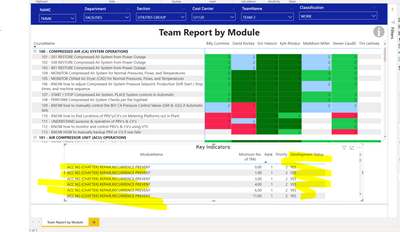
So this worked I think this worked.... but now when I put it into my table, it gets rid of my filters and shows more rows than normal....
before:
after:
I'm not sure what a switch statement is.... how would I write that?
Hi
A switch statement would probably work for this?
The Power BI Data Visualization World Championships is back! It's time to submit your entry.
Check out the January 2026 Power BI update to learn about new features.
| User | Count |
|---|---|
| 60 | |
| 46 | |
| 30 | |
| 24 | |
| 23 |
| User | Count |
|---|---|
| 144 | |
| 106 | |
| 64 | |
| 38 | |
| 31 |