cancel
Showing results for 
Search instead for 
Did you mean: 

Did you hear? There's a new SQL AI Developer certification (DP-800). Start preparing now and be one of the first to get certified. Register now

Reply
anthonydiclemen
Regular Visitor

Creating a custom date range based on a given date input

Hi Everyone,


I would like to create a specified date range depending on user input. This could be done in a slicer. Here's an example. I want to always show the previous 6 months of data based on a date:


IE. User inputs 6/01/2022 and the visualizations would then refresh to show the previous 6 months.


Any help would be greatly appreciated.


Thanks!


Anthony

1 ACCEPTED SOLUTION
v-yanjiang-msft
Community Support
Community Support

Hi @anthonydiclemen ,

According to your description, I create a sample.

vkalyjmsft_0-1655370166630.png

Here's my solution.

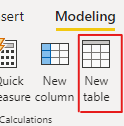
1.Create a new Date table, don't make relationship between the two tables.

vkalyjmsft_1-1655370320927.png

Date = VALUES('Table'[Date])

2.Create a measure.

Check =
IF (
    ISFILTERED ( 'Date'[Date] ),
    IF (
        MAX ( 'Table'[Date] )
            IN DATESINPERIOD ( 'Date'[Date], SELECTEDVALUE ( 'Date'[Date] ), -6, MONTH ),
        1
    ),
    1
)

Put the measure in the visual filter and select its value to 1, then put the new Date column in the slicer, get the result.

vkalyjmsft_2-1655370501304.png

I attach my sample below for reference.


Best Regards,
Community Support Team _ kalyj

If this post helps, then please consider Accept it as the solution to help the other members find it more quickly.

View solution in original post

5 REPLIES 5
v-yanjiang-msft
Community Support
Community Support

Hi @anthonydiclemen ,

Is your problem solved?? If so, Would you mind accept the helpful replies as solutions? Then we are able to close the thread. More people who have the same requirement will find the solution quickly and benefit here. Thank you.

Best Regards,
Community Support Team _ kalyj

v-yanjiang-msft
Community Support
Community Support

Hi @anthonydiclemen ,

According to your description, I create a sample.

vkalyjmsft_0-1655370166630.png

Here's my solution.

1.Create a new Date table, don't make relationship between the two tables.

vkalyjmsft_1-1655370320927.png

Date = VALUES('Table'[Date])

2.Create a measure.

Check =
IF (
    ISFILTERED ( 'Date'[Date] ),
    IF (
        MAX ( 'Table'[Date] )
            IN DATESINPERIOD ( 'Date'[Date], SELECTEDVALUE ( 'Date'[Date] ), -6, MONTH ),
        1
    ),
    1
)

Put the measure in the visual filter and select its value to 1, then put the new Date column in the slicer, get the result.

vkalyjmsft_2-1655370501304.png

I attach my sample below for reference.


Best Regards,
Community Support Team _ kalyj

If this post helps, then please consider Accept it as the solution to help the other members find it more quickly.

Ashish_Mathur
Super User
Super User

Hi,

You may refer to my solution here - Flex a Pivot Table to show data for x months ended a certain user defined month.

Download the workbook from there and do not open it.  Open PowerBI Desktop and import this workbook into that. 


Regards,
Ashish Mathur
http://www.ashishmathur.com
https://www.linkedin.com/in/excelenthusiasts/

Hi,


Thank you. This seems like a great solution for Excel but not exactly sure how I can dynamically use this in Power BI. Any guidance would be appreciated

Hi,

As mentioned in my previous message, open PowerBI Desktop and import the MS Excel workbook.  Once imported, please spend some time in studying my solution.


Regards,
Ashish Mathur
http://www.ashishmathur.com
https://www.linkedin.com/in/excelenthusiasts/

Helpful resources

Announcements
April Power BI Update Carousel

Power BI Monthly Update - April 2026

Check out the April 2026 Power BI update to learn about new features.

Fabric SQL PBI Data Days

Data Days 2026 coming soon!

Sign up to receive a private message when registration opens and key events begin.

New to Fabric survey Carousel

New to Fabric Survey

If you have recently started exploring Fabric, we'd love to hear how it's going. Your feedback can help with product improvements.

Power BI DataViz World Championships carousel

Power BI DataViz World Championships - June 2026

A new Power BI DataViz World Championship is coming this June! Don't miss out on submitting your entry.