cancel
Showing results for 
Search instead for 
Did you mean: 

July 7 - July 17 | Round 2 of the Power BI Dataviz World Championships. Don't miss your chance! Learn more

Reply
deanbland
Helper III
Helper III

Creating a conditional column

Hi, 


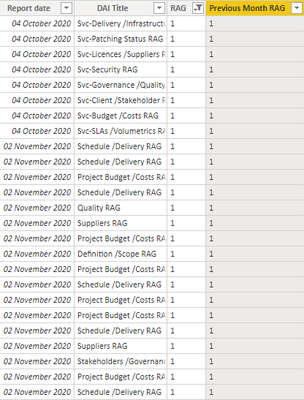
I am trying to create a column that presents "True" or "False" depending on the date. I am wanting the column to look at 'Report Date', assess whether it is the current month or last month, and then present a value in the 'Previous Month RAG'. 


If possible, It would be beneficial to show the RAG status from the previous month in the 'Previous Month RAG' rather than just 'True' or 'False' (a copy and paste if you will). IF you look below, I have tried to do this but It is currently presenting values for everything and not just the previous month. 


The sample data is below along with the formula that I have used. 

Previous Month RAG = CALCULATE(FIRSTNONBLANK('Open_Activities_DAI'[RAG],TRUE()),FILTER(ALLEXCEPT('Open_Activities_DAI','OPEN_ACTIVITIES_DAI'[RAG]),MONTH('Open_Activities_DAI'[Report date])=MONTH(TODAY())-1)) 


deanbland_0-1605863645989.png


4 REPLIES 4
Anonymous
Not applicable

Hi @deanbland ,


Could you tell me if your problem has been solved? If it is, kindly Accept it as the solution. More people will benefit from it. Or you are still confused about it, please provide me with more details about your table and your problem or share me with your pbix file from your Onedrive for Business.


Best Regards,
Eyelyn Qin

Anonymous
Not applicable

Hi @speedramps ,


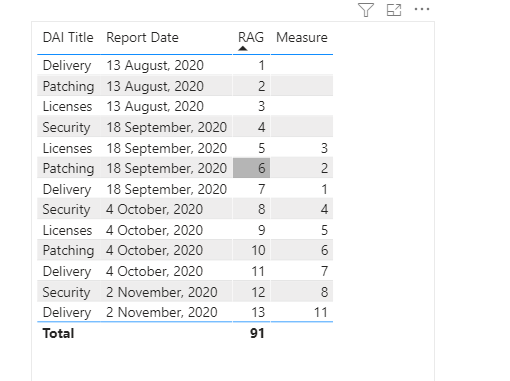
Please try this:

Measure =
CALCULATE (
    MAX ( 'Open_Activities_DAI'[RAG] ),
    PREVIOUSMONTH ( 'Open_Activities_DAI'[Report Date] )
)

 11.23.6.1.PNG

Did I answer your question ? Please mark my reply as solution. Thank you very much.
If not, please upload some insensitive data samples and expected output.


Best Regards,
Eyelyn Qin

speedramps
Super User
Super User

Please consider this solution and click accept solution to leave kudos

Try using a calendar table with a date and month offset column
Eg 0 = this month, -1 = last month, -2 =pervious month and +1 next month

Then create a one to many relationship between the calendar[date] and  RAGS(date)

Then create the following dax measures

RAG Last Month =

CALCULATE(SUM(RAGS[RAG]),

'Calendar'[MonthOffset]=-1)


RAG This Month =

CALCULATE(SUM(RAGS[RAG]),

'Calendar'[MonthOffset]=0)


Click here for PBIX example 


amitchandak
Super User
Super User

@deanbland , a New column like


maxx(filter(table, 'OPEN_ACTIVITIES_DAI'[Report Date] =dateadd(earlier('OPEN_ACTIVITIES_DAI'[Report Date]),-1,month) ),'OPEN_ACTIVITIES_DAI'[RAG])


or


maxx(filter(table, 'OPEN_ACTIVITIES_DAI'[Report Date] =dateadd(earlier('OPEN_ACTIVITIES_DAI'[Report Date]),-1,month)
&& 'OPEN_ACTIVITIES_DAI'[RDAI Title] =earlier('OPEN_ACTIVITIES_DAI'[RDAI Title] ) ),'OPEN_ACTIVITIES_DAI'[RAG])

Share with Power BI Enthusiasts: Full Power BI Video (20 Hours) YouTube
Microsoft Fabric Series 60+ Videos YouTube
Microsoft Fabric Hindi End to End YouTube

Helpful resources

Announcements
FabCon and SQLCon Barcelona 2026

FabCon & SQLCon – Barcelona 2026

Join us in Barcelona for FabCon and SQLCon, the Fabric, Power BI, SQL, and AI community event. Save €200 with code FABCMTY200.

60 days of Data Days Carousel

Data Days 2026

Join Fabric Data Days 2026: 60 days of free live/on-demand sessions, challenges, study groups, and certification opportunities.

Power BI DataViz World Championships carousel

Power BI DataViz World Championships - June 2026

A new Power BI DataViz World Championship is coming this June! Don't miss out on submitting your entry.