
Join us at FabCon Atlanta from March 16 - 20, 2026, for the ultimate Fabric, Power BI, AI and SQL community-led event. Save $200 with code FABCOMM.
Register now!Get Fabric Certified for FREE during Fabric Data Days. Don't miss your chance! Request now
Hello,
I am currently having an issue generating a column chart that shows how many ids contain a value equal to 1 in multiple columns.
My data model looks something like this:
| Id | error1 | error2 | error3 | error4 |
| A | 1 | 0 | 0 | 0 |
| B | 0 | 1 | 1 | 0 |
| C | 0 | 0 | 1 | 1 |
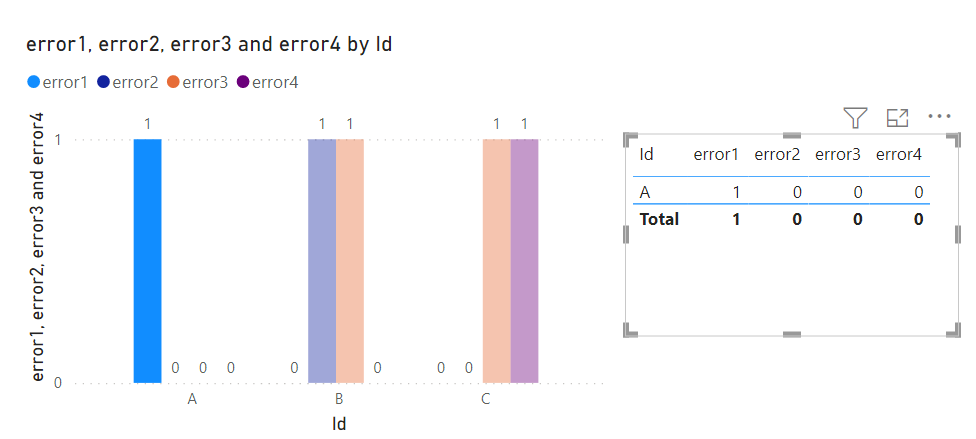
I want to generate a chart that shows how many values in each column are equal to 1, and when I click in that column in the chart, it will apply a filter for that column in the visual.
Currently, I can generate the chart fine, but it acts more like of a sum of all values and when I click in it, it filters nothing.
Does anyone know a solution for this?
Thank you in advance.
Hi i have the ecomm data in period wise (7 periods)in visual i have taken all the periods but i want current period displayed on the page but have the option to filter by previous periods as well .
but i need only one period in visual if suppose iam filtering the period 2 in page i want to display the period 2 data in visual
Hi, @T_von_Axt
Do you expect a result like this?
If not, please let us know more details.
Best Regards,
Community Support Team _Charlotte
If this post helps, then please consider Accept it as the solution to help the other members find it more quickly.
Hello, @v-zhangti
My expected solution would be if those values were stacked. What I mean is one column for each error showing the total amount of ids per error, with the option to filter these ids by clicking in the columns. Currently I have around 85k ids. It would not work with this solution.
@T_von_Axt , unpivot all error columns in power query, that will give a better solution
Hi @amitchandak ,
Unfortunately I cannot unpivot the columns, since their values are generated by different DAX expressions.
Is there any way to do it with charts?
Check out the November 2025 Power BI update to learn about new features.
Advance your Data & AI career with 50 days of live learning, contests, hands-on challenges, study groups & certifications and more!