Join us at FabCon Atlanta from March 16 - 20, 2026, for the ultimate Fabric, Power BI, AI and SQL community-led event. Save $200 with code FABCOMM.
Register now!The Power BI Data Visualization World Championships is back! Get ahead of the game and start preparing now! Learn more
Hi All,
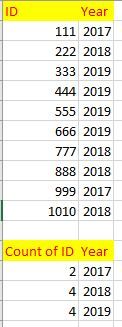
I am a beginner to PowerBI and learning about measures. I have been trying to create a measure where it should display the below table in the image attached. I am looking for a solution to display count of ID and Year as shown.
Please do help me with it.
Any suggestions are welcome.
Thank you in advance.
Solved! Go to Solution.
Hey,
create a measure ( https://docs.microsoft.com/en-us/power-bi/desktop-tutorial-create-measures ) like so:
Count of ID = COUNT('<name of your table>'[ID])
If your table might contain the same ID more than once per year then you might consider replacing the COUNT ( https://dax.guide/count/ )function with DISTINCTCOUNT ( https://dax.guide/distinctcount/ ).
Use the column "Year" (from your existing table) and the measure in a table visual - done 🙂
Hopefully, this provides some new insights.
Regards,
Tom
Hey,
create a measure ( https://docs.microsoft.com/en-us/power-bi/desktop-tutorial-create-measures ) like so:
Count of ID = COUNT('<name of your table>'[ID])
If your table might contain the same ID more than once per year then you might consider replacing the COUNT ( https://dax.guide/count/ )function with DISTINCTCOUNT ( https://dax.guide/distinctcount/ ).
Use the column "Year" (from your existing table) and the measure in a table visual - done 🙂
Hopefully, this provides some new insights.
Regards,
Tom
The Power BI Data Visualization World Championships is back! Get ahead of the game and start preparing now!
| User | Count |
|---|---|
| 38 | |
| 38 | |
| 36 | |
| 28 | |
| 28 |
| User | Count |
|---|---|
| 124 | |
| 89 | |
| 73 | |
| 66 | |
| 65 |