Don't miss your chance to take exam DP-600 or DP-700 on us!
Request nowLearn from the best! Meet the four finalists headed to the FINALS of the Power BI Dataviz World Championships! Register now
Hi,
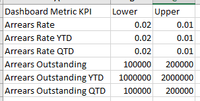
I'm trying to create a KPI Table using the Import menu from a .xlxs file (I've also tried .xls)
but I get the following error
Migration Failed - The following Excel Workbook doesn't contain any queries or a model to import
Can anyone help please?
Thanks
S
Solved! Go to Solution.
Hey, @Stuartm1983
How did you connect to your file?
Check if these related threads can work for you.
https://community.powerbi.com/t5/Desktop/Excel-workbook-Import-error/td-p/41039
Best regards
Community Support Team _ Eason
I'll mark as solution, but it's not really.
nksAht
Hey, @Stuartm1983
How did you connect to your file?
Check if these related threads can work for you.
https://community.powerbi.com/t5/Desktop/Excel-workbook-Import-error/td-p/41039
Best regards
Community Support Team _ Eason
Share feedback directly with Fabric product managers, participate in targeted research studies and influence the Fabric roadmap.
Check out the February 2026 Power BI update to learn about new features.
| User | Count |
|---|---|
| 54 | |
| 47 | |
| 39 | |
| 16 | |
| 15 |
| User | Count |
|---|---|
| 83 | |
| 70 | |
| 38 | |
| 28 | |
| 26 |