cancel
Showing results for 
Search instead for 
Did you mean: 

Next up in the FabCon + SQLCon recap series: The roadmap for Microsoft SQL and Maximizing Developer experiences in Fabric. All sessions are available on-demand after the live show. Register now

Reply
PeteDASHBRS
Regular Visitor

Creating a Filter based on multiple relationships

Hi All,

Could someone please help me to create multiple filters that will display data for two tables based on different relationships?

For example with the below tables:

Table 1                                 Table 2
- Task                                  - Task
- Date                                  - Date
- Action                               - Action
- Many more columns        - Many more columns

I can only manage to link one relationship at a time, since they can only be many to many. I can create a relationship between task to task, but not with date and action at the same time. So when I filter, by task, it will display data on both tables related to that task. But when I filter on date, it only changes the view on Table 1. Is there a way I can create a relationship with Table1[Task] & Table2[Task], Table1[Date] & Table2[Date] that are both active and can have two visual filters?

2 REPLIES 2
Mariusz
Community Champion
Community Champion

Hi @PeteDASHBRS 


Is Task a unique identifier in one or both tables?

What do you mean by two visual filters, can you explain, please?


You can have only one active relationship between two tables however, you can create a date dimension/calendar table and task dimension that have active relationships with both tables and use this to filter both tables.


Please see the example in the attached file.


Best Regards,
Mariusz

Please feel free to connect with me.
Mariusz Repczynski


Capture.PNGCapture.PNGCapture.PNG


Hi Mariusz,

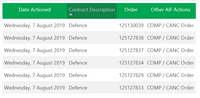
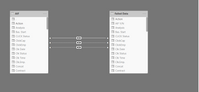
I'm trying to get three filters to work at the same time.  As per above (sorry it was wierd uploading the pictures), theres three relationships between two tables [AIF] & [Failed Data]. Contract, Date Actioned, Action. Example of records is the same in both tables. Only by filtering by contract both visuals update. When filtering by date actioned, it only updates the visual that it corresponds to.

Each order can occur in multiple days.

Hope that clears it up

Helpful resources

Announcements
New to Fabric survey Carousel

New to Fabric Survey

If you have recently started exploring Fabric, we'd love to hear how it's going. Your feedback can help with product improvements.

Power BI DataViz World Championships carousel

Power BI DataViz World Championships - June 2026

A new Power BI DataViz World Championship is coming this June! Don't miss out on submitting your entry.

Join our Fabric User Panel

Join our Fabric User Panel

Share feedback directly with Fabric product managers, participate in targeted research studies and influence the Fabric roadmap.

March Power BI Update Carousel

Power BI Community Update - March 2026

Check out the March 2026 Power BI update to learn about new features.