cancel
Showing results for 
Search instead for 
Did you mean: 

Get Fabric certified for FREE! Don't miss your chance! Learn more

Reply
taylorb
Helper I
Helper I

Creating a Dynamic Matrix Based on Column Names in Every Table

I have several reports using Roles to hide sensitive date. Each table with the sensitive data contains a column with the customer name called "CustomerSource" so only that customer should see the information in that row. I want a quick and easy way to validate the roles across several reports.


My ideal solution would be a hidden tab that has a matrix/table with a column for every table with a CustomerSource column and then it would list the distinct values in that column like this:


Table 1Table 2Table 3Table 4Table 5
Customer 1Customer 1Customer 1Customer 1Customer 1
Customer 2Customer 2Customer 2Customer 2Customer 2
Customer 3Customer 3Customer 3Customer 3Customer 3
Customer 4Customer 4Customer 4Customer 4Customer 4


Then when I view as a role (e.g. Customer1Role) if it was working it would only show Customer 1 in the table like this:


Table 1Table 2Table 3Table 4Table 5
Customer 1Customer 1Customer 1Customer 1Customer 1


Or if there was an issue it would show more values than intended:

Table 1Table 2Table 3Table 4Table 5
Customer 1Customer 1Customer 1Customer 1Customer 1
  Customer 2  


The issue is that I want to be able to quickly build this visual out in multiple reports. Is there a way with DAX to check every table for a certain column name and then display those values?

1 ACCEPTED SOLUTION
v-robertq-msft
Community Support
Community Support

Hi, @taylorb 

According to your description, I guess you want to get a table that displays the [CustomerSource] column in the five tables, and the value should be the user who views this report. I think you can not achieve this in a simple DAX, you can create measures for each table to get the expected result, you can take a look at my steps:

  1. Create the five measures in five tables (one by one):
Table1 = CALCULATE(MAX('Table1'[CustomerSource]),FILTER('Table1',[CustomerSource]=USERPRINCIPALNAME()))

Table2 = CALCULATE(MAX('Table1'[CustomerSource]),FILTER('Table2',[CustomerSource]=USERPRINCIPALNAME()))

Table3 = CALCULATE(MAX('Table1'[CustomerSource]),FILTER('Table3',[CustomerSource]=USERPRINCIPALNAME()))

Table4 = CALCULATE(MAX('Table1'[CustomerSource]),FILTER('Table4',[CustomerSource]=USERPRINCIPALNAME()))

Table5 = CALCULATE(MAX('Table1'[CustomerSource]),FILTER('Table5',[CustomerSource]=USERPRINCIPALNAME()))


  1. Create a table chart and place them into it, and view as a username, you can get what you want, like this:
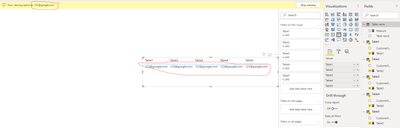
v-robertq-msft_0-1606893762130.png


You can download my test pbix file here


If this result is not what you want, you can post some sample data(without sensitive data) and your expected result.

How to Get Your Question Answered Quickly 


Best Regards,

Community Support Team _Robert Qin

If this post helps, then please consider Accept it as the solution to help the other members find it more quickly.

View solution in original post

2 REPLIES 2
v-robertq-msft
Community Support
Community Support

Hi, @taylorb 

According to your description, I guess you want to get a table that displays the [CustomerSource] column in the five tables, and the value should be the user who views this report. I think you can not achieve this in a simple DAX, you can create measures for each table to get the expected result, you can take a look at my steps:

  1. Create the five measures in five tables (one by one):
Table1 = CALCULATE(MAX('Table1'[CustomerSource]),FILTER('Table1',[CustomerSource]=USERPRINCIPALNAME()))

Table2 = CALCULATE(MAX('Table1'[CustomerSource]),FILTER('Table2',[CustomerSource]=USERPRINCIPALNAME()))

Table3 = CALCULATE(MAX('Table1'[CustomerSource]),FILTER('Table3',[CustomerSource]=USERPRINCIPALNAME()))

Table4 = CALCULATE(MAX('Table1'[CustomerSource]),FILTER('Table4',[CustomerSource]=USERPRINCIPALNAME()))

Table5 = CALCULATE(MAX('Table1'[CustomerSource]),FILTER('Table5',[CustomerSource]=USERPRINCIPALNAME()))


  1. Create a table chart and place them into it, and view as a username, you can get what you want, like this:

v-robertq-msft_0-1606893762130.png


You can download my test pbix file here


If this result is not what you want, you can post some sample data(without sensitive data) and your expected result.

How to Get Your Question Answered Quickly 


Best Regards,

Community Support Team _Robert Qin

If this post helps, then please consider Accept it as the solution to help the other members find it more quickly.

This looks great, thank you

Helpful resources

Announcements
Sticker Challenge 2026 Carousel

Join our Community Sticker Challenge 2026

If you love stickers, then you will definitely want to check out our Community Sticker Challenge!

January Power BI Update Carousel

Power BI Monthly Update - January 2026

Check out the January 2026 Power BI update to learn about new features.

FabCon Atlanta 2026 carousel

FabCon Atlanta 2026

Join us at FabCon Atlanta, March 16-20, for the ultimate Fabric, Power BI, AI and SQL community-led event. Save $200 with code FABCOMM.

Users online (4,501)