
This is best Fabric, Power BI, SQL and AI community event. How do we know? The last event sold out! Save €200 with code FABCMTY200.
Register nowA new Data Days event is coming soon! This time we’re going bigger than ever. Fabric, Power BI, SQL, AI and more. Don't miss out.
Hi Everyone,
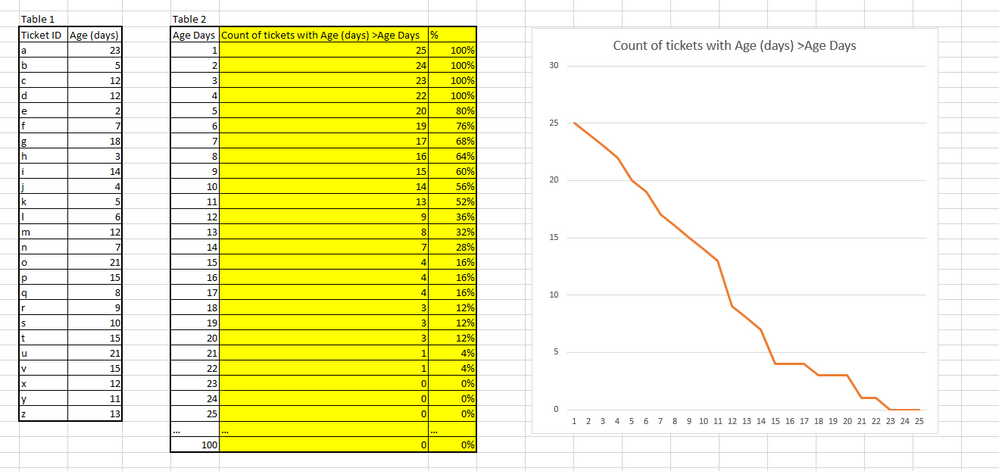
I was wondering if anyone could help me create the following visualization
Y axis = number of tickets
X axis = Age of tickets Days
Specifically I need help either creating the calculated columns highlighted in yellow or measures that would do the same thing. I've been working with Calculation, Count, and related functions but I can't seem to nail down the right combination of the three.
EDIT - Pasting Data
| Table 1 | Table 2 | ||||
| Ticket ID | Age (days) | Age Days | Count of tickets with Age (days) >Age Days | % | |
| a | 23 | 1 | 25 | 100% | |
| b | 5 | 2 | 24 | 100% | |
| c | 12 | 3 | 23 | 100% | |
| d | 12 | 4 | 22 | 100% | |
| e | 2 | 5 | 20 | 80% | |
| f | 7 | 6 | 19 | 76% | |
| g | 18 | 7 | 17 | 68% | |
| h | 3 | 8 | 16 | 64% | |
| i | 14 | 9 | 15 | 60% | |
| j | 4 | 10 | 14 | 56% | |
| k | 5 | 11 | 13 | 52% | |
| l | 6 | 12 | 9 | 36% | |
| m | 12 | 13 | 8 | 32% | |
| n | 7 | 14 | 7 | 28% | |
| o | 21 | 15 | 4 | 16% | |
| p | 15 | 16 | 4 | 16% | |
| q | 8 | 17 | 4 | 16% | |
| r | 9 | 18 | 3 | 12% | |
| s | 10 | 19 | 3 | 12% | |
| t | 15 | 20 | 3 | 12% | |
| u | 21 | 21 | 1 | 4% | |
| v | 15 | 22 | 1 | 4% | |
| x | 12 | 23 | 0 | 0% | |
| y | 11 | 24 | 0 | 0% | |
| z | 13 | 25 | 0 | 0% | |
| … | … | … | |||
| 100 | 0 | 0% |
Solved! Go to Solution.
Ok to achieve this we need an AGE table, which simply has a column called "Age(Days)" with a unique values from 1 to the number of days you want in the graph. Link this to Table1 in your table relationships.
Create this measure:
Cumulative Measure = VAR currentAge = max(Age[Age (Days)])
RETURN
CALCULATE(
COUNTROWS(Table1),
ALL(Table1),
Table1[Age (days)] > currentAge
)
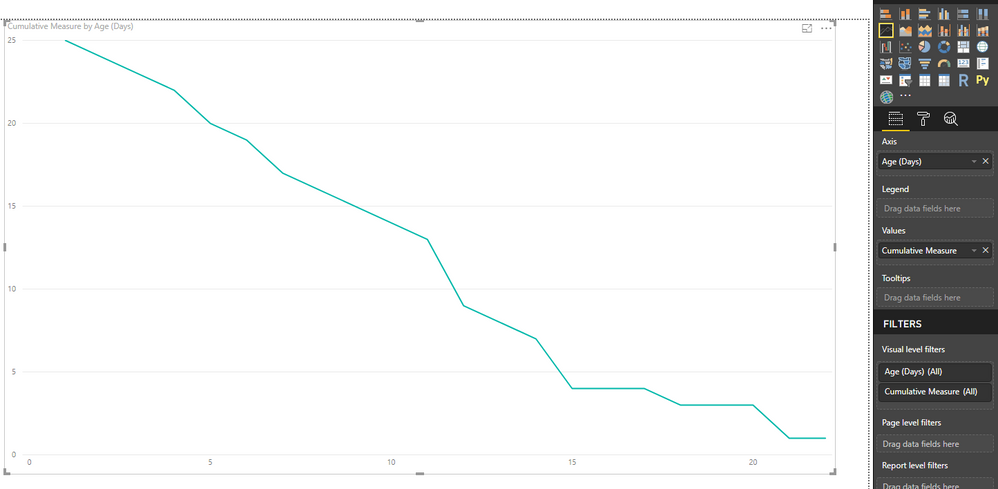
Create a line graph using these settings:
Axis - 'Age'[Age(Days)]
Values - The measure we created
You'll get this:
Ok to achieve this we need an AGE table, which simply has a column called "Age(Days)" with a unique values from 1 to the number of days you want in the graph. Link this to Table1 in your table relationships.
Create this measure:
Cumulative Measure = VAR currentAge = max(Age[Age (Days)])
RETURN
CALCULATE(
COUNTROWS(Table1),
ALL(Table1),
Table1[Age (days)] > currentAge
)
Create a line graph using these settings:
Axis - 'Age'[Age(Days)]
Values - The measure we created
You'll get this:
That's great! Thank you for your help 🙂
Follow up question
How would I add a bar to show the target days? When I tried the bar was horizontal instead of vertical.
I updated the proposed function to allow for outside filters.
Cumulative Measure = VAR currentAge = max(Age[Age (Days)])
RETURN
CALCULATE(
COUNTROWS(Table1),
ALLSELECTED(Table1),
Table1[Age (days)] > currentAge
)
This is what I would like it to look like.
Great suggestion on your alteration to the code. Its great to see you getting your head around the code and tweaking it to your scenario.
I can't think of an easy way to create the line you want. Most of the trending are all hoziontal lines. Its possible to use the "Line and Clustered Column chart" to have vertical lines, so my thoughts are to using that some how.
Check out the May 2026 Power BI update to learn about new features.
Sign up to receive a private message when registration opens and key events begin.
If you have recently started exploring Fabric, we'd love to hear how it's going. Your feedback can help with product improvements.
| User | Count |
|---|---|
| 31 | |
| 26 | |
| 23 | |
| 22 | |
| 13 |
| User | Count |
|---|---|
| 61 | |
| 47 | |
| 27 | |
| 23 | |
| 18 |