I am not sure if this is an option, but I have tried many things but it is not working the way I want, so I'm here asking for help to see if this is an option, and if so, how do I complete this request.
I have a table that has several different fields including: Market, Date, and Period. Below is an example of the data:
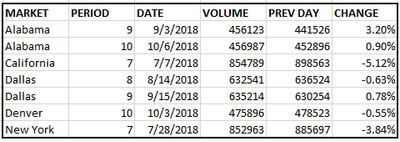
This table will continue thousands of data, since we have information for each day, each market for several periods.
What I have created is a matrix that highlights the days that need to be reviewed (normally due to a drop in volume) with an IF formula .... Researched = IF ( ALL_CYCLE [CHANGE] <0, 5, IF (ALL_CYCLE [CHANGE] = 0, 0, IF ( ALL_CYCLE [CHANGE] >0, 10, 0)))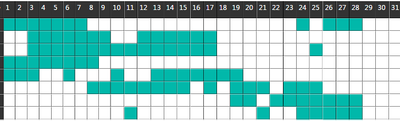
What I am looking for is creating another column named "Research" for those Market-Days-Periods that were researched, so we can change the matrix color from teal to yellow. I know I can do this through conditional formating, however I don't know how to use a new table or merged duplicate table to update those accordingly.
I have created a column with "Research" and made them all '0'. Then used the Append Query as New and duplicated the original query. I filtered out a few Market-Day-Periods and used Replace Values to '20' so I could use conditional formating to change that. However I am unable to update the above "IF Formula" to include IF ( Updated_ALL_CYCLE [Research] = 20, 20) since it won't pick up the second query within the formula.
Any assistance would greatly be appreciated. Thanks in advance!


