Don't miss your chance to take the Fabric Data Engineer (DP-600) exam for FREE! Find out how by watching the DP-600 session on-demand now through April 28th.
Learn moreJoin the FabCon + SQLCon recap series. Up next: Power BI, Real-Time Intelligence, IQ and AI, and Data Factory take center stage. All sessions are available on-demand after the live show. Register now
Hi All,
Can you please help me with the below issue?
One of the tables is called "All tickets" - which includes the Ticket ID, Created time and Completed time and others non-related columns.
As a start I want to create a a visual "Cout of Request ID VS Created time" and "Cout of Request ID VS Created time" (So like when do I receive most tickets and when do I close most)
I searched many fixes on the internet but none worked with my model.
Can you please help me create a Time Table such as the Date table where I can connect it to all my tables and use it accordingly?
Solved! Go to Solution.
Hi @Anonymous ,
Paste this into a blank query in Power Query to create a dimension table similar to your Date table, but for every second of the day.
let
hoursTable = Table.FromList({0..23}, Splitter.SplitByNothing(), null, null, ExtraValues.Error),
renHours = Table.RenameColumns(hoursTable, {{"Column1", "hours"}}),
minutesTable = Table.FromList({0..59}, Splitter.SplitByNothing(), null, null, ExtraValues.Error),
secondsTable = Table.FromList({0..59}, Splitter.SplitByNothing(), null, null, ExtraValues.Error),
addCJminutes = Table.AddColumn(renHours, "minutes", each minutesTable),
expandCJminutes = Table.ExpandTableColumn(addCJminutes, "minutes", {"Column1"}, {"minutes"}),
addCJseconds = Table.AddColumn(expandCJminutes, "seconds", each secondsTable),
expandCJseconds = Table.ExpandTableColumn(addCJseconds, "seconds", {"Column1"}, {"seconds"}),
addTime = Table.AddColumn(expandCJseconds, "time", each Text.Combine({Text.From([hours], "en-GB"), Text.From([minutes], "en-GB"), Text.From([seconds], "en-GB")}, ":"), type text),
chgAllTypes = Table.TransformColumnTypes(addTime, {{"time", type time}, {"hours", Int64.Type}, {"minutes", Int64.Type}, {"seconds", Int64.Type}})
in
chgAllTypes
It has a specific hours column if that's all you're interested in, but should be easy enough to edit it however you want.
Pete
Proud to be a Datanaut!
Hi @Anonymous ,
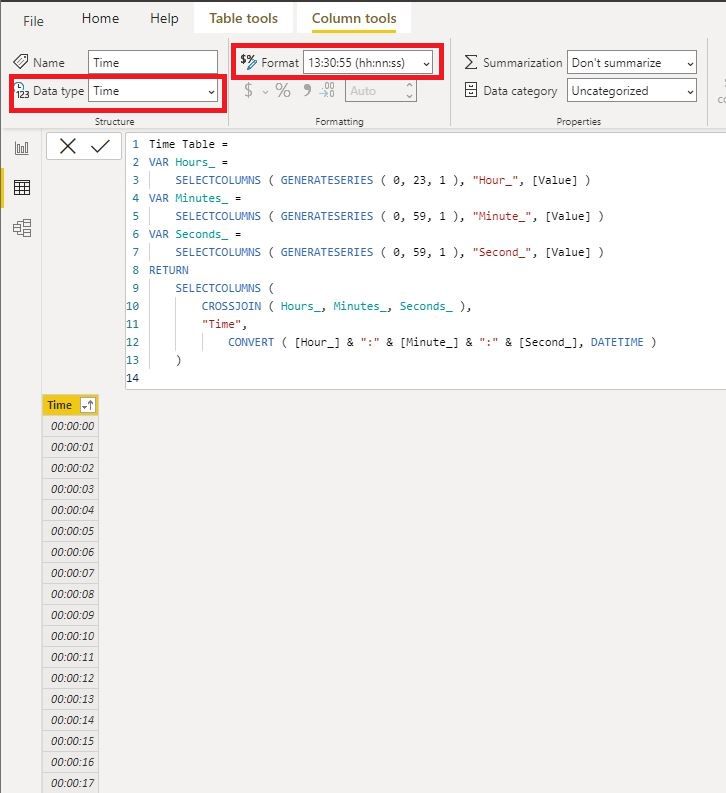
You can also create a time table using DAX like below and set the data type as "Time":
Time Table =
VAR Hours_ =
SELECTCOLUMNS ( GENERATESERIES ( 0, 23, 1 ), "Hour_", [Value] )
VAR Minutes_ =
SELECTCOLUMNS ( GENERATESERIES ( 0, 59, 1 ), "Minute_", [Value] )
VAR Seconds_ =
SELECTCOLUMNS ( GENERATESERIES ( 0, 59, 1 ), "Second_", [Value] )
RETURN
SELECTCOLUMNS (
CROSSJOIN ( Hours_, Minutes_, Seconds_ ),
"Time",
CONVERT ( [Hour_] & ":" & [Minute_] & ":" & [Second_], DATETIME )
)
If you only need hours, try this:
Time Table just with Hours =
SELECTCOLUMNS (
GENERATESERIES ( 0, 23, 1 ),
"Time", CONVERT ( [Value] & ":00:00", DATETIME )
)
Best Regards,
Icey
If this post helps, then please consider Accept it as the solution to help the other members find it more quickly.
Hi @Anonymous ,
You can also create a time table using DAX like below and set the data type as "Time":
Time Table =
VAR Hours_ =
SELECTCOLUMNS ( GENERATESERIES ( 0, 23, 1 ), "Hour_", [Value] )
VAR Minutes_ =
SELECTCOLUMNS ( GENERATESERIES ( 0, 59, 1 ), "Minute_", [Value] )
VAR Seconds_ =
SELECTCOLUMNS ( GENERATESERIES ( 0, 59, 1 ), "Second_", [Value] )
RETURN
SELECTCOLUMNS (
CROSSJOIN ( Hours_, Minutes_, Seconds_ ),
"Time",
CONVERT ( [Hour_] & ":" & [Minute_] & ":" & [Second_], DATETIME )
)
If you only need hours, try this:
Time Table just with Hours =
SELECTCOLUMNS (
GENERATESERIES ( 0, 23, 1 ),
"Time", CONVERT ( [Value] & ":00:00", DATETIME )
)
Best Regards,
Icey
If this post helps, then please consider Accept it as the solution to help the other members find it more quickly.
Hi @Anonymous ,
Paste this into a blank query in Power Query to create a dimension table similar to your Date table, but for every second of the day.
let
hoursTable = Table.FromList({0..23}, Splitter.SplitByNothing(), null, null, ExtraValues.Error),
renHours = Table.RenameColumns(hoursTable, {{"Column1", "hours"}}),
minutesTable = Table.FromList({0..59}, Splitter.SplitByNothing(), null, null, ExtraValues.Error),
secondsTable = Table.FromList({0..59}, Splitter.SplitByNothing(), null, null, ExtraValues.Error),
addCJminutes = Table.AddColumn(renHours, "minutes", each minutesTable),
expandCJminutes = Table.ExpandTableColumn(addCJminutes, "minutes", {"Column1"}, {"minutes"}),
addCJseconds = Table.AddColumn(expandCJminutes, "seconds", each secondsTable),
expandCJseconds = Table.ExpandTableColumn(addCJseconds, "seconds", {"Column1"}, {"seconds"}),
addTime = Table.AddColumn(expandCJseconds, "time", each Text.Combine({Text.From([hours], "en-GB"), Text.From([minutes], "en-GB"), Text.From([seconds], "en-GB")}, ":"), type text),
chgAllTypes = Table.TransformColumnTypes(addTime, {{"time", type time}, {"hours", Int64.Type}, {"minutes", Int64.Type}, {"seconds", Int64.Type}})
in
chgAllTypes
It has a specific hours column if that's all you're interested in, but should be easy enough to edit it however you want.
Pete
Proud to be a Datanaut!
Check out the April 2026 Power BI update to learn about new features.
If you have recently started exploring Fabric, we'd love to hear how it's going. Your feedback can help with product improvements.
A new Power BI DataViz World Championship is coming this June! Don't miss out on submitting your entry.
| User | Count |
|---|---|
| 45 | |
| 38 | |
| 34 | |
| 21 | |
| 17 |
| User | Count |
|---|---|
| 66 | |
| 64 | |
| 31 | |
| 26 | |
| 26 |