cancel
Showing results for 
Search instead for 
Did you mean: 

Data Days is here! Join us now for 60+ days of learning, challenges, and connection. Learn more

Reply
Treyson
Advocate I
Advocate I

Creating Static Visuals

Hello,


I want to create some dashboards with some static visualization. By this I mean that I would like to be able to create charts and graphs that are not filtered by clicking on other charts and graphs or slicers. I come from Tableau so I like that Power BI has the built in capability for visualizations to effect one another, but I have not been able to figure out how to keep it from doing this.

1 ACCEPTED SOLUTION
ankitpatira
Community Champion
Community Champion

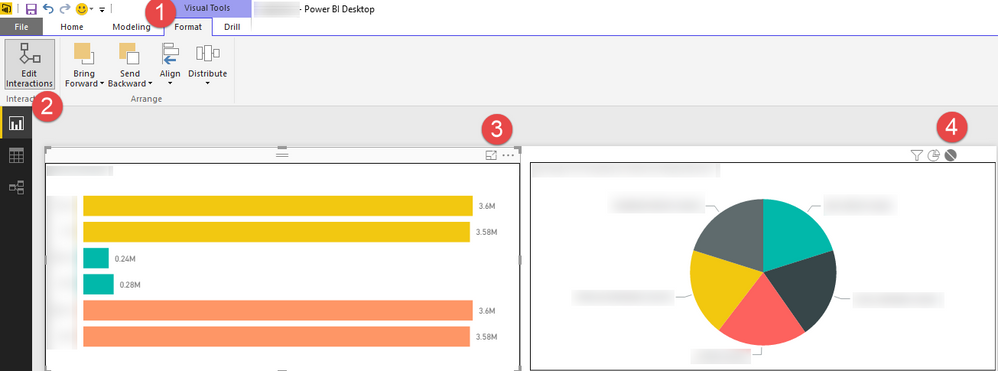
@Treyson In powerbi desktop, as shown below go to Format -> Edit Interactions -> select visual for which you want other visual to be static -> choose none. You can do this for all the visuals one by one.


2016-05-10_9-40-13.png

View solution in original post

4 REPLIES 4
ankitpatira
Community Champion
Community Champion

@Treyson In powerbi desktop, as shown below go to Format -> Edit Interactions -> select visual for which you want other visual to be static -> choose none. You can do this for all the visuals one by one.


2016-05-10_9-40-13.png

Anonymous
Not applicable

It was extremely helpful. I have been able to use it in a few of my reports. Thanks.

It's not clear to me in this example which chart you are trying to keep static. 

Thank you very much sir! This is going to help a lot!

Helpful resources

Announcements
Fabric Data Days is here Carousel

Fabric Data Days 2026

Don't miss out on Data Days, June 15 through August 7. Learn Fabric, Power BI, SQL, AI and more.

May Power BI Update Carousel

Power BI Monthly Update - May 2026

Check out the May 2026 Power BI update to learn about new features.

Power BI DataViz World Championships carousel

Power BI DataViz World Championships - June 2026

A new Power BI DataViz World Championship is coming this June! Don't miss out on submitting your entry.