cancel
Showing results for 
Search instead for 
Did you mean: 

Get Fabric Certified for FREE during Fabric Data Days. Don't miss your chance! Request now

Reply
kdesai
Frequent Visitor

Creating R&E reports in Power BI Desktop and Formatting

Hi All,


I am recreating my organization's R&E reports in Power BI(So far they have been using Excel to do this.)


The issue that we are facing is -

-With the formatting of columns, runtime alignment of columns

-The duplicate "Total" rows in a Matrix visual.

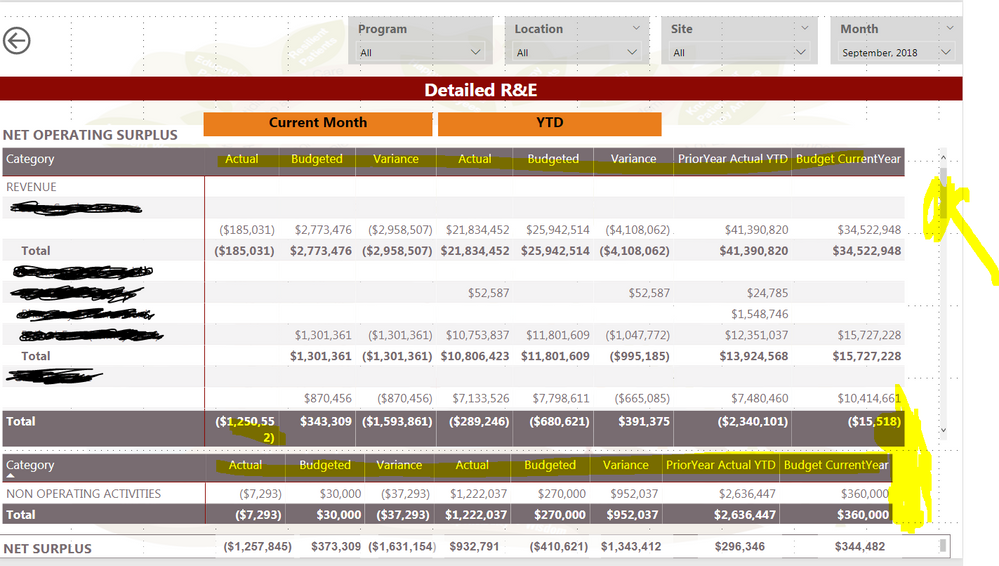
-Fitting all the categories in a Matrix(the available categories are Revenue, Expenses and Non Operating Activities as you can see in the screen shot)

-A horizontal scroll bar appears and the headings "Current Month" and "YTD" do not hold good.

-Alignment of each category table in run time.


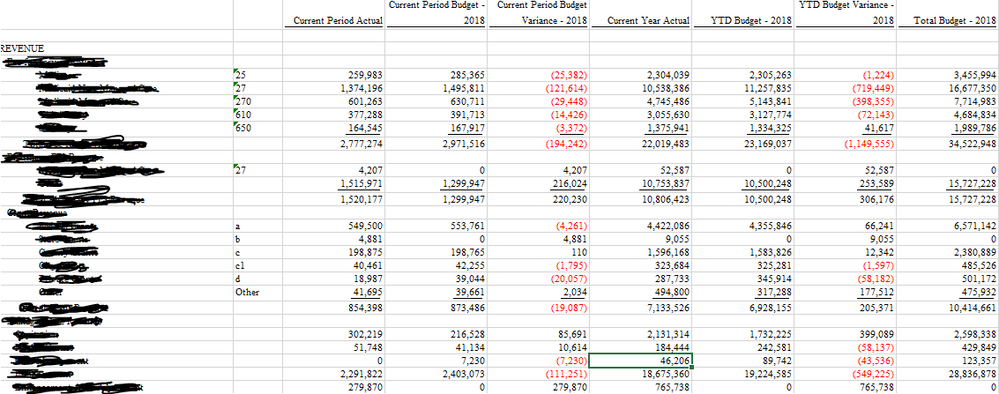
I have highlighted couple in the below screen shot! and have also attached an Excel R&E screen shot.

sc2.PNGsc1.PNG


As the Managers are use to seeing the formatted Excel reports, they are a bit reluctunt to accept the latest Power BI reports!


Let me know if anyone has a better idea for building R&E in Power BI.


Also, is there a R&E template in Power BI.


Thank You.

1 REPLY 1
v-juanli-msft
Community Support
Community Support

Hi @kdesai

-With the formatting of columns, runtime alignment of columns

do you mean to format the color of values in some columns?


-The duplicate "Total" rows in a Matrix visual.

Go to "format"->subtotals->turn off "row total" and "column total"


-Fitting all the categories in a Matrix(the available categories are Revenue, Expenses and Non Operating Activities as you can see in the screen shot)

what do you mean by this?


-A horizontal scroll bar appears and the headings "Current Month" and "YTD" do not hold good.

Is the headings "Current Month" and "YTD" text boxes or column added in the matrix?


-Alignment of each category table in run time.

Which do you mean by this?


Could you send me an example dataset or pbix via privacy message so taht i can edit for you?


Best Regards

Maggie

Helpful resources

Announcements
November Power BI Update Carousel

Power BI Monthly Update - November 2025

Check out the November 2025 Power BI update to learn about new features.

Fabric Data Days Carousel

Fabric Data Days

Advance your Data & AI career with 50 days of live learning, contests, hands-on challenges, study groups & certifications and more!

FabCon Atlanta 2026 carousel

FabCon Atlanta 2026

Join us at FabCon Atlanta, March 16-20, for the ultimate Fabric, Power BI, AI and SQL community-led event. Save $200 with code FABCOMM.

Top Solution Authors
Top Kudoed Authors