Join us at FabCon Atlanta from March 16 - 20, 2026, for the ultimate Fabric, Power BI, AI and SQL community-led event. Save $200 with code FABCOMM.
Register now!Get Fabric certified for FREE! Don't miss your chance! Learn more
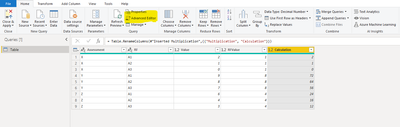
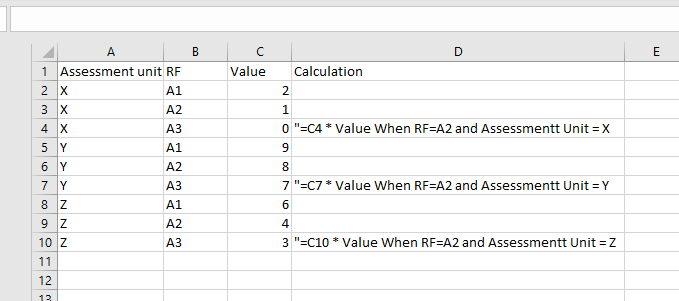
Hello, How can i recreate the Calculation Coumn shown in the image below in Power Query, in a way that it can be done automatically if any new Assessment Unit was added?
Thank you.
Solved! Go to Solution.
Hi,
Go to Home then select Advanced Editor. Copy and and past following M code. Then you can get an idea how to do it.
Please note that if there is more than one A2 to one Assesment you will get a wrong answer.
Without seen your dataset its hard to give the best solution.
let
Source = Table.FromRows(Json.Document(Binary.Decompress(Binary.FromText("i45WilDSUXI0BBJGSrE6UK4RkDBEcI2BhAGYGwlTbIngghRbILggxeZgbhRMsRmCC1JsguCCFBsrxcYCAA==", BinaryEncoding.Base64), Compression.Deflate)), let _t = ((type nullable text) meta [Serialized.Text = true]) in type table [Assessment = _t, RF = _t, Value = _t]),
#"Changed Type" = Table.TransformColumnTypes(Source,{{"Assessment", type text}, {"RF", type text}, {"Value", Int64.Type}}),
#"Grouped Rows" = Table.Group(#"Changed Type", {"Assessment"}, {{"Count", each _, type table [Assessment=nullable text, RF=nullable text, Value=nullable number]}}),
#"Duplicated Column" = Table.DuplicateColumn(#"Grouped Rows", "Count", "Count - Copy"),
#"Added Custom" = Table.AddColumn(#"Duplicated Column", "Custom", each Table.SelectRows([#"Count - Copy"], each ([RF] = "A2"))),
#"Expanded Custom" = Table.ExpandTableColumn(#"Added Custom", "Custom", {"Value"}, {"Value"}),
#"Removed Columns" = Table.RemoveColumns(#"Expanded Custom",{"Count - Copy"}),
#"Renamed Columns" = Table.RenameColumns(#"Removed Columns",{{"Value", "RFValue"}}),
#"Expanded Count" = Table.ExpandTableColumn(#"Renamed Columns", "Count", {"RF", "Value"}, {"RF", "Value"}),
#"Changed Type1" = Table.TransformColumnTypes(#"Expanded Count",{{"RFValue", type number}}),
#"Inserted Multiplication" = Table.AddColumn(#"Changed Type1", "Multiplication", each [Value] * [RFValue], type number),
#"Renamed Columns1" = Table.RenameColumns(#"Inserted Multiplication",{{"Multiplication", "Calculation"}})
in
#"Renamed Columns1"
Thank you.
Hello Dinesh, the formula is (Value C4 x Value where Assessment Unit = Assessment Unit of C4 AND RF = A2),
Basically for each assessment unit, when the RF = A3 i want to calculate its value times the value of A2 that has the same Assessment unit.
Hi,
Go to Home then select Advanced Editor. Copy and and past following M code. Then you can get an idea how to do it.
Please note that if there is more than one A2 to one Assesment you will get a wrong answer.
Without seen your dataset its hard to give the best solution.
let
Source = Table.FromRows(Json.Document(Binary.Decompress(Binary.FromText("i45WilDSUXI0BBJGSrE6UK4RkDBEcI2BhAGYGwlTbIngghRbILggxeZgbhRMsRmCC1JsguCCFBsrxcYCAA==", BinaryEncoding.Base64), Compression.Deflate)), let _t = ((type nullable text) meta [Serialized.Text = true]) in type table [Assessment = _t, RF = _t, Value = _t]),
#"Changed Type" = Table.TransformColumnTypes(Source,{{"Assessment", type text}, {"RF", type text}, {"Value", Int64.Type}}),
#"Grouped Rows" = Table.Group(#"Changed Type", {"Assessment"}, {{"Count", each _, type table [Assessment=nullable text, RF=nullable text, Value=nullable number]}}),
#"Duplicated Column" = Table.DuplicateColumn(#"Grouped Rows", "Count", "Count - Copy"),
#"Added Custom" = Table.AddColumn(#"Duplicated Column", "Custom", each Table.SelectRows([#"Count - Copy"], each ([RF] = "A2"))),
#"Expanded Custom" = Table.ExpandTableColumn(#"Added Custom", "Custom", {"Value"}, {"Value"}),
#"Removed Columns" = Table.RemoveColumns(#"Expanded Custom",{"Count - Copy"}),
#"Renamed Columns" = Table.RenameColumns(#"Removed Columns",{{"Value", "RFValue"}}),
#"Expanded Count" = Table.ExpandTableColumn(#"Renamed Columns", "Count", {"RF", "Value"}, {"RF", "Value"}),
#"Changed Type1" = Table.TransformColumnTypes(#"Expanded Count",{{"RFValue", type number}}),
#"Inserted Multiplication" = Table.AddColumn(#"Changed Type1", "Multiplication", each [Value] * [RFValue], type number),
#"Renamed Columns1" = Table.RenameColumns(#"Inserted Multiplication",{{"Multiplication", "Calculation"}})
in
#"Renamed Columns1"
Thank you.
Thank you so much, Appreciated.
Share feedback directly with Fabric product managers, participate in targeted research studies and influence the Fabric roadmap.
Check out the February 2026 Power BI update to learn about new features.
| User | Count |
|---|---|
| 70 | |
| 60 | |
| 47 | |
| 20 | |
| 16 |
| User | Count |
|---|---|
| 109 | |
| 108 | |
| 39 | |
| 27 | |
| 27 |