Get certified for free when you join Fabric Data Days 2026 and dive into Fabric, Power BI, SQL, AI, and other essential data skills.
Join nowData Days is here! Join us now for 60+ days of learning, challenges, and connection. Learn more
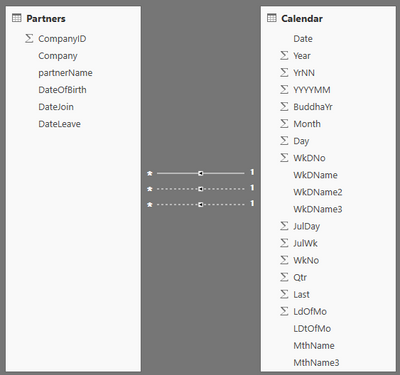
I have the following sources/relationships in PowerBI :
I have create a page in Power BI Desktop that has three Slicers - so the user can select
- Year (from Calendar Dimensions table),
- Month Name (from Calendar Dimensions table)
- Company from the Partners table.
Then there are three table visualisations and i want them to show:
Visualisation1 : a list of partners from the selected company with a dob in the selected year and selected month
Visualisation2 : a list of partners from the selected company with a date join in the selected year and selected month
Visualisation3 : a list of partners from the selected company with a date leave in the selected year and selected month
Currently, as you can see from the screenshot when i select a Year, Month and company:
Visulaisation1 is correct because power bi uses the default relationship between two source tables (between calender.Date & Partners.DateOfBirth).
Visualisation2 and Visualisation3 are incorrect, they show the same records as Visualisation1 - not what i want them to show.
Please could i have some guidance on how i can achieve this?
Thanks
Hi @efinitibi,
>>a list of partners from the selected company with a dob in the selected year and selected month. a list of partners from the selected company with a date join in the selected year and selected month
You create two slicers, one inlucidng year and another one including selected month. And create interactions between slicers and Tables by click Edit interactions under formut on home page.
>>a list of partners from the selected company with a date leave in the selected year and selected month
You can create a another new table including the selected year and selected month. Create a slicer including new table year and month. Use filter to get the values leave in the selected year and selected month.
>> as the visualisations always use the default relations between the two tables, and so in tables 2 and 3, i see partners who have a dob matching the selected year and month
Houw many table in your resource table? Partners table, Date Dimensions table, Table2 and Table3? I am confused.
According to your given information, I am unable to reproduce your scenario. Could you please share your resource table or .pbix file for further analysis?
Best Regards,
Angelia
Hi @efinitibi,
Yeah, I am unable to reproduce your scenario according to your information.
Best Regards,
Angelia
Don't miss out on Data Days, June 15 through August 7. Learn Fabric, Power BI, SQL, AI and more.
Check out the May 2026 Power BI update to learn about new features.
| User | Count |
|---|---|
| 23 | |
| 23 | |
| 21 | |
| 17 | |
| 13 |
| User | Count |
|---|---|
| 58 | |
| 51 | |
| 39 | |
| 29 | |
| 24 |