Learn from the best! Meet the four finalists headed to the FINALS of the Power BI Dataviz World Championships! Register now
Hello Everyone,
Have a question regarding how we can create the hierarchy from two different dimension tables. Not sure if that is even possible?
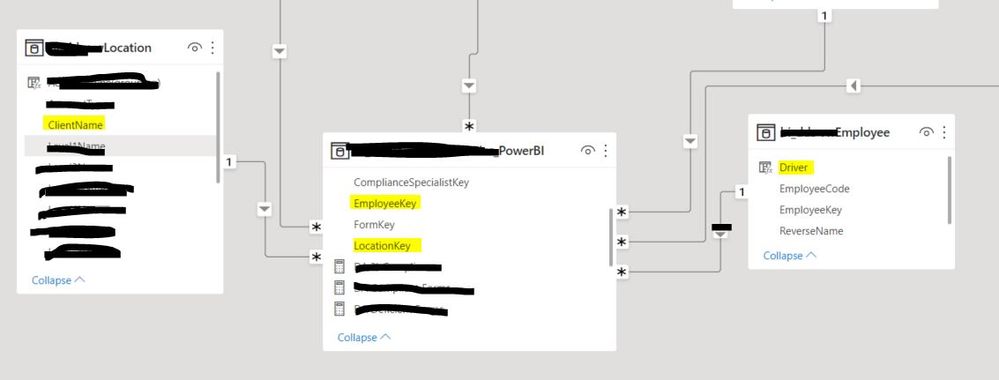
I have a Location dim table, an Employee dim table joined with one fact table. There is a column name Client in the location table and driver in the Employee table can I create a hierarchy between those two tables. Relationship between two table
Thank you for your help.
Solved! Go to Solution.
@Nepal101 you cannot create a hierarchy but in the visuals, you can drop the column from both the tables, let's if you are using a line chart, on the x-axis, you can have employee and location on Aix and that will allow you to drill up and down.
✨ Follow us on LinkedIn
Learn about conditional formatting at Microsoft Reactor
My latest blog post The Power of Using Calculation Groups with Inactive Relationships (Part 1) (perytus.com) I would ❤ Kudos if my solution helped. 👉 If you can spend time posting the question, you can also make efforts to give Kudos to whoever helped to solve your problem. It is a token of appreciation!
⚡ Visit us at https://perytus.com, your one-stop-shop for Power BI-related projects/training/consultancy.⚡
Subscribe to the @PowerBIHowTo YT channel for an upcoming video on List and Record functions in Power Query!!
Learn Power BI and Fabric - subscribe to our YT channel - Click here: @PowerBIHowTo
If my solution proved useful, I'd be delighted to receive Kudos. When you put effort into asking a question, it's equally thoughtful to acknowledge and give Kudos to the individual who helped you solve the problem. It's a small gesture that shows appreciation and encouragement! ❤
Did I answer your question? Mark my post as a solution. Proud to be a Super User! Appreciate your Kudos 🙂
Feel free to email me with any of your BI needs.
@Nepal101 In matrix, you can drop columns from both the tables on the row and it will work as hierarchy.
✨ Follow us on LinkedIn
Learn about conditional formatting at Microsoft Reactor
My latest blog post The Power of Using Calculation Groups with Inactive Relationships (Part 1) (perytus.com) I would ❤ Kudos if my solution helped. 👉 If you can spend time posting the question, you can also make efforts to give Kudos to whoever helped to solve your problem. It is a token of appreciation!
⚡ Visit us at https://perytus.com, your one-stop-shop for Power BI-related projects/training/consultancy.⚡
Subscribe to the @PowerBIHowTo YT channel for an upcoming video on List and Record functions in Power Query!!
Learn Power BI and Fabric - subscribe to our YT channel - Click here: @PowerBIHowTo
If my solution proved useful, I'd be delighted to receive Kudos. When you put effort into asking a question, it's equally thoughtful to acknowledge and give Kudos to the individual who helped you solve the problem. It's a small gesture that shows appreciation and encouragement! ❤
Did I answer your question? Mark my post as a solution. Proud to be a Super User! Appreciate your Kudos 🙂
Feel free to email me with any of your BI needs.
What could be an alternate solution for it? If I am using Matrix.
@Nepal101 you cannot create a hierarchy but in the visuals, you can drop the column from both the tables, let's if you are using a line chart, on the x-axis, you can have employee and location on Aix and that will allow you to drill up and down.
✨ Follow us on LinkedIn
Learn about conditional formatting at Microsoft Reactor
My latest blog post The Power of Using Calculation Groups with Inactive Relationships (Part 1) (perytus.com) I would ❤ Kudos if my solution helped. 👉 If you can spend time posting the question, you can also make efforts to give Kudos to whoever helped to solve your problem. It is a token of appreciation!
⚡ Visit us at https://perytus.com, your one-stop-shop for Power BI-related projects/training/consultancy.⚡
Subscribe to the @PowerBIHowTo YT channel for an upcoming video on List and Record functions in Power Query!!
Learn Power BI and Fabric - subscribe to our YT channel - Click here: @PowerBIHowTo
If my solution proved useful, I'd be delighted to receive Kudos. When you put effort into asking a question, it's equally thoughtful to acknowledge and give Kudos to the individual who helped you solve the problem. It's a small gesture that shows appreciation and encouragement! ❤
Did I answer your question? Mark my post as a solution. Proud to be a Super User! Appreciate your Kudos 🙂
Feel free to email me with any of your BI needs.
| User | Count |
|---|---|
| 50 | |
| 39 | |
| 29 | |
| 18 | |
| 17 |
| User | Count |
|---|---|
| 67 | |
| 57 | |
| 40 | |
| 22 | |
| 19 |