
Join us at FabCon Atlanta from March 16 - 20, 2026, for the ultimate Fabric, Power BI, AI and SQL community-led event. Save $200 with code FABCOMM.
Register now!Vote for your favorite vizzies from the Power BI Dataviz World Championship submissions. Vote now!
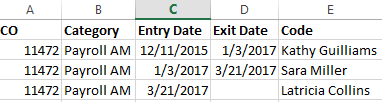
I have a table with entries like this:
So the company ID is the same, the entry date shows when the account was handed over to another manager. I want to create an end date field as well because I will need it for a formula. So above we see Kathy Guilliams first owned the account on 12/11/2015. Then Sara Miller took over on 1/3/2017. How can I make Sara's start date the end date for Kathy? And so on and so forth... It will be like this for multiple companies so I'm not sure what the approach is. So I would like the desired output for all companies to be like:
Solved! Go to Solution.
@Anonymous Please try this as a "New Column"
ExitDate = CALCULATE(MIN(Test66Lkp[EntryDate]),FILTER(ALL(Test66Lkp),Test66Lkp[Code]=EARLIER(Test66Lkp[Code]) && Test66Lkp[Name] <> EARLIER(Test66Lkp[Name]) && Test66Lkp[EntryDate] > EARLIER(Test66Lkp[EntryDate])))
Proud to be a PBI Community Champion
@Anonymous Please try this as a "New Column"
ExitDate = CALCULATE(MIN(Test66Lkp[EntryDate]),FILTER(ALL(Test66Lkp),Test66Lkp[Code]=EARLIER(Test66Lkp[Code]) && Test66Lkp[Name] <> EARLIER(Test66Lkp[Name]) && Test66Lkp[EntryDate] > EARLIER(Test66Lkp[EntryDate])))
Proud to be a PBI Community Champion
Vote for your favorite vizzies from the Power BI World Championship submissions!
If you love stickers, then you will definitely want to check out our Community Sticker Challenge!
Check out the January 2026 Power BI update to learn about new features.
| User | Count |
|---|---|
| 58 | |
| 53 | |
| 43 | |
| 17 | |
| 16 |
| User | Count |
|---|---|
| 123 | |
| 107 | |
| 44 | |
| 32 | |
| 24 |