cancel
Showing results for 
Search instead for 
Did you mean: 

Vote for your favorite vizzies from the Power BI Dataviz World Championship submissions. Vote now!

Reply
Anonymous
Not applicable

Creating Dummy Date Field?

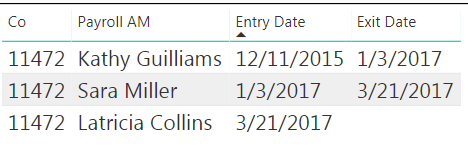
I have this table:

1.PNG


It shows over time when someone owned an account. I was provided an entry date only, so I had to come up with a date field to represent their exit date which is simply the date it was given to the next person:

1.PNG


So Latricia is currently the account owner meaning she does not yet have an exit date. How can I modify my formula to give her a dummy date far in the future (ex: 12/31/2100) until she has an official exit date loaded into the system? For another formula I'm working on, it will require that everyone has an exit date.

1 ACCEPTED SOLUTION
PattemManohar
Community Champion
Community Champion

@Anonymous Please try this...


ExitDate = 
VAR _ExitDate = CALCULATE(MIN(Test66Lkp[EntryDate]),FILTER(ALL(Test66Lkp),Test66Lkp[Code]=EARLIER(Test66Lkp[Code]) && Test66Lkp[Name] <> EARLIER(Test66Lkp[Name]) && Test66Lkp[EntryDate] > EARLIER(Test66Lkp[EntryDate])))
RETURN IF(_ExitDate=BLANK(),DATE(2100,12,31),_ExitDate)

image.png


Did I answer your question? Mark my post as a solution!

Proud to be a PBI Community Champion


View solution in original post

3 REPLIES 3
PattemManohar
Community Champion
Community Champion

@Anonymous Please try this...


ExitDate = 
VAR _ExitDate = CALCULATE(MIN(Test66Lkp[EntryDate]),FILTER(ALL(Test66Lkp),Test66Lkp[Code]=EARLIER(Test66Lkp[Code]) && Test66Lkp[Name] <> EARLIER(Test66Lkp[Name]) && Test66Lkp[EntryDate] > EARLIER(Test66Lkp[EntryDate])))
RETURN IF(_ExitDate=BLANK(),DATE(2100,12,31),_ExitDate)

image.png


Did I answer your question? Mark my post as a solution!

Proud to be a PBI Community Champion


Anonymous
Not applicable

@PattemManohar Thanks! One question I do have. So let's say Latricia no longer becomes the owner and there is another person after her. Would Latricia's eixt date change to whatever date that was, and would the new person then be assigned 12/31/2100?

@Anonymous Yes it will do. Please change the data by adding another owner and test the same. It should work dynamically.


Did I answer your question? Mark my post as a solution!

Proud to be a PBI Community Champion


Helpful resources

Announcements
Power BI DataViz World Championships

Power BI Dataviz World Championships

Vote for your favorite vizzies from the Power BI World Championship submissions!

Sticker Challenge 2026 Carousel

Join our Community Sticker Challenge 2026

If you love stickers, then you will definitely want to check out our Community Sticker Challenge!

January Power BI Update Carousel

Power BI Monthly Update - January 2026

Check out the January 2026 Power BI update to learn about new features.

FabCon Atlanta 2026 carousel

FabCon Atlanta 2026

Join us at FabCon Atlanta, March 16-20, for the ultimate Fabric, Power BI, AI and SQL community-led event. Save $200 with code FABCOMM.