cancel
Showing results for 
Search instead for 
Did you mean: 

Data Days is here! Join us now for 60+ days of learning, challenges, and connection. Learn more

Reply
Anonymous
Not applicable

Creating Calculated Table help

I am trying to create a (calculated?) table that will provide the following:


Column1 = yesterday's date (truncated)

Column2 = COUNTROWS (from another existing table in my report/dataset)


I'm seeing documentation but not anything that helps me understand how to write this in DAX, defining each column as needed.


Desired result:

ReportDate, Volume
09/11/2023, 132

My plan is to use PowerAutomate to refresh this report, then export this table to .csv and save to Sharepoint, then add that Sharepoint as a data source back to the report so I can keep a running 7-day total of volume each day.

Ultimately it will look like this,
ReportDate, Volume
09/05/2023, 90
09/06/2023, 103
09/07/2023, 98
09/08/2023, 110
09/09/2023, 122
09/10/2023, 96
09/11/2023, 132

1 ACCEPTED SOLUTION
Anonymous
Not applicable

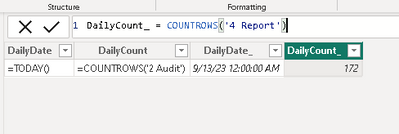
I'm not sure why my previous attempt doesn't work. I was able to get it by doing "New column" and adding the functions that way. I don't see anything in the documentation that explains why it must be done this way..

Brenden_1-1694611103491.png


View solution in original post

2 REPLIES 2
Anonymous
Not applicable

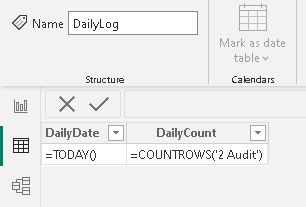
I tried another way, but no luck. At least this shows clearly what I am trying to do. Any ideas?

Brenden_0-1694610881514.png


How can I get these functions to work?

Anonymous
Not applicable

I'm not sure why my previous attempt doesn't work. I was able to get it by doing "New column" and adding the functions that way. I don't see anything in the documentation that explains why it must be done this way..

Brenden_1-1694611103491.png


Helpful resources

Announcements
Fabric Data Days is here Carousel

Fabric Data Days 2026

Don't miss out on Data Days, June 15 through August 7. Learn Fabric, Power BI, SQL, AI and more.

May Power BI Update Carousel

Power BI Monthly Update - May 2026

Check out the May 2026 Power BI update to learn about new features.

Power BI DataViz World Championships carousel

Power BI DataViz World Championships - June 2026

A new Power BI DataViz World Championship is coming this June! Don't miss out on submitting your entry.