Join us in Barcelona for FabCon and SQLCon, September 28 - October 1, 2026.
This is best Fabric, Power BI, SQL and AI community event. How do we know? The last event sold out! Save €200 with code FABCMTY200.
Register now- Power BI forums
- Get Help with Power BI
- Desktop
- Service
- Report Server
- Power Query
- Mobile Apps
- Developer
- DAX Commands and Tips
- Custom Visuals Development Discussion
- Health and Life Sciences
- Power BI Spanish forums
- Translated Spanish Desktop
- Training and Consulting
- Instructor Led Training
- Dashboard in a Day for Women, by Women
- Galleries
- Data Stories Gallery
- Themes Gallery
- Contests Gallery
- QuickViz Gallery
- Quick Measures Gallery
- Visual Calculations Gallery
- Fabric Apps Gallery
- Notebook Gallery
- Translytical Task Flow Gallery
- TMDL Gallery
- R Script Showcase
- Webinars and Video Gallery
- Ideas
- Custom Visuals Ideas (read-only)
- Issues
- Issues
- Events
- Upcoming Events
July 28 - August 9 | Final Round of the Power BI Dataviz World Championships. This is your chance. Learn more
- Power BI forums
- Forums
- Get Help with Power BI
- Desktop
- Re: Creating BOM Availability
- Subscribe to RSS Feed
- Mark Topic as New
- Mark Topic as Read
- Float this Topic for Current User
- Bookmark
- Subscribe
- Printer Friendly Page


- Mark as New
- Bookmark
- Subscribe
- Mute
- Subscribe to RSS Feed
- Permalink
- Report Inappropriate Content
Creating BOM Availability
I'm trying to make a report for whether you can make a master part number or not, and then which sub-assemblies can be used. I'm connecting to a Business Central DB but that part doesn't really matter when you get to PBI.
Here's a sample of what the data looks like:
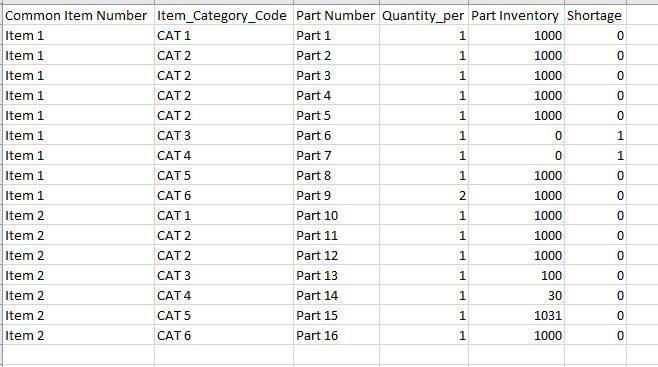
Part 1 can't be made because it has shortage in inventory
Item 2 can be made but has a bottle neck on Category 4.
The biggest part is - What is available to be made or not made.
Can this be done with a measure/filter? I'm not good with filters yet.
Solved! Go to Solution.


- Mark as New
- Bookmark
- Subscribe
- Mute
- Subscribe to RSS Feed
- Permalink
- Report Inappropriate Content
Hello,
Create these calculated columns:
Inventory Per Category  Per Item =
CALCULATE (
    SUM ( 'Table'[Inventory] ),
    ALLEXCEPT ( 'Table', 'Table'[Common Item Number], 'Table'[Item_Category_Code] )
)
Min Inventory in All Categories Per Item =
CALCULATE (
MIN ( 'Table'[Inventory Per Category] ),
ALLEXCEPT ( 'Table', 'Table'[Common Item Number] )
)BOM =
//returns true if [Inventory Per Category] = [Min Inventory in All Categories Per Item]
'Table'[Inventory Per Category] = 'Table'[Min Inventory in All Categories Per Item]
Dane Belarmino | Microsoft MVP | Proud to be a Super User!
Did I answer your question? Mark my post as a solution!
"Tell me and I’ll forget; show me and I may remember; involve me and I’ll understand."
Need Power BI consultation, get in touch with me on LinkedIn or hire me on UpWork.
Learn with me on YouTube @DAXJutsu or follow my page on Facebook @DAXJutsuPBI.
- Mark as New
- Bookmark
- Subscribe
- Mute
- Subscribe to RSS Feed
- Permalink
- Report Inappropriate Content
Hi @pcowman1
Assuming that whether an item can be done is based on sum of shortage per unique Common Item Numer and Part Number, create a calculated column similar to below:
Item Part Can Be Done =
IF (
    CALCULATE (
        SUM ( Table[Shortage] ),
        ALLEXCEPT ( Table, 'Table'[Part Number], 'Table'[Common Item Number] )
    ) > 0,
    "No",
    "Yes"
)
Or if it is based solely on Common Item Number:
Item Can Be Done =
IF (
    CALCULATE (
        SUM ( Table[Shortage] ),
        ALLEXCEPT ( Table, 'Table'[Common Item Number] )
    ) > 0,
    "No",
    "Yes"
)
Dane Belarmino | Microsoft MVP | Proud to be a Super User!
Did I answer your question? Mark my post as a solution!
"Tell me and I’ll forget; show me and I may remember; involve me and I’ll understand."
Need Power BI consultation, get in touch with me on LinkedIn or hire me on UpWork.
Learn with me on YouTube @DAXJutsu or follow my page on Facebook @DAXJutsuPBI.
- Mark as New
- Bookmark
- Subscribe
- Mute
- Subscribe to RSS Feed
- Permalink
- Report Inappropriate Content
I'm trying for the second - I got No on both
- Mark as New
- Bookmark
- Subscribe
- Mute
- Subscribe to RSS Feed
- Permalink
- Report Inappropriate Content
Can you please post a sample data (not an image) and then your exact conditions/criteria (what can be made and based on what)? Excel formula coud also be helpful.
Dane Belarmino | Microsoft MVP | Proud to be a Super User!
Did I answer your question? Mark my post as a solution!
"Tell me and I’ll forget; show me and I may remember; involve me and I’ll understand."
Need Power BI consultation, get in touch with me on LinkedIn or hire me on UpWork.
Learn with me on YouTube @DAXJutsu or follow my page on Facebook @DAXJutsuPBI.
- Mark as New
- Bookmark
- Subscribe
- Mute
- Subscribe to RSS Feed
- Permalink
- Report Inappropriate Content
Say I'm making these two parts - Item 1 has a bottle neck at Category 1 because there are only 2.
Item 2 has a bottle neck at Category 2 because there are only 20 and the rest of the categories are larger.
| Common Item Number | Item_Category_Code | Part Number | Inventory |
| Item 1 | Category 1 | Part 1 | 2 |
| Item 1 | Category 2 | Part 2 | 5 |
| Item 1 | Category 3 | Part 3 | 15 |
| Item 1 | Category 3 | Part 4 | 31 |
| Item 1 | Category 3 | Part 5 | 59 |
| Item 1 | Category 5 | Part 6 | 63 |
| Item 1 | Category 6 | Part 7 | 168 |
| Item 1 | Category 4 | Part 8 | 254 |
| Item 1 | Category 3 | Part 9 | 398 |
| Item 1 | Category 3 | Part 10 | 647 |
| Item 1 | Category 5 | Part 11 | 725 |
| Item 1 | Category 3 | Part 12 | 2000 |
| Item 2 | Category 1 | Part 13 | 50 |
| Item 2 | Category 2 | Part 14 | 20 |
| Item 2 | Category 4 | Part 15 | 8 |
| Item 2 | Category 3 | Part 16 | 15 |
| Item 2 | Category 4 | Part 17 | 25 |
| Item 2 | Category 3 | Part 18 | 31 |
| Item 2 | Category 5 | Part 19 | 63 |
| Item 2 | Category 4 | Part 20 | 127 |
| Item 2 | Category 6 | Part 21 | 168 |
| Item 2 | Category 3 | Part 22 | 398 |
| Item 2 | Category 3 | Part 23 | 647 |
| Item 2 | Category 5 | Part 24 | 725 |
| Item 2 | Category 3 | Part 25 | 2000 |
So the end result would look like this:
| Common Item Number | Item_Category_Code | Inventory |
| Item 1 | Category 1 | 2 |
| Item 2 | Category 2 | 20 |
- Mark as New
- Bookmark
- Subscribe
- Mute
- Subscribe to RSS Feed
- Permalink
- Report Inappropriate Content
I'm going to add to this (and I really think this should be simple and don't know why I'm having a hard time):
if (sum(Inventory in Category) = min(sum(inventory in Category of all category sums))
Is that clearer? Am i making it worse?
- Mark as New
- Bookmark
- Subscribe
- Mute
- Subscribe to RSS Feed
- Permalink
- Report Inappropriate Content
Hello,
Create these calculated columns:
Inventory Per Category  Per Item =
CALCULATE (
    SUM ( 'Table'[Inventory] ),
    ALLEXCEPT ( 'Table', 'Table'[Common Item Number], 'Table'[Item_Category_Code] )
)
Min Inventory in All Categories Per Item =
CALCULATE (
MIN ( 'Table'[Inventory Per Category] ),
ALLEXCEPT ( 'Table', 'Table'[Common Item Number] )
)BOM =
//returns true if [Inventory Per Category] = [Min Inventory in All Categories Per Item]
'Table'[Inventory Per Category] = 'Table'[Min Inventory in All Categories Per Item]
Dane Belarmino | Microsoft MVP | Proud to be a Super User!
Did I answer your question? Mark my post as a solution!
"Tell me and I’ll forget; show me and I may remember; involve me and I’ll understand."
Need Power BI consultation, get in touch with me on LinkedIn or hire me on UpWork.
Learn with me on YouTube @DAXJutsu or follow my page on Facebook @DAXJutsuPBI.
- Mark as New
- Bookmark
- Subscribe
- Mute
- Subscribe to RSS Feed
- Permalink
- Report Inappropriate Content
Thank you! It's late here and I've been working since early but it looks perfect! Many thanks. If I ever see you, I owe you a drink.
- Mark as New
- Bookmark
- Subscribe
- Mute
- Subscribe to RSS Feed
- Permalink
- Report Inappropriate Content
I'm seriously considering moving the whole thing to excel because I need to pivot a table and join it to another table. Might easier in excel where I can do vlookup on the columns but I'm really not that great with vlookup in excel either. I need to up my game in this area.
I fixed the first one by doing a second table that uses the common number and bom number and then does a calculated column filtering.

Helpful resources

FabCon & SQLCon – Barcelona 2026
Join us in Barcelona for FabCon and SQLCon, the Fabric, Power BI, SQL, and AI community event. Save €200 with code FABCMTY200.

Power BI DataViz World Championships - June 2026
A new Power BI DataViz World Championship is coming this June! Don't miss out on submitting your entry.

| User | Count |
|---|---|
| 27 | |
| 22 | |
| 20 | |
| 18 | |
| 14 |


| User | Count |
|---|---|
| 23 | |
| 20 | |
| 20 | |
| 20 | |
| 20 |


