cancel
Showing results for 
Search instead for 
Did you mean: 

Learn from the best! Meet the four finalists headed to the FINALS of the Power BI Dataviz World Championships! Register now

Reply
Anonymous
Not applicable

Created Group Help

Hi,


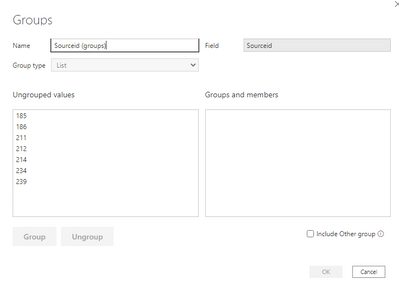
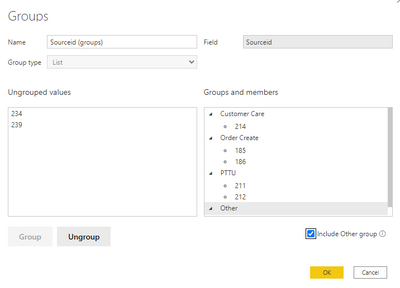
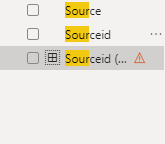
I am tring to create a grouping and no matted what I try it doesn't appear to be working properly. I keep getting an error that says "Field list item has an error". The steps I took are shown below. 


Glange63_0-1636559262780.png


Glange63_1-1636559313657.png


Glange63_2-1636559369911.png


1 ACCEPTED SOLUTION
v-jingzhang
Community Support
Community Support

Hi @Anonymous 


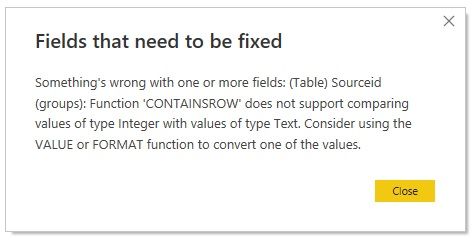
I can reproduce it. It is because Sourceid column is of Text data type. If you change it to Whole number type, you will not see this error. 


The group/bin feature is also written by DAX. If I put this error field into a visual, it will display below details. 

21111601.jpg


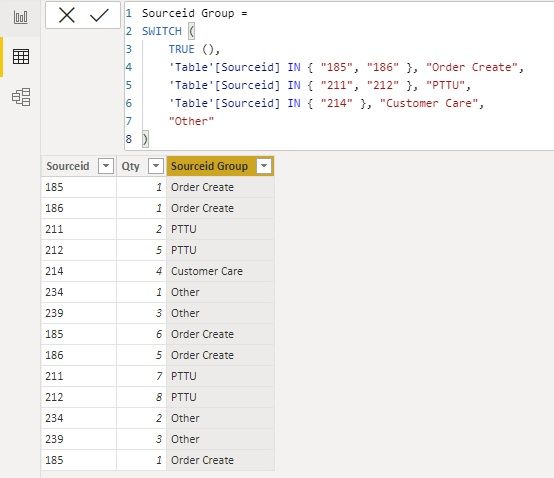
If you want to keep Sourceid column of Text data type, you can create a group column with below code. 

Sourceid Group = 
SWITCH (
    TRUE (),
    'Table'[Sourceid] IN { "185", "186" }, "Order Create",
    'Table'[Sourceid] IN { "211", "212" }, "PTTU",
    'Table'[Sourceid] IN { "214" }, "Customer Care",
    "Other"
)

21111602.jpg


Best Regards,
Community Support Team _ Jing
If this post helps, please Accept it as Solution to help other members find it.

View solution in original post

2 REPLIES 2
v-jingzhang
Community Support
Community Support

Hi @Anonymous 


I can reproduce it. It is because Sourceid column is of Text data type. If you change it to Whole number type, you will not see this error. 


The group/bin feature is also written by DAX. If I put this error field into a visual, it will display below details. 

21111601.jpg


If you want to keep Sourceid column of Text data type, you can create a group column with below code. 

Sourceid Group = 
SWITCH (
    TRUE (),
    'Table'[Sourceid] IN { "185", "186" }, "Order Create",
    'Table'[Sourceid] IN { "211", "212" }, "PTTU",
    'Table'[Sourceid] IN { "214" }, "Customer Care",
    "Other"
)

21111602.jpg


Best Regards,
Community Support Team _ Jing
If this post helps, please Accept it as Solution to help other members find it.

lbendlin
Super User
Super User

any fancy hidden or special (Unicode) characters in your data?  Maybe you can provide a sample?

Helpful resources

Announcements
Join our Fabric User Panel

Join our Fabric User Panel

Share feedback directly with Fabric product managers, participate in targeted research studies and influence the Fabric roadmap.

February Power BI Update Carousel

Power BI Monthly Update - February 2026

Check out the February 2026 Power BI update to learn about new features.

FabCon Atlanta 2026 carousel

FabCon Atlanta 2026

Join us at FabCon Atlanta, March 16-20, for the ultimate Fabric, Power BI, AI and SQL community-led event. Save $200 with code FABCOMM.