Don't miss your chance to take exam DP-600 or DP-700 on us!
Request nowLearn from the best! Meet the four finalists headed to the FINALS of the Power BI Dataviz World Championships! Register now
Hi,
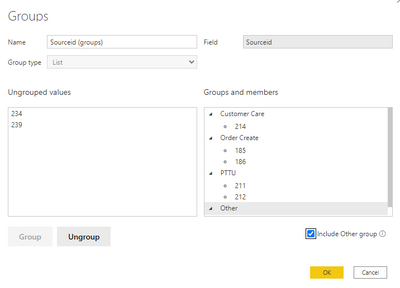
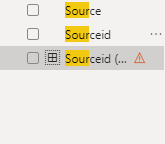
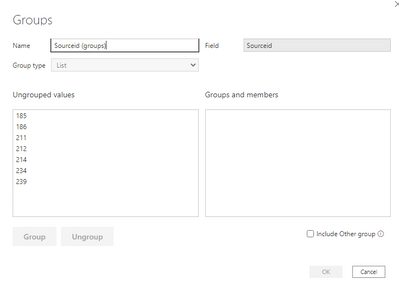
I am tring to create a grouping and no matted what I try it doesn't appear to be working properly. I keep getting an error that says "Field list item has an error". The steps I took are shown below.
Solved! Go to Solution.
Hi @Anonymous
I can reproduce it. It is because Sourceid column is of Text data type. If you change it to Whole number type, you will not see this error.
The group/bin feature is also written by DAX. If I put this error field into a visual, it will display below details.
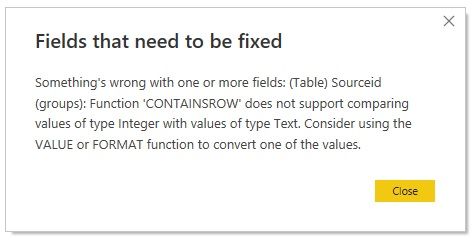
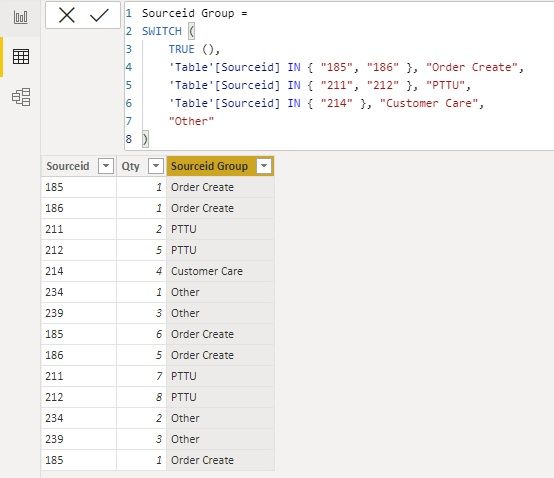
If you want to keep Sourceid column of Text data type, you can create a group column with below code.
Sourceid Group =
SWITCH (
TRUE (),
'Table'[Sourceid] IN { "185", "186" }, "Order Create",
'Table'[Sourceid] IN { "211", "212" }, "PTTU",
'Table'[Sourceid] IN { "214" }, "Customer Care",
"Other"
)
Best Regards,
Community Support Team _ Jing
If this post helps, please Accept it as Solution to help other members find it.
Hi @Anonymous
I can reproduce it. It is because Sourceid column is of Text data type. If you change it to Whole number type, you will not see this error.
The group/bin feature is also written by DAX. If I put this error field into a visual, it will display below details.
If you want to keep Sourceid column of Text data type, you can create a group column with below code.
Sourceid Group =
SWITCH (
TRUE (),
'Table'[Sourceid] IN { "185", "186" }, "Order Create",
'Table'[Sourceid] IN { "211", "212" }, "PTTU",
'Table'[Sourceid] IN { "214" }, "Customer Care",
"Other"
)
Best Regards,
Community Support Team _ Jing
If this post helps, please Accept it as Solution to help other members find it.
any fancy hidden or special (Unicode) characters in your data? Maybe you can provide a sample?
| User | Count |
|---|---|
| 50 | |
| 41 | |
| 32 | |
| 14 | |
| 13 |
| User | Count |
|---|---|
| 84 | |
| 72 | |
| 37 | |
| 27 | |
| 24 |