Join us at FabCon Atlanta from March 16 - 20, 2026, for the ultimate Fabric, Power BI, AI and SQL community-led event. Save $200 with code FABCOMM.
Register now!Vote for your favorite vizzies from the Power BI Dataviz World Championship submissions. Vote now!
What I have now:
I can edit parameter, choose "1" and I get Luke Skywalker; "2" and I get C-3PO; "3" and it's R2-D2.
It's possible because I have 3 queries:
What I'd like to have:
One table with all character details or new table for every character.
PBIX:
I can't upload the file. Sorry. Here's how I did it:
Solved! Go to Solution.
I did it in one table instead of creating new table for each character's id.
We need one table and one function.
Here's full solution:
1. Create function getCharacter(id):
let
Source = (id as text) => let
Source = Json.Document(Web.Contents("https://swapi.co/api/people/" & id)),
#"Converted to Table" = Record.ToTable(Source)
in
#"Converted to Table"
in
Source
2. Create table with ids for id parameter in URL: https://swapi.co/api/people/{id}
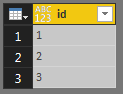
Table with ids for API: https://swapi.co/api/people/{id}
3. Invoke the function getCharacter(id) on this table: go to 'Add column' -> 'Invoke custom function' and expand.
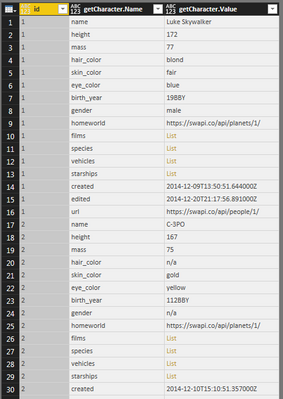
Expanded table with character details for each id specified earlier
M code for the expanded table above:
let
idList = {"1", "2", "3"},
#"Converted to Table" = Table.FromList(idList, Splitter.SplitByNothing(), null, null, ExtraValues.Error),
#"Renamed Columns" = Table.RenameColumns(#"Converted to Table",{{"Column1", "id"}}),
#"Invoked Custom Function" = Table.AddColumn(#"Renamed Columns", "getCharacter", each getCharacter([id])),
#"Expanded getCharacter" = Table.ExpandTableColumn(#"Invoked Custom Function", "getCharacter", {"Name", "Value"}, {"getCharacter.Name", "getCharacter.Value"})
in
#"Expanded getCharacter"
I did it in one table instead of creating new table for each character's id.
We need one table and one function.
Here's full solution:
1. Create function getCharacter(id):
let
Source = (id as text) => let
Source = Json.Document(Web.Contents("https://swapi.co/api/people/" & id)),
#"Converted to Table" = Record.ToTable(Source)
in
#"Converted to Table"
in
Source
2. Create table with ids for id parameter in URL: https://swapi.co/api/people/{id}
Table with ids for API: https://swapi.co/api/people/{id}
3. Invoke the function getCharacter(id) on this table: go to 'Add column' -> 'Invoke custom function' and expand.
Expanded table with character details for each id specified earlier
M code for the expanded table above:
let
idList = {"1", "2", "3"},
#"Converted to Table" = Table.FromList(idList, Splitter.SplitByNothing(), null, null, ExtraValues.Error),
#"Renamed Columns" = Table.RenameColumns(#"Converted to Table",{{"Column1", "id"}}),
#"Invoked Custom Function" = Table.AddColumn(#"Renamed Columns", "getCharacter", each getCharacter([id])),
#"Expanded getCharacter" = Table.ExpandTableColumn(#"Invoked Custom Function", "getCharacter", {"Name", "Value"}, {"getCharacter.Name", "getCharacter.Value"})
in
#"Expanded getCharacter"
While this is an old post, for anyone who ends up here looking for a solution, the above process is explained quite well in this video:
https://www.youtube.com/watch?v=MCTXMUuH3gk&ab_channel=PowerBIGuy
@v-chuncz-msft, thank you. Also, if somebody has similiar problem, that's very helpful: Radacad: Custom Functions Made Easy in Power BI Desktop.
Right now, I have a table for each parameter. Below.
How can I export Table as a new query automatically?
I know I can do it manually: right click on the Table and choose 'Add as a new query'.
| list | character |
| 1 | Table |
| 2 | Table |
| 3 | Table |
You may write code in The Advanced Editor.
You may right click the query and select Create Function, then invoke it for each row in Query Editor.
https://msdn.microsoft.com/en-us/library/mt185361.aspx
Vote for your favorite vizzies from the Power BI World Championship submissions!
If you love stickers, then you will definitely want to check out our Community Sticker Challenge!
Check out the January 2026 Power BI update to learn about new features.
| User | Count |
|---|---|
| 64 | |
| 56 | |
| 43 | |
| 20 | |
| 17 |
| User | Count |
|---|---|
| 123 | |
| 108 | |
| 44 | |
| 32 | |
| 24 |