cancel
Showing results for 
Search instead for 
Did you mean: 

The Power BI Data Visualization World Championships is back! Get ahead of the game and start preparing now! Learn more

Reply
sthandiwe
Frequent Visitor

Create table with measures as values

Hi All 

Happy new year. I have searched the community for this issue, but I am not finding anything to help. 

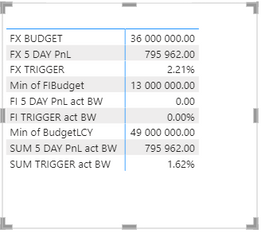
I have a table (matrix) that looks like this:

sthandiwe_0-1642413909078.png

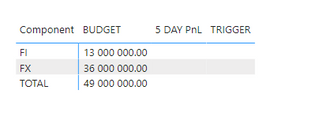
That I need in the table format like this:

sthandiwe_1-1642413968926.png


The budget is a MIN(budget) value from the table, 
The 5 Day PnL values are measures all calculated in a similar fashion: FI 5 DAY PnL act BW = CALCULATE( SELECTEDVALUE(BW[ROLLING_FI]), FILTER(BW, BW[TRANSDATE]=[SelectedDate BW]))

The trigger values are measures all calculated in a similar fashion: FI TRIGGER act BW = CALCULATE( SELECTEDVALUE(BW[TRIGGER_FI]), FILTER(BW, BW[TRANSDATE]=[SelectedDate BW]))
 
I have tried to use the UNION to create the second table, but the values are not showing:
Table =
UNION(
ROW ("Component", "FX", "BUDGET", MIN(BW[FXBudget]),"5 DAY PnL", [FX 5 DAY PnL act BW], "TRIGGER", [FX TRIGGER act BW], "DATE", [SelectedDate BW]),
ROW ("Component", "FI", "BUDGET", MIN(BW[FIBudget]),"5 DAY PnL", [FI 5 DAY PnL act BW], "TRIGGER", [FI TRIGGER act BW],"DATE",[SelectedDate BW]),
ROW ("Component", "TOTAL", "BUDGET", MIN(BW[BudgetLCY]),"5 DAY PnL", [SUM 5 DAY PnL act BW], "TRIGGER", [SUM TRIGGER act BW],"DATE", [SelectedDate BW])
    )
 
2 ACCEPTED SOLUTIONS
MFelix
Super User
Super User

Hi @sthandiwe ,


For this you need to create two tables:

  • Component
  • Type of measure


Then using a SWTICH function you must add the measures you need to the calculation something similar to:


Metric by component =

SWITCH( TRUE(),
SELECTEDVALUE(Component[Table]) = "Fi" && SELECTEDVALUE(MeasureType[Column]) = "Budget",MIN(BW[FIBudget]),
SELECTEDVALUE(Component[Table]) = "Fx" && SELECTEDVALUE(MeasureType[Column]) = "Budget",MIN(BW[FxBudget]),
...
)


Then just make the necessary adjustments for each of your metrics


Regards

Miguel Félix


Did I answer your question? Mark my post as a solution!

Proud to be a Super User!

Check out my blog: Power BI em Português


View solution in original post

Hi @sthandiwe ,


You should put last part of the names:

Budget

 5 Day PNL

Triggger


Regards

Miguel Félix


Did I answer your question? Mark my post as a solution!

Proud to be a Super User!

Check out my blog: Power BI em Português


View solution in original post

3 REPLIES 3
MFelix
Super User
Super User

Hi @sthandiwe ,


For this you need to create two tables:

  • Component
  • Type of measure


Then using a SWTICH function you must add the measures you need to the calculation something similar to:


Metric by component =

SWITCH( TRUE(),
SELECTEDVALUE(Component[Table]) = "Fi" && SELECTEDVALUE(MeasureType[Column]) = "Budget",MIN(BW[FIBudget]),
SELECTEDVALUE(Component[Table]) = "Fx" && SELECTEDVALUE(MeasureType[Column]) = "Budget",MIN(BW[FxBudget]),
...
)


Then just make the necessary adjustments for each of your metrics


Regards

Miguel Félix


Did I answer your question? Mark my post as a solution!

Proud to be a Super User!

Check out my blog: Power BI em Português


Hi Felix

What do I put in the types of measures table?

Hi @sthandiwe ,


You should put last part of the names:

Budget

 5 Day PNL

Triggger


Regards

Miguel Félix


Did I answer your question? Mark my post as a solution!

Proud to be a Super User!

Check out my blog: Power BI em Português


Helpful resources

Announcements
Power BI DataViz World Championships

Power BI Dataviz World Championships

The Power BI Data Visualization World Championships is back! Get ahead of the game and start preparing now!

December 2025 Power BI Update Carousel

Power BI Monthly Update - December 2025

Check out the December 2025 Power BI Holiday Recap!

FabCon Atlanta 2026 carousel

FabCon Atlanta 2026

Join us at FabCon Atlanta, March 16-20, for the ultimate Fabric, Power BI, AI and SQL community-led event. Save $200 with code FABCOMM.